
Raspberry Pi 5 Starter Kits: 3 Kits Compared

For a Raspberry Pi 5 starter kit with an accessory set, choose CanaKit Pi 5 PRO 8GB 128GB Kit: its 8GB board comes with a 128GB preloaded microSD card, case, fan, heatsink, 45W power supply, and two display cables. Choose CanaKit Pi 5 Essentials 4GB Kit if 4GB RAM is sufficient, but confirm the power, cooling, and storage components before ordering.
CanaKit Pi 4 PRO 4GB Kit is a Raspberry Pi 4 kit, not a Pi 5 option; choose it only if you specifically want the older board and its included 32GB card and accessories.
We earn a commission if you buy through links on this page. As an Amazon Associate I earn from qualifying purchases. Products are compared on manufacturer specifications, not hands-on testing.
- Best overall: CanaKit Pi 5 PRO 8GB 128GB Kit – The 8GB Pi 5 kit names its 128GB preloaded card, 45W power supply, cooling, case, and display cables.
- Best for 4GB RAM: CanaKit Pi 5 Essentials 4GB Kit – This Pi 5 starter kit is identified as a 4GB RAM version.
| Product | Best for | Board and RAM | microSD card | Power supply | Shop |
|---|---|---|---|---|---|
| CanaKit Pi 5 PRO 8GB 128GB Kit | Complete accessory set | Pi 5, 8GB | 128GB, preloaded OS | 45W PD | Check Price on Amazon |
| CanaKit Pi 5 Essentials 4GB Kit | 4GB Pi 5 setup | Pi 5, 4GB | — | — | Check Price on Amazon |
| CanaKit Pi 4 PRO 4GB Kit | Pi 4 projects | Pi 4, 4GB | 32GB, preloaded | 3.5A USB-C | Check Price on Amazon |
Raspberry Pi 5 Starter Kits
Compare the board generation, memory, storage, and included components before choosing a kit.
CanaKit Pi 5 PRO 8GB 128GB Kit
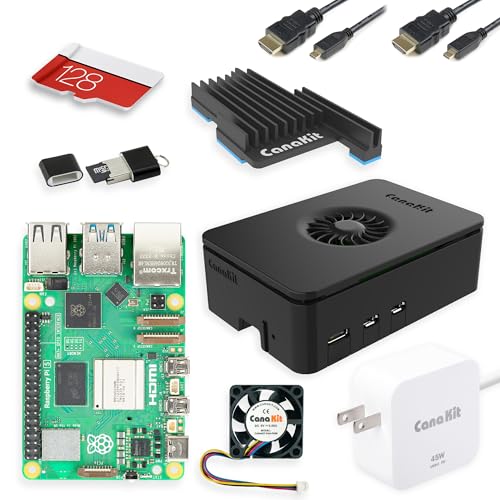
CanaKit Pi 5 PRO 8GB 128GB Kit is the most fully itemized Pi 5 option here, pairing 8GB RAM with a preloaded 128GB microSD card, case, fan, heatsink, 45W PD power supply, and two 6-foot display cables. The card comes with 64-bit Raspberry Pi OS, and the cables support up to 4K at 60p. This set suits someone who wants the main board, power, cooling, storage, and display cabling in one package. Its limitation is that 8GB may be more memory than a lightweight project needs.
Bottom line: Pick this if you want a Pi 5 kit with its key power, cooling, storage, and display parts itemized.
CanaKit Pi 5 Essentials 4GB Kit

CanaKit Pi 5 Essentials 4GB Kit is the 4GB-memory Pi 5 option, making it the closer fit for projects that do not need the 8GB configuration of CanaKit Pi 5 PRO 8GB 128GB Kit. Its product name identifies it as an Essentials Starter Kit, but the maker does not establish which accessories are included. Before choosing it, confirm that the package covers your needs for a power supply, cooling, and microSD storage. That extra check matters if you are assembling a first Pi 5 setup and do not already own compatible parts.
Bottom line: Pick this if 4GB RAM suits your project and you confirm the accessories you need.
CanaKit Pi 4 PRO 4GB Kit

Unlike the Pi 5 options, CanaKit Pi 4 PRO 4GB Kit is built around a Raspberry Pi 4 Model B with 4GB RAM and a 1.5GHz 64-bit quad-core CPU. It includes a preloaded 32GB Class 10 microSD card, reader, fan, heatsinks, USB-C power supply, display cable, and an on/off PiSwitch. The Pi 4 board makes this a fit for a project that specifically calls for that generation, rather than a substitute for a Pi 5. Its storage card is smaller than the 128GB card in CanaKit Pi 5 PRO 8GB 128GB Kit.
Bottom line: Choose this only when your project calls for a Raspberry Pi 4.
How to choose a Raspberry Pi 5 starter kit
Choose by memory and the accessories you need, not by the word “starter” alone. Raspberry Pi 5 comes in 4GB and 8GB RAM configurations represented here; more RAM helps when running several applications or memory-heavy workloads, while 4GB is sufficient for many single-purpose projects. A Pi 5 board uses USB-C power, and Raspberry Pi recommends a 5V/5A supply to support the board’s full power budget. The kit with the clearest included set is CanaKit Pi 5 PRO 8GB 128GB Kit, whose supply is 45W PD. If a kit does not identify its power, cooling, or storage parts, confirm those before ordering rather than assuming they are included.
Pi 5 kit accessories and connections
Raspberry Pi 5 uses two micro-HDMI ports, supports two displays, and can drive dual 4K displays at up to 60Hz when the displays and cables support the required mode. That makes the pair of 6-foot display cables in CanaKit Pi 5 PRO 8GB 128GB Kit useful for a dual-screen setup. Pi 5 also exposes a PCIe 2.0 x1 interface for compatible add-ons, but an adapter or expansion board may be needed; a standard microSD card remains the straightforward boot-storage route. For reliable operation, use a stable 5V supply and avoid drawing more power from USB peripherals than the board can provide.
Raspberry Pi 4 versus Raspberry Pi 5
Raspberry Pi 4 and Raspberry Pi 5 are different board generations, so select the generation your software, accessories, and project require. The Pi 5 models here use 4GB or 8GB RAM; CanaKit Pi 4 PRO 4GB Kit is a Pi 4 with 4GB RAM, a 32GB card, fan, heatsinks, and a 3.5A USB-C supply. Pi 5’s faster processor and PCIe connection can suit newer workloads and expansion, while a Pi 4 kit can make sense for an existing Pi 4 setup. Do not assume every case, cooler, or add-on fits both generations; check its board compatibility before reusing it.
Cooling and safe power for Raspberry Pi 5
Raspberry Pi 5 can throttle its processor if it gets too hot, so active cooling is useful for sustained workloads such as compiling, gaming, or running several services. A fan should be mounted so airflow reaches the board’s heatsink area, and its cable must connect to the correct fan header rather than being forced onto another connector. Power supplies also matter: a weak supply can cause instability, especially when USB devices draw current. Use a suitable USB-C supply and keep the board on a stable, ventilated surface; avoid enclosing it in a case that blocks airflow.
Frequently Asked Questions
How much RAM does a Raspberry Pi 5 need?
4GB is enough for many single-purpose projects, while 8GB offers more room for multitasking and memory-heavy applications. Choose based on the software you plan to run rather than assuming more RAM always improves a simple setup.
What power supply does a Raspberry Pi 5 need?
Raspberry Pi recommends a 5V/5A USB-C supply for the board’s full power budget. A supply with less capacity can restrict power available to peripherals or affect stability under load.
Can a Raspberry Pi 5 run two 4K displays?
Yes, Raspberry Pi 5 supports dual 4K displays at up to 60Hz, provided both displays and the cables support the selected mode. Confirm connector type and resolution support across the whole display setup.
Does a Raspberry Pi 5 need a fan?
A fan is most useful for sustained high-load work because the Pi 5 can reduce processor speed when it becomes too hot. For light tasks, a heatsink and adequate airflow may be sufficient, but keep the board ventilated.
Can I reuse a Raspberry Pi 4 case for Pi 5?
Do not assume a Pi 4 case will fit a Pi 5, since board layouts and connector positions differ between generations. Check the case’s board compatibility before reusing it.