
Scorch Marker Heat Gun: Tool and Alternatives Compared

The Scorch Marker Craft Heat Gun is the direct match, with a fine-tip nozzle and two settings—842°F and 1,202°F—for wood burning and embossing. Choose a variable-temperature tool instead if you need adjustable heat for projects beyond activating Scorch Marker or Scorch Paint.
We earn a commission if you buy through links on this page. As an Amazon Associate I earn from qualifying purchases. Products are compared on manufacturer specifications, not hands-on testing.
- Best overall: Scorch Marker Craft Heat Gun – Its fine-tip nozzle and two heat settings are designed for Scorch Marker and Scorch Paint activation.
- Best for adjustable heat: SEEKONE 1800W Variable-Temperature Heat Gun – Variable-temperature from 122°F to 1,202°F accommodates a broader range of craft tasks.
- Best for two fixed settings: SEEKONE 1800W Two-Setting Heat Gun – Two outputs, 752°F and 1,112°F, pair with two airflow speeds and four nozzles.
| Product | Best for | Temperature settings | Airflow | Nozzle options | Shop |
|---|---|---|---|---|---|
| Scorch Marker Craft Heat Gun | Scorch designs | 842°F; 1,202°F | — | Fine-tip nozzle | Check Price on Amazon |
| SEEKONE 1800W Variable-Temperature Heat Gun | Adjustable heat | 122°F–1,202°F | 190–210 or 250–500 L/min | 4 nozzles | Check Price on Amazon |
| SEEKONE 1800W Two-Setting Heat Gun | Fixed heat jobs | 752°F; 1,112°F | 250 or 500 L/min | 4 nozzles | Check Price on Amazon |
| Scorch Marker Pro | Drawing designs | — | Requires hot air | Nozzle not applicable | Check Price on Amazon |
| Scorch Marker Scorch Paint, 2 fl oz | Painted designs | — | Requires hot air | Nozzle not applicable | Check Price on Amazon |
Scorch Marker Heat Guns and Alternatives
Compare the direct-match tool with related heat guns and the consumables used to make heat-activated wood designs.
Scorch Marker Craft Heat Gun

For activating Scorch Marker and Scorch Paint, this 1,500-watt tool pairs two fixed heat settings with a fine-tip nozzle. The maker says the lower 842°F setting is for embossing and delicate work, while 1,202°F activates wood-burning designs; the focused tip is intended to direct heat around details. It is the clearest fit for buyers making Scorch designs rather than seeking a temperature dial for varied jobs. The two-setting control is a limitation if a project calls for a specific temperature between the available outputs.
Bottom line: Choose this for Scorch designs where focused heat and a simple two-setting control matter most.
SEEKONE 1800W Variable-Temperature Heat Gun

Unlike the Scorch-specific tool, this SEEKONE offers a variable-temperature dial from 122°F to 1,202°F and a two-position airflow switch. The maker says it reaches 1,202°F in 1.5 seconds; the airflow ranges are 190–210 L/min on the lower mode and 250–500 L/min on the higher mode. Four nozzles support different applications, including shrink tubing, paint removal and 3D printing. Its broad temperature range suits buyers who want one tool for varied tasks, but it lacks the fine-tip Scorch-focused setup, so detailed designs may need more careful aiming.
Bottom line: Choose this if adjustable temperature is more useful than a Scorch-focused nozzle.
SEEKONE 1800W Two-Setting Heat Gun

This SEEKONE differs from the direct match by combining two fixed temperature outputs with two airflow speeds and four nozzles. Its settings are 752°F at 250 L/min and 1,112°F at 500 L/min, giving a lower-temperature option for craft work and a hotter one for tasks such as vinyl wrapping, shrink wrapping and paint removal. The maker says the tool may smoke and smell briefly on first use as its anti-rust coating melts. Unlike a variable-temperature model, its two outputs cannot be tuned between settings, which matters when a material needs more precise heat control.
Bottom line: Choose this for jobs that fit its two heat-and-airflow combinations and nozzle choices.
Scorch Marker Pro
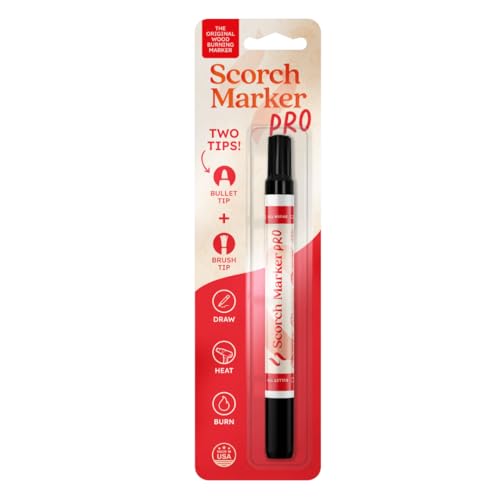
This is a heat-activated wood-burning marker, not a heat gun; it supplies the design material rather than the hot air. Its bullet tip is for lines and lettering, while its brush tip handles fills and shading, and the marker can be used freehand or with mesh stencils. The maker says mistakes can be sanded away before heating and the burned design is permanent afterward. It suits someone who needs the marker for a project, but it does not replace the heat gun required to activate the ink.
Bottom line: Choose this when you need a two-tip marker to draw the wood design.
Scorch Marker Scorch Paint, 2 fl oz
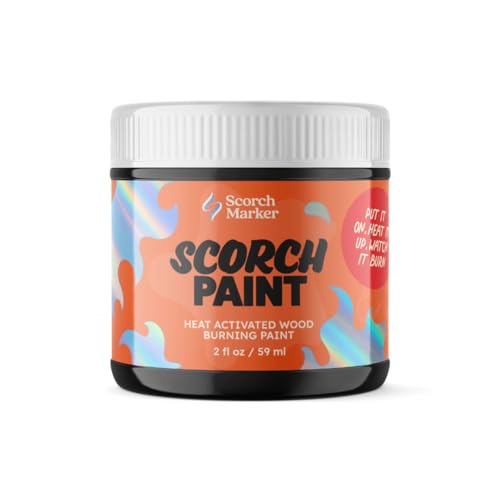
Scorch Paint is the paint-on alternative to drawing with a marker, and it still requires a heat gun to create the burned design. The 2-fluid-ounce, water-based paint can be brushed or applied with a foam sponge and used with mesh stencils; the maker says a jar covers 30 or more projects. The maker also says it cleans up with water and is non-toxic. This is for broad painted areas or stencil work, not for supplying heat, so buyers without a compatible heat gun need a separate tool.
Bottom line: Choose this for stencil or brush-applied Scorch designs when you already have a heat gun.
How to choose a heat gun for Scorch Marker
For Scorch Marker, prioritize a controllable heat stream and a setting that reaches the product’s activation range; the direct-match tool offers 1,202°F on high and a fine-tip nozzle. Airflow matters alongside temperature: a strong stream can disturb embossing powder, which is why the tool’s lower 842°F setting is intended for delicate work. If you also remove paint or shrink tubing, an adjustable dial spanning 122°F to 1,202°F gives more flexibility than two fixed outputs. Choose variable heat for mixed-material projects; choose the fine-tip tool when focused Scorch design work is the main job.
Heat gun temperature and airflow choices
Heat guns differ in whether they pair fixed temperature levels with airflow or let you adjust temperature continuously. A lower airflow can help keep lightweight powders in place, while higher airflow moves more hot air across a larger area; the models specify 190–500 L/min depending on setting. Compare the controls as a pair rather than choosing by maximum heat alone.
| Control style | Useful when | Tradeoff |
|---|---|---|
| Two fixed temperatures | You repeat similar jobs | No in-between temperature |
| Variable-temperature with airflow switch | Materials need varied heat | More adjustment while working |
| Fine-tip nozzle | Heat should be directed at small designs | Not a general temperature control |
Use the tool’s specified setting and nozzle for the task; keep hot air away from hands and combustible surfaces.
Marker or paint for wood-burning designs
A heat-activated marker is suited to drawn lines and lettering, while paint is suited to filled areas and stencil application. The Scorch Marker Pro includes bullet and brush tips, so it can cover both line work and shading; the paint can be brushed or applied with a sponge. Mesh stencils help create repeatable shapes, but the design medium still needs a heat gun to activate it. Before applying either medium to a finished project, test the technique on scrap wood of the same type: wood density, surface preparation and application thickness can change how evenly a heat-darkened design appears. Keep the heat source moving rather than holding it on one point.
Safe handling and heat gun care
Heat guns produce air hot enough to burn skin and ignite nearby materials; the tools here reach as high as 1,202°F. Work on a stable, heat-resistant surface, keep the nozzle pointed away from people, and let the tool cool before setting it down or changing attachments. Remove paper, solvents and other combustibles from the work area, and do not leave a powered heat gun unattended. On SEEKONE’s two-setting model, the maker notes first-use smoke and odor from the heating-core coating; use ventilation and stop if smoke continues rather than treating persistent smoke as normal. Store the tool only after it has cooled.
Frequently Asked Questions
What temperature activates Scorch Marker designs?
The Scorch Marker heat gun has a 1,202°F high setting for activating wood-burning designs. Its lower 842°F setting is intended for embossing and delicate work.
Can I use any heat gun with Scorch Marker?
A heat gun supplies the hot air needed to activate Scorch Marker or Scorch Paint. A model with adjustable heat can suit other materials, while a fine-tip nozzle helps direct heat onto smaller designs.
Why does a heat gun have different airflow settings?
Airflow controls how quickly hot air moves across the work and can affect delicate materials such as embossing powder. The SEEKONE models pair lower and higher settings with different airflow rates, from 190 to 500 L/min.
How should I use a heat gun safely for crafts?
Keep the hot nozzle away from skin and combustible materials, use a stable heat-resistant work surface, and do not leave the tool unattended. The compared tools can reach 1,202°F, so allow the gun to cool before handling its nozzle or storing it.
What is the difference between Scorch Marker and Scorch Paint?
Scorch Marker is a two-tip marker for drawn lines, lettering, fills and shading; Scorch Paint is applied with a brush or sponge and comes in a 2-fluid-ounce jar. Both require hot air to create the burned design.