
Mount Tablet in Car Dash: 5 Holders Compared

For a broad range of tablets and either windshield or dash placement, choose Universal Suction Tablet Holder; its clamp accommodates devices from 4.7 to 12.9 inches. Pick a different mount if you need a long arm, a fixed drill base, or a narrower tablet fit.
A car dash tablet mount holds a device within reach for navigation or other in-car tasks. Check that the mount does not obstruct your view, controls, or airbag deployment area.
We earn a commission if you buy through links on this page. As an Amazon Associate I earn from qualifying purchases. Products are compared on manufacturer specifications, not hands-on testing.
- Best overall: Universal Suction Tablet Holder – Fits 4.7- to 12.9-inch devices and supports windshield or dash mounting.
- Best for large tablets: OHLPRO Long-Arm Suction Mount – Its device range spans 5 to 17 inches.
- Best for long reach: Truckules 16.7-Inch Arm Mount – The arm measures 16.7 inches and has three joints.
- Best for fixed mounting: iBOLT TabDock BizMount AMPS – The drill base attaches to a flat surface and suits 7- to 11-inch tablets.
| Product | Best for | Device fit | Mount type | Shop |
|---|---|---|---|---|
| Universal Suction Tablet Holder | Broad tablet fit | 4.7–12.9 in | Suction; dash or windshield | Check Price on Amazon |
| eSamcore 6–11-Inch Dash Holder | Cased small tablets | 6–11 in; max 9-in opening | 2.9-in suction cup; dash disk | Check Price on Amazon |
| OHLPRO Long-Arm Suction Mount | Large tablets | 5–17 in | Suction; dash or windshield | Check Price on Amazon |
| Truckules 16.7-Inch Arm Mount | Long truck reach | 5.51–11.8 in wide | Suction; dash or windshield | Check Price on Amazon |
| iBOLT TabDock BizMount AMPS | Fixed drill base | 7–11 in | Drill base; flat surface | Check Price on Amazon |
Car Dash Tablet Mounts Compared
Compare tablet fit and mounting style first, then match the mount to your dash surface and preferred reach.
Universal Suction Tablet Holder

For the broadest device range among these suction mounts, choose this holder: it fits 4.7- to 12.9-inch tablets and can attach to the dash or windshield. The clamp is up to 10 inches wide and 0.8 inch deep. The maker says its gel suction cup is washable and reusable, which may suit drivers who want to reposition it. The limitation is the 0.8-inch clamp depth; check that your tablet and case can sit within it before choosing this mount.
Bottom line: Choose this if you need a suction mount for a wide range of tablet sizes.
eSamcore 6–11-Inch Dash Holder

For a smaller tablet and a case-thickness limit, choose this eSamcore holder: its clamps open to 9 inches and accept cases under 0.9 inch thick. The 2.9-inch suction cup pairs with a 3.1-inch dash mount disk, and the clamp pads are silicone. That combination makes it a fit-focused choice for compatible 6- to 11-inch tablets. Its size range is narrower than Universal Suction Tablet Holder and OHLPRO Long-Arm Suction Mount, so drivers with larger tablets should compare those options instead.
Bottom line: Choose this for a compatible 6- to 11-inch tablet with a case under 0.9 inch thick.
OHLPRO Long-Arm Suction Mount
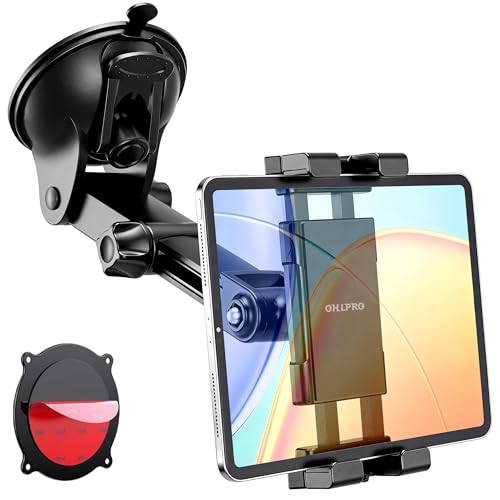
For the largest tablet range here, choose this OHLPRO mount, which fits devices from 5 to 17 inches and can attach to the dash or windshield. Its base is 80 mm across, and the maker describes it as a glue-free vacuum suction design. This may suit a driver who needs to position a large screen rather than rely on a narrow tablet range. The range alone does not establish how a particular tablet or case sits in the clamp, so confirm the fit before choosing it.
Bottom line: Choose this if your tablet is larger than 12.9 inches and falls within the range.
Truckules 16.7-Inch Arm Mount

For extended reach, choose this Truckules mount: its three-joint arm measures 16.7 inches, and its spring-loaded holder fits devices 5.51 to 11.8 inches wide. The maker describes the base as a vacuum gel suction design and says the materials resist temperature changes. The width measurement is the key fit check, so measure the tablet across its holder orientation rather than relying only on its diagonal screen size. The long arm may be unnecessary if you want a compact mount close to the dashboard.
Bottom line: Choose this when a long, adjustable arm is more important than a compact setup.
iBOLT TabDock BizMount AMPS
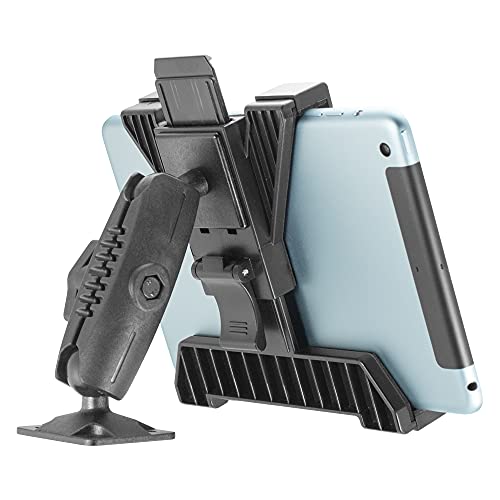
Unlike the suction options, this iBOLT holder uses a drill base for attachment to a flat surface, including a vehicle dash. Its tablet range is 7 to 11 inches, and the four contact points are designed to grip devices, including those with bulky cases. It rotates between horizontal and vertical positioning. This is the choice for a permanent, screwed-down setup rather than a removable suction mount; it requires a suitable flat mounting area and installation, so it is not the pick for drivers who want to avoid drilling.
Bottom line: Choose this for a fixed installation on a suitable flat dash surface.
How to Choose a Car Dash Tablet Mount
Start with tablet size, case thickness, and attachment method: those determine whether a mount fits before arm length or adjustability matters. Diagonal screen size is not the same as the device width or thickness a clamp grips, so measure the tablet with its case in the orientation you plan to use. Suction cups need a smooth, clean, nonporous surface; textured dashboards may need a smooth mounting disk. A drill base is a better match when you want a fixed installation and have a suitable flat surface. Keep the tablet clear of the driver’s forward view, dashboard controls, and airbag deployment zones.
Use this quick rule: if you do not want to drill, narrow the choices to suction mounts; if the tablet is wider or thicker than a clamp’s limits, choose a model whose range covers the cased device.
Dashboard Surface and Mounting Method
Suction mounts work best on smooth, flat, nonporous areas, while a textured or curved dash can prevent a reliable seal. A dash disk gives the suction cup a smoother landing surface, but the available space still needs to be flat enough for the base. Clean dust and residue from the contact area before attaching a cup; a dirty cup or dashboard can compromise adhesion. Do not assume a suction mount is suitable for every dashboard just because it can also be positioned on a windshield.
A drill base trades easy removal for a fixed attachment and requires a suitable surface and installation. Before committing to any mount, place the tablet where it will sit and check sight lines, reach to controls, and clearance from airbag zones. Avoid placing a screen where it could become a projectile or interfere with safe driving.
Tablet Fit, Clamp Size, and Case Thickness
Measure the tablet with its case because a clamp must fit the outside dimensions, not just the screen diagonal. Width-based ranges and diagonal ranges are not directly interchangeable: two tablets with the same screen size can have different outside widths and case thicknesses. Check the clamp’s opening and depth where those measurements are given, and account for any raised case corners or folio cover.
Use the table as a fit filter, not a guarantee of compatibility for every case. A tablet that exceeds the width or thickness can sit insecurely or fail to fit. If your cased device is near a limit, confirm that exact dimension before ordering.
| Mount type | Useful when | Trade-off |
|---|---|---|
| Suction | You want a removable mount | Needs a smooth contact surface |
| Suction with dash disk | The dash needs a smoother mounting spot | Requires room for the disk |
| Drill base | You want a fixed attachment | Requires installation on a suitable flat area |
Arm Reach and Safe Screen Placement
Longer arms can bring a tablet closer or position it around dash obstacles, but added reach can also increase movement on a bumpy road. Choose the shortest arm that places the screen where you can glance at it without obstructing the windshield view or reaching across the wheel. A multi-joint arm offers more positioning options, while a compact mount may be easier to keep close to the dash.
Never mount a tablet over an airbag cover or where deployment could strike the device or mount. Keep the screen out of the driver’s sight line and avoid blocking vents, switches, or the instrument panel. Set navigation before moving and do not adjust a mount while driving.
Frequently Asked Questions
Can a tablet mount go on a textured dashboard?
A suction cup generally needs a smooth, nonporous surface to seal reliably, so texture can interfere with grip. A smooth dash disk can provide a more suitable contact spot if the dashboard has room for it.
How do I measure a tablet for a car mount?
Measure the device with its case on, including the outside width and thickness at the points where the clamp will grip. Compare those measurements with the holder’s opening and depth; diagonal screen size alone does not confirm clamp fit.
Is a windshield tablet mount safe to use?
A windshield mount should not block the driver’s forward view or interfere with controls or airbag deployment areas. Place the screen where it can be glanced at without obstructing visibility, and set it before driving.
Do suction cup mounts need cleaning?
Yes, dust and residue on the cup or mounting surface can weaken contact. Clean the surface and cup before attaching; washable cups should be fully dry before being repositioned.
Is a drill-base mount removable?
A drill-base mount is intended for a fixed installation rather than quick repositioning like a suction cup. Check the dash material and available flat area before installation, since drilling leaves a permanent mounting point.