
Kindle Paperwhite 6th Gen Cases: 4 Covers Compared

The Kindle Paperwhite 6th generation itself isn’t among these picks, but MOROCK 6-inch Paperwhite Case is a case made for its 6-inch reader, identified by model EY21 or DP75SDI. Choose a different cover if you want a screen protector included, a magnetic closure, or a hand strap.
We earn a commission if you buy through links on this page. As an Amazon Associate I earn from qualifying purchases. Products are compared on manufacturer specifications, not hands-on testing.
- Best overall: MOROCK 6-inch Paperwhite Case – Fits the 6-inch Paperwhite models EY21 and DP75SDI and weighs about 0.20 pounds.
- Best for screen protection: Smart Case with Screen Protector – Includes a screen protector along with the case.
- Best for magnetic closure: Fintie Slimshell 6-inch Case – Adds a magnetic clasp and weighs 0.18 pounds.
- Best for a hand strap: MonsDirect Floral Case – Adds a hand strap and supports wireless charging only with compatible readers.
| Product | Best for | Added feature | Weight | Shop |
|---|---|---|---|---|
| MOROCK 6-inch Paperwhite Case | Everyday carrying | Auto wake/sleep | 0.20 lb | Check Price on Amazon |
| Smart Case with Screen Protector | Screen protection | Screen protector included | 0.24 lb | Check Price on Amazon |
| Fintie Slimshell 6-inch Case | Magnetic closure | Magnetic clasp | 0.18 lb | Check Price on Amazon |
| MonsDirect Floral Case | Hand-strap grip | Hand strap | 0.22 lb | Check Price on Amazon |
Kindle Paperwhite 6th Gen Cases
These covers are made for the 6-inch Paperwhite generation associated with model numbers EY21 and DP75SDI; check your reader’s model before choosing.
MOROCK 6-inch Paperwhite Case

MOROCK 6-inch Paperwhite Case is a slim PU leather cover for 6-inch Kindle Paperwhites identified as EY21 or DP75SDI. Its soft back and microfiber interior add a layer between the reader and everyday scuffs, while the cover’s auto wake/sleep feature is intended to turn the screen on or off as you open or close it. The misty blue color makes it easy to distinguish from the black and floral options here. Confirm your Kindle’s model number before ordering; this cover is not for newer 10th- or 11th-generation Paperwhites.
Bottom line: Choose this if you want a lightweight, simple cover for the older 6-inch reader.
Smart Case with Screen Protector

Smart Case with Screen Protector is the only option here that includes a screen protector, making it the distinct choice if you want a separate layer over the display as well as a cover. The dark green PU leather case is sized for the 6-inch Paperwhite 5th, 6th, and 7th generations, and its auto wake/sleep function responds to opening and closing the cover. At 0.24 pounds, it is the heaviest of these four cases. Check the reader’s model number, since the fit excludes the 10th- and 11th-generation Paperwhite.
Bottom line: Choose this if you want a screen protector bundled with the case.
Fintie Slimshell 6-inch Case
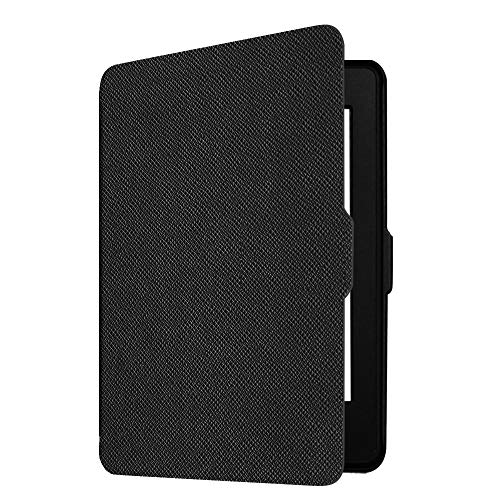
Fintie Slimshell 6-inch Case combines a magnetic clasp with a synthetic-leather exterior and soft interior, giving it a closure feature the other covers do not specify. The black hard-shell cover is made for 6-inch Paperwhites from 2012–2017 with model EY21 or DP75SDI, and opening or closing it wakes or sleeps the reader. Its 0.18-pound weight is the lightest among these options. The magnetic clasp avoids a front strap, but buyers who want a hand strap or included screen protector should consider another style.
Bottom line: Choose this if a magnetic closure and the lowest case weight matter most.
MonsDirect Floral Case

MonsDirect Floral Case adds a hand strap for holding the reader, a feature that sets it apart from the other covers. The floral PU leather case also has auto sleep/wake and is made for 6-inch Paperwhite 5th-, 6th-, and 7th-generation devices with model EY21 or DP75SDI. The maker says wireless charging is supported only for readers that have wireless-charging capability, so do not assume the case adds that capability to the device. Verify the model number, especially if your reader is a 2018 or 2021 Paperwhite.
Bottom line: Choose this if you want a hand strap and your reader already supports wireless charging.
How to identify a 6th-generation Paperwhite
The 6th-generation Paperwhite is the 6-inch model associated with model number DP75SDI; some compatible covers also name EY21. Check the device’s Settings under Device Options or Device Info, or look for the model number printed on the reader, before selecting a case. Generation names can be confusing because product titles sometimes group several Paperwhite generations together. Use the model number and physical size as the deciding checks, not just the phrase “Paperwhite” or a similar-looking screen. A cover for a newer 6.8-inch Paperwhite is a different fit, even if its title also says Kindle Paperwhite.
What to check before choosing a Paperwhite case
Match the reader’s model number and screen size before weighing extras such as a strap or clasp. For this older 6-inch generation, a cover that explicitly names EY21 or DP75SDI is a better fit check than a generic “Kindle” label. Consider how you hold the reader: a hand strap may help with one-handed reading, while a magnetic clasp keeps the front closed without a strap over the screen. If you want display coverage beyond the front flap, choose a case that explicitly includes a screen protector. Case weight ranges from 0.18 to 0.24 pounds among these options, so the lightest choice may suit readers who prioritize carrying less added weight.
| Need | Feature to look for |
|---|---|
| Extra screen layer | Included screen protector |
| One-handed grip | Hand strap |
| Front flap stays closed | Magnetic clasp |
| Automatic screen state | Auto wake/sleep cover |
How older Kindle cases differ from newer fits
A Kindle Paperwhite case is shaped around a particular reader’s body and openings, so generation compatibility matters more than a shared brand name. The 6-inch Paperwhite from this era is not interchangeable with the 2018 10th-generation or 2021 11th-generation models; those devices have different dimensions. Older Paperwhite cases often group several consecutive generations because those readers share a compatible size and model family. Avoid assuming that a case labeled for “6th gen” means the sixth generation of every Kindle model. Confirm the exact reader model, then check for any exclusions such as later Paperwhite generations before choosing.
Wireless charging and sleep-cover features
Wireless charging depends on the reader as well as the case: a compatible cover cannot give wireless-charging hardware to a Kindle that lacks it. The hand-strap case specifies wireless charging only for readers that already have wireless-charging capability, so confirm that feature on the device itself before relying on it. Auto wake/sleep covers use the cover’s open or closed position to wake or sleep the reader, but they do not replace charging or device power controls. If automatic screen behavior is important, choose a case that explicitly identifies auto wake/sleep rather than inferring it from the presence of a front flap.
Frequently Asked Questions
How do I check my Kindle Paperwhite model number?
Open Settings and look under Device Options or Device Info for the model information. Match the displayed number to EY21 or DP75SDI before choosing one of these 6-inch covers.
Will a 6th-generation Paperwhite case fit a 2021 model?
No; the 2021 11th-generation Paperwhite is a newer, larger model and is explicitly excluded by these covers. Check the reader’s model number rather than relying on the Paperwhite name alone.
Does a Paperwhite case add wireless charging?
No, a case does not add wireless-charging hardware to a reader. Wireless charging works only if the Kindle itself supports it; the hand-strap case specifies this same limitation.
Are all 6-inch Paperwhite covers compatible with every Kindle?
No; these cases are intended for specific 6-inch Paperwhite generations, not every Kindle or e-reader. Confirm the reader model and screen size, since newer Paperwhite generations have different dimensions.
What does auto wake and sleep do on a Kindle case?
An auto wake/sleep cover is designed to wake the reader when opened and put it to sleep when closed. Choose a case that explicitly names this feature, since a front flap alone does not establish it.