
Keyboards for Long Nails: 4 Styles Compared by Fit

For most people seeking keyboards for long nails, Raised Silicone Keyboard Stickers, Clear is the most adaptable pick: its raised silicone stickers fit over an existing keyboard and have a micro-frosted surface. Choose Black-and-Pink Wireless Bubble Keyboard Combo instead if you want a complete wireless keyboard with round bubble keys and a number pad, rather than stickers for keys you already own.
We earn a commission if you buy through links on this page. As an Amazon Associate I earn from qualifying purchases. Products are compared on manufacturer specifications, not hands-on testing.
- Best overall: Raised Silicone Keyboard Stickers, Clear – Raised reusable silicone stickers add a nail-friendly profile to an existing keyboard.
- Best for a full keyboard: Black-and-Pink Wireless Bubble Keyboard Combo – The wireless combo has raised round keys and a number pad.
- Best for heart shapes: Quafochi 65-Piece Heart Keyboard Bubbles – The raised stickers have a heart design and 6 mm height.
- Best for more stickers: Pink 70-Piece Raised Silicone Stickers – The 70-piece set is made of silicone and has raised heart-shaped letters.
| Product | Best for | Format | Piece count | Key profile | Shop |
|---|---|---|---|---|---|
| Raised Silicone Keyboard Stickers, Clear | Existing keyboards | Raised stickers | 64 | 0.6 (unit unspecified) | Check Price on Amazon |
| Quafochi 65-Piece Heart Keyboard Bubbles | Heart-shaped keys | Raised stickers | 65 | 6 mm | Check Price on Amazon |
| Black-and-Pink Wireless Bubble Keyboard Combo | Full keyboard setup | Wireless keyboard and mouse | — | Raised round keys | Check Price on Amazon |
| Pink 70-Piece Raised Silicone Stickers | Larger sticker set | Raised stickers | 70 | 0.1 (unit unspecified) | Check Price on Amazon |
Keyboards for Long Nails
Compare add-on raised stickers with a complete keyboard to find the format that suits your setup.
Raised Silicone Keyboard Stickers, Clear

Unlike a complete keyboard, these 64 clear silicone stickers add raised, glitter-infused key surfaces to a keyboard you already have. The maker describes the shape as a cylindrical trapezoid and says the micro-frosted finish adds fingertip friction; the silicone is reusable. That makes this set a fit for someone who wants to keep their current keyboard and try a taller contact surface. The limitation is that stickers are individual add-ons, not a replacement keyboard, so they may not suit someone who wants to change the keyboard itself or avoid placing pieces key by key.
Bottom line: Choose this if you want reusable raised silicone pieces for a keyboard you already own.
Quafochi 65-Piece Heart Keyboard Bubbles

The 6 mm height and heart-shaped design distinguish this 65-piece set from the clear glitter and pink sticker options. The maker says the reusable adhesive removes without residue and that the elevated profile is intended to help fingers reach the keys without nail contact. Consider it if a heart motif matters and you want to reposition stickers. The practical tradeoff is installation: individual raised pieces change the feel and height of selected keys, so this format is less suited to anyone seeking the consistent, built-in key layout of a complete keyboard.
Bottom line: Pick this for a heart design and a 6 mm raised profile.
Black-and-Pink Wireless Bubble Keyboard Combo
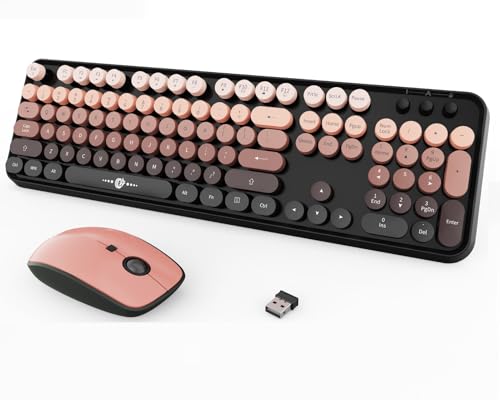
Unlike the sticker sets, this is a complete wireless keyboard-and-mouse combo with a full-size layout and number pad. Its round raised bubble keys, extra spacing, black-and-pink color scheme, and 2.4 GHz connection make it the option for someone replacing a keyboard rather than adapting existing keys. The maker says the elevated keycaps are designed for long nails and to reduce typing mistakes. A limitation is that the specifications do not give a key count or height measurement, so buyers comparing exact dimensions should verify those before choosing it.
Bottom line: Choose this if you want a full wireless keyboard with a number pad.
Pink 70-Piece Raised Silicone Stickers

This pink set has 70 pieces, more than the 64- and 65-piece sticker sets, and uses silicone stickers with raised heart-shaped letters. The maker says the shape is intended to help fingers land on keys more smoothly and that the silicone can help guard a keyboard against dust, spills, and wear. It suits someone who wants a pink look and a larger sticker set. The dimensions are 2 by 3 inches for the skin, but the height unit is unclear, so confirm the measurement if exact clearance matters.
Bottom line: Pick this if pink styling and a 70-piece sticker set suit your keyboard.
Choosing raised stickers or a complete keyboard
Choose stickers if you want to keep your current keyboard; choose a complete keyboard if you want to replace its layout and keys. Stickers sit on individual existing keys, while a standalone keyboard brings its own keycaps and connection. A standard US ANSI full-size layout has 104 keys, while a tenkeyless layout usually has 87; sticker count alone does not establish compatibility with either layout. Check your keyboard’s layout and key shapes before applying a set, especially if it has nonstandard keys. If you want a number pad built in, select a full-size keyboard rather than assuming a sticker pack adds keys. Raised profiles can feel different from flat key surfaces, so try a small group of stickers before committing to the whole board.
Matching sticker count to keyboard layout
Sticker count is not the same as keyboard compatibility: layouts vary in key sizes, spacing, and the number of keys included. A US ANSI full-size keyboard generally has 104 keys, but a 64-, 65-, or 70-piece pack covers fewer than that, so check which keys the pack is intended to cover. The center-to-center spacing of standard keyboard keys is typically 19.05 mm, but keycap shape and keyboard layout still affect fit. Before applying pieces, compare the sticker footprint with the target keys and confirm that legends remain readable. Avoid placing raised stickers where they interfere with stabilizer keys such as Space, Enter, or Shift.
Use this quick guide to match the format to your setup.
| Need | Format to consider | Check first |
|---|---|---|
| Keep current keyboard | Raised stickers | Piece count and key shape |
| Replace keyboard and add a number pad | Full-size keyboard | Connection and layout |
| Change only select keys | Smaller sticker set | Which keys are covered |
How raised key surfaces change typing
Raised key surfaces change where a fingertip contacts the keyboard, which can help keep long nails from striking the key face but may also feel unfamiliar at first. A typical standard keyboard has a 19.05 mm key pitch, measured from the center of one key to the next; added stickers do not change that spacing. Start by applying a few pieces and check that neighboring keys remain easy to reach without catching a nail or shifting a sticker. For a complete keyboard, round keys and extra spacing are design features, not a guarantee that every hand or nail length will feel comfortable. Take breaks during long typing sessions and stop if your fingers or wrists become uncomfortable.
Applying and removing keyboard stickers
Apply stickers to clean, dry key surfaces and press them down evenly so edges do not lift into neighboring keys. Individual pieces can shift the feel of a row, so test frequently used keys before covering less-used ones. Adhesive performance depends on the keyboard surface and residue from skin oils or cleaning products; a smooth, dry keycap gives adhesive a better contact surface than a dusty one. Remove a sticker slowly rather than pulling sharply, especially from low-profile keys. For any keyboard, keep liquids away from the keys while cleaning and disconnect a wired or wireless keyboard before using a damp cloth. Do not assume a sticker makes a keyboard waterproof.
Frequently Asked Questions
How many keys does a standard full-size keyboard have?
A standard US ANSI full-size keyboard generally has 104 keys, including a number pad. Tenkeyless layouts usually have 87 keys, so compare the layout before choosing a sticker count.
What is the spacing between standard keyboard keys?
Standard keyboard key pitch is typically 19.05 mm from one key center to the next. Sticker shape and the keyboard’s layout can still affect fit, so test a piece on an actual key before applying a set.
Can I use raised stickers on every keyboard?
No; sticker fit depends on key shape, surface, and layout. Check that each piece sits within its key and does not catch on neighboring keys or interfere with larger keys such as Space and Enter.
How should I clean a keyboard with raised stickers?
Disconnect the keyboard first, then use a dry cloth or a lightly damp cloth without letting liquid enter the keys. Do not assume raised stickers make the keyboard spillproof, and avoid soaking sticker edges.
Will raised stickers work with a number pad?
They can only cover number-pad keys if the set includes pieces that fit those keys. A full-size US ANSI keyboard usually has 104 keys, so compare the pack’s intended coverage with your specific layout.