
Veise VE07 Smart Lock: Handle Set Models Compared

The Veise VE07-H is the match for a handle set smart lock with fingerprint entry and eight access methods; choose Veise VE07-L Fingerprint Lever Set instead if you want a two-lever set. Veise VE018 Fingerprint Knob Lock, Veise VE012W-H Wi-Fi Handle Set and Veise VE029 Wi-Fi Lever Lock are alternatives with different lock styles or connectivity features, so choose among them only if those differences suit your door.
Smart locks replace or supplement a conventional door lock with electronic access such as a keypad, fingerprint reader or app. Before ordering, confirm your door thickness and deadbolt backset against the model’s requirements.
We earn a commission if you buy through links on this page. As an Amazon Associate I earn from qualifying purchases. Products are compared on manufacturer specifications, not hands-on testing.
- Best overall: Veise VE07-H Fingerprint Handle Set – The VE07-H combines a handle set, eight access methods and capacity for 50 fingerprints.
- Best for lever handles: Veise VE07-L Fingerprint Lever Set – The VE07-L comes with two lever handles and supports app-set auto-lock timing from 5 to 900 seconds.
- Best for built-in Wi-Fi: Veise VE012W-H Wi-Fi Handle Set – The VE012W-H connects directly to 2.4 GHz Wi-Fi and supports remote lock management.
| Product | Best for | Lock style | Fingerprint capacity | Connectivity | Shop |
|---|---|---|---|---|---|
| Veise VE07-H Fingerprint Handle Set | Handle set entry | Handle set | Up to 50 | App; web portal | Check Price on Amazon |
| Veise VE07-L Fingerprint Lever Set | Lever-handle entry | Two-lever set | — | App; web portal | Check Price on Amazon |
| Veise VE018 Fingerprint Knob Lock | Knob-style doors | Knob handle | Up to 20 | Bluetooth app | Check Price on Amazon |
| Veise VE012W-H Wi-Fi Handle Set | Remote Wi-Fi access | Handle set | — | Built-in 2.4 GHz Wi-Fi | Check Price on Amazon |
| Veise VE029 Wi-Fi Lever Lock | Wi-Fi lever access | Lever lock | — | Built-in Wi-Fi, 2.4 GHz | Check Price on Amazon |
Veise smart locks and VE07 models
Compare the VE07 handle set variations with related Veise locks by style, fingerprint capacity and connectivity.
Veise VE07-H Fingerprint Handle Set
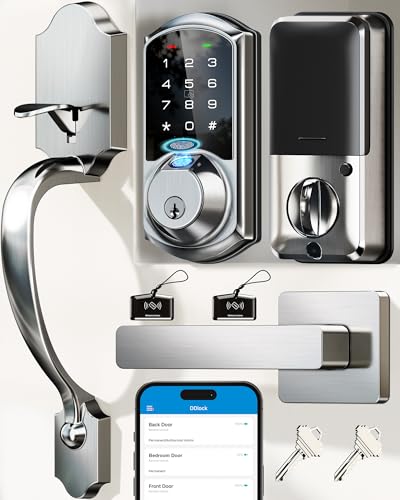
The VE07-H is the VE07 option with a front-door handle set and fingerprint entry. It offers eight access methods, including an app, fingerprint, Apple Watch compatibility, web portal, codes, eKeys, fobs and a mechanical key. Veise says fingerprint unlocking takes 0.3 seconds; the lock can store up to 50 fingerprints. Satin nickel is the finish. This model suits households that want fingerprint access alongside multiple alternatives, but its handle set format is the wrong choice if you specifically need a pair of lever handles.
Bottom line: Choose this if you want a handle set and capacity for up to 50 fingerprints.
Veise VE07-L Fingerprint Lever Set

The VE07-L differs from Veise VE07-H Fingerprint Handle Set by including two lever handles rather than a handle set. The specifications describe eight access methods, including app, fingerprint, web portal, codes, eKeys and fobs, with fob capacity above 1,000. Its auto-lock delay can be set in the app from 5 to 900 seconds. The satin nickel set has metal front and back panels and zinc-alloy handles. Choose it when lever handles suit the door; the fields do not give its fingerprint capacity, so it is harder to compare on that measure.
Bottom line: Pick this when you want two lever handles and adjustable auto-lock timing.
Veise VE018 Fingerprint Knob Lock

The VE018 is a knob-style lock, not one of the VE07 handle set models. It provides eight access methods, including fingerprint, app control, keypad, IC card, mechanical key and remote authorization. Veise says fingerprint recognition takes 0.2 seconds and has 99%+ accuracy; the lock stores up to 20 fingerprints. The app can name and manage fingerprints and track which one was used. Its satin nickel finish may suit buyers who need a knob format, but it is a partial match if your search is specifically for a VE07 handle set.
Bottom line: Choose this only if a fingerprint-enabled knob is the format you need.
Veise VE012W-H Wi-Fi Handle Set

The VE012W-H adds built-in Wi-Fi to a handle set format, making it a different choice from the VE07 models. It connects to a 2.4 GHz home network without a separate gateway or bridge, and the app supports remote locking and unlocking, user management, notifications and lock history. The specifications also name fingerprint entry, voice control, auto-lock and an IP55 rating. This satin nickel model suits buyers who prioritize remote access; choose another option if you need a fingerprint capacity or specifically want the VE07 model family.
Bottom line: Pick this if built-in Wi-Fi and remote app management matter most.
Veise VE029 Wi-Fi Lever Lock
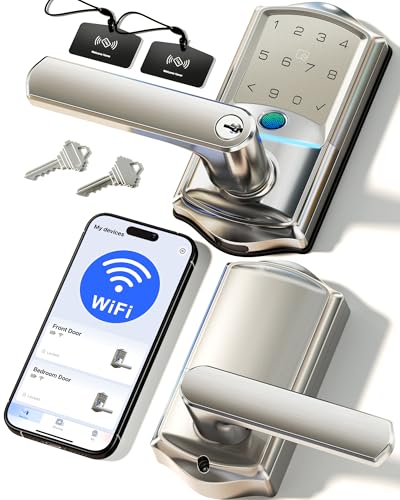
The VE029 is a Wi-Fi lever lock with a digital keypad, rather than a VE07 model. It supports eight access methods, including app control, fingerprint, IC card, PIN code, backup key, voice control, authorization and code sharing. The fields specify 100+ PIN codes, Alexa and Google compatibility, real-time alerts and an IP65 rating. Its app supports permanent, recurring, one-time and duration passwords. This satin nickel option fits buyers looking for remote access and varied code permissions, but it is a partial match if you specifically want a VE07 handle set.
Bottom line: Choose this for built-in Wi-Fi, lever access and flexible PIN permissions.
How to choose a Veise smart lock style
Choose the lock style that matches the hardware your door needs: a handle set, lever set or knob are not interchangeable just because each is electronic. A deadbolt is a separate locking bolt that extends into the door frame; a knob or lever is the handle you turn to open the door. Many exterior doors use a deadbolt plus a separate handle, while some handle sets pair the handle with a deadbolt. For a straightforward choice, pick a VE07 model when you want its handle set format, and the VE07-L when you need two levers. Consider partial-match models only if a knob, Wi-Fi feature or different lock format is acceptable. Keep a mechanical-key option available as a fallback when electronic access is unavailable.
Door fit and measurements for smart locks
Measure the door before choosing a smart lock: common US deadbolt backsets are 2 3/8 or 2 3/4 inches, and many residential exterior doors are 1 3/8 to 1 3/4 inches thick. Backset is the distance from the door edge to the center of the bore hole. A mismatch can prevent the latch from lining up, even when the lock’s handle style looks right. Also check the bore-hole diameter, edge-bore size and spacing between the deadbolt and handle; existing door preparation varies. Use this as a fit checklist, not a substitute for the selected model’s measurements.
| Measure | Common residential reference | Why it matters |
|---|---|---|
| Deadbolt backset | 2 3/8 or 2 3/4 in. | Positions the latch from the door edge |
| Door thickness | 1 3/8–1 3/4 in. | Determines whether the lock hardware spans the door |
| Handle format | Handle set, lever or knob | Must match the desired door hardware |
Fingerprint, keypad and app access
Fingerprint access can be convenient, but a backup method matters because a dead battery, wet or dirty finger, or sensor issue can interrupt biometric entry. Keep the mechanical key accessible outside the locked area, and maintain a code or app method where the model supports one. Fingerprint capacity is useful to compare when many household members need separate enrollment: the VE07-H supports up to 50, while the VE018 supports up to 20. A keypad code is easier to share temporarily but should be deleted or changed when a guest no longer needs entry. Avoid reusing a household or alarm code as a door PIN, and do not share access codes publicly.
Wi-Fi smart locks and remote access
Built-in Wi-Fi lets a lock communicate with an app over a home network; the VE012W-H and VE029 specify 2.4 GHz Wi-Fi, while the VE07 descriptions emphasize app and web-portal options without specifying built-in Wi-Fi. Remote control is useful only when the lock has a working network connection, so retain a local entry method such as a key, keypad or fingerprint. Wi-Fi devices also depend on home router coverage at the door, and exterior walls can weaken the signal. For remote entry, confirm the chosen model’s connectivity requirements and check that the door location receives a reliable 2.4 GHz signal.
Frequently Asked Questions
What is a deadbolt backset on a smart lock?
A deadbolt backset is the distance from the door edge to the center of the lock bore. Common residential measurements are 2 3/8 and 2 3/4 inches, and the lock must accommodate the door’s measurement.
How thick are most residential front doors?
Many residential exterior doors are 1 3/8 to 1 3/4 inches thick. Measure the door at the lock bore because trim or weatherstripping can make an edge measurement misleading.
Can fingerprint locks work when the battery dies?
Electronic fingerprint entry needs power, so keep a mechanical key or another supported access method available. Replace batteries when the lock signals low power rather than waiting for entry to fail.
Does built-in Wi-Fi need a separate hub?
Built-in Wi-Fi models can connect directly to a compatible home network, while other smart locks may need a bridge or use local Bluetooth. The VE012W-H and VE029 specify direct 2.4 GHz Wi-Fi without a hub.
How many fingerprints can a smart lock store?
Capacity depends on the model: the VE07-H supports up to 50 fingerprints, and the VE018 supports up to 20. Check capacity against the number of people who need individual enrollment.