
Camera to See Inside Walls: 4 Borescopes Compared

For most wall inspections, Teslong Articulating Borescope is the better fit because its two-way 210° articulating probe can steer around obstructions. Choose SUP-ANESOK Single-Lens Borescope instead if you want to view the feed on a compatible iOS or Android device, or 4.3-Inch Screen Borescope, 16.5 ft if a built-in screen matters more than saving photos.
A borescope is a small camera on a flexible probe that can enter an access opening; it cannot see through drywall, so the probe needs a path into the cavity.
We earn a commission if you buy through links on this page. As an Amazon Associate I earn from qualifying purchases. Products are compared on manufacturer specifications, not hands-on testing.
- Best overall: Teslong Articulating Borescope – Its probe articulates two ways through 210° for steering in tight spaces.
- Best for phone viewing: SUP-ANESOK Single-Lens Borescope – Connects to compatible iOS 9.0+ and Android 7+ devices.
- Best for built-in screen: 4.3-Inch Screen Borescope, 16.5 ft – Has a 4.3-inch IPS display and does not require an app.
| Product | Best for | Probe length | Display | Probe movement | Shop |
|---|---|---|---|---|---|
| Teslong Articulating Borescope | Steering around corners | — | 4.5-inch IPS | Two-way, 210° | Check Price on Amazon |
| SUP-ANESOK Single-Lens Borescope | Phone-based viewing | 16.4 ft | Phone display | Semi-rigid | Check Price on Amazon |
| 4.3-Inch Screen Borescope, 16.5 ft | Standalone screen viewing | 16.5 ft | 4.3-inch IPS | — | Check Price on Amazon |
| Dual-Lens Borescope, 16.4 ft | Multi-angle inspection | 16.4 ft | — | Semi-rigid | Check Price on Amazon |
Cameras to See Inside Walls
Compare how each borescope presents the camera feed and steers through confined spaces.
Teslong Articulating Borescope

Two-way articulation up to 210° sets this borescope apart when the probe must turn around an obstruction inside a wall cavity. Its 2.0MP camera feeds a 4.5-inch IPS screen, and the semi-rigid gooseneck provides reach while holding a shape. The product includes 32GB storage, eight LED lights, and an IP67 waterproof rating. It suits inspections where steering matters more than a simple straight push.
Bottom line: Choose this when steering the probe around a cavity obstruction is the priority.
SUP-ANESOK Single-Lens Borescope
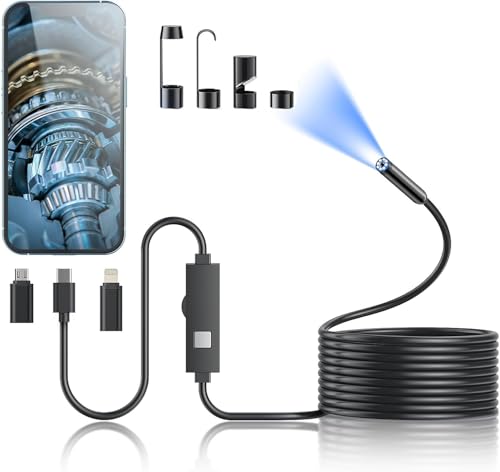
Phone connectivity distinguishes this single-lens borescope from models with a dedicated screen. Its 7.9 mm probe and 16.4-foot semi-rigid cable can bend while retaining a pushed shape, and the 2.0MP camera captures images and video at 1920×1440 resolution. The maker says the IP67 probe is waterproof; the camera connects through an app to iOS 9.0+ or Android 7+ devices. It suits someone who wants to view on a compatible phone. Its app-based connection is a drawback if you prefer a standalone display.
Bottom line: Pick this if your compatible phone is the display you want to use.
4.3-Inch Screen Borescope, 16.5 ft

A built-in 4.3-inch IPS display makes this borescope distinct for buyers who do not want to connect a phone. The maker says it shows 1920×1080 live images, with brightness adjustment and color flip controls; eight LED lights and an IP67 rating support inspection in dim or wet locations. The 16.5-foot probe is suited to reaching farther through an access route. The product cannot take or store photos, so it is a poor match if you need to keep image records.
Bottom line: Choose this for direct viewing when saving photos or video is unnecessary.
Dual-Lens Borescope, 16.4 ft

The dual-lens wiring-harness version offers a different camera arrangement from the single-lens options, with an 8-light probe and 16.4-foot semi-rigid cable. The maker says the 1920×1440 endoscope is intended for multi-angle observation of pipes, wall wiring, and engine compartments, including damp or dark spaces. Its IP67 rating and adjustable lights are useful for inspection through an existing opening. The fields do not establish a display or phone connection method, so confirm compatibility with the viewing device you plan to use before buying.
Bottom line: Pick this for the dual-lens configuration after confirming how you will view its feed.
How a Wall Inspection Borescope Works
A borescope shows the view from a small camera at the end of a probe; it does not image through drywall. The probe must enter through an existing opening, such as a removed outlet cover or a small inspection hole, and a clear route is needed to reach the target. Electrical wiring can be hazardous: turn off the relevant breaker and verify the circuit is de-energized before inserting a probe near wiring. A camera is not a voltage tester. The lens shows only the area within its field of view, so a live feed cannot establish the condition of an entire wall cavity.
Before making an opening, check for plumbing, wiring, and framing with appropriate detection methods. Avoid pushing a semi-rigid probe against insulation or wiring; snagging can damage the cable or the obstruction. Where a visual check cannot confirm what is behind a surface, use a qualified electrician or other relevant trade professional.
Choosing a Wall Inspection Camera
Choose the viewing setup first: a built-in screen works independently, while an app-connected model needs a compatible phone and successful connection. Then match probe movement to the route. A straight, semi-rigid cable can be pushed into an open path, while articulation can help direct the camera around an obstacle but does not make the probe smaller or longer. Cable length matters only if the access route is reasonably direct; extra length will not help a probe negotiate a tight bend.
For a known turn in the route, favor an articulating probe; for a straight, longer reach, compare the cable lengths. If you need records, verify that the camera can save images or video: one model here explicitly cannot store either. The input provides no length for the articulating model, so confirm reach before selecting it.
Probe Reach and Wall Access
Wall cavities are divided by framing, fire blocking, insulation, and pipes, so a long probe does not guarantee access to every bay. A typical stud bay is about 14.5 inches wide between framing members when studs are spaced 16 inches on center, but openings and obstructions determine the usable route. A probe needs an opening large enough for its camera head and room to turn; do not force it through a tight hole.
Map the intended route before insertion and mark the probe at the access point to estimate how far it has traveled. If the route requires a sharp turn, select articulation rather than assuming a semi-rigid cable will bend around it. For a cavity separated by a solid obstruction or blocked by insulation, reposition the access point instead of pushing harder.
Safe Use Around Electrical Wiring
De-energize nearby circuits before inspecting a wall cavity that may contain wiring, and verify power is off with a properly rated voltage tester. A borescope camera cannot determine whether a conductor is live, and an IP67 probe rating does not make the tool electrically safe. Keep the camera away from exposed conductors, sharp metal edges, and moving equipment.
Use a small, controlled insertion rather than sweeping the probe through the cavity. Stop if the cable catches or the image shows a damaged conductor; do not use the camera to move wires aside. If the access point or wiring condition is uncertain, have a qualified electrician perform the inspection.
Frequently Asked Questions
Can a borescope see through drywall?
No, a borescope needs an opening into the wall cavity because its camera views only what is in front of its lens. It can inspect a cavity through an existing or deliberately made access hole.
How do I get a camera into a wall cavity?
Use an existing opening or make a small access hole only after checking for wiring, plumbing, and framing. The camera head must fit the opening, and the probe needs a route without a blocked turn.
Can an inspection camera find live wires?
No, a camera cannot verify whether a wire is energized. Turn off the circuit and use a properly rated voltage tester to confirm it is de-energized before probing nearby.
What probe length is useful for wall inspections?
A 16-foot probe can reach well beyond a nearby access point along an open route, but framing and insulation may stop it much sooner. Measure the route and account for turns before choosing length.
Can I save photos from a wall camera?
Some borescopes can capture or store images, but the 4.3-inch screen model here cannot take or store photos. Check the camera’s recording capability if you need a visual record.