
Cubicle Shade to Block Light: 5 Options Compared

STAYDEN 65-Inch Round Cubicle Shade is a strong fit for most cubicles because its 65-inch round shade pairs broad coverage with a 20-to-40-inch adjustable rod. Choose another option if you need a rectangular canopy, adjustable tilt, or a specific mounting setup.
A cubicle shade is a canopy or light shield positioned above a desk to reduce overhead light and glare. Measure your desk and check available mounting clearance before choosing a size or clamp style.
We earn a commission if you buy through links on this page. As an Amazon Associate I earn from qualifying purchases. Products are compared on manufacturer specifications, not hands-on testing.
- Best overall: STAYDEN 65-Inch Round Cubicle Shade – A 65-inch round shade and adjustable 20-to-40-inch rod offer broad coverage and height flexibility.
- Best for rectangular coverage: TopShade 35-by-51-Inch Desk Shade – The 35-by-51-inch shade has a 16-to-31-inch adjustable height and rotational adjustment.
- Best for adjustable angle: BALAPET Adjustable-Angle Cubicle Shade – The shade tilts and supports desk or cubicle-partition mounting.
| Product | Best for | Shade size | Height adjustment | Mounting or adjustment | Shop |
|---|---|---|---|---|---|
| STAYDEN 65-Inch Round Cubicle Shade | Broad round coverage | 65-inch diameter | 20–40 inches | Adjustable rod | Check Price on Amazon |
| TopShade 35-by-51-Inch Desk Shade | Rectangular coverage | 35 × 51 inches | 16–31 inches | Clamp mount; rotates | Check Price on Amazon |
| Large Size 52-Inch Office Cubicle Shade | Quick-install shade | 52-inch round | — | Tabletop retaining clips | Check Price on Amazon |
| BALAPET Adjustable-Angle Cubicle Shade | Tilted light control | Cubicle-sized in use | — | Desk or partition mount; tilts | Check Price on Amazon |
| Comastbo 65-by-47-Inch Desk Shade | Rectangular light blocking | 65 × 47 inches | — | Desk clamp mount | Check Price on Amazon |
Cubicle Shades to Block Light
Compare shade shape, height range, and installation approach against your desk and cubicle layout.
STAYDEN 65-Inch Round Cubicle Shade

STAYDEN 65-Inch Round Cubicle Shade stands out for its 65-inch round canopy and adjustable rod, which ranges from 20 to 40 inches. The maker says its 420D Oxford fabric can withstand 99% of light, and the shade is designed to reduce glare and add privacy above an office space. Choose it if a circular canopy suits your desk and you want a relatively wide height adjustment range. Its round shape may be less suitable than a rectangular shade when you want coverage aligned with a long desk edge; measure the available overhead area before choosing.
Bottom line: Choose this for a wide round canopy with a 20-to-40-inch adjustable rod.
TopShade 35-by-51-Inch Desk Shade

TopShade 35-by-51-Inch Desk Shade differs from round canopies with its 35-by-51-inch rectangular shade, adjustable from 16 to 31 inches and able to rotate for repositioning. The maker says it is intended to reduce harsh overhead lighting, screen glare, and visual distractions. Its clamp mount and shorter height range suit buyers who want to adjust coverage around a desk setup rather than choose a round shield. The shade is smaller in at least one dimension than the 65-inch round options, so it may not suit someone seeking broad circular coverage.
Bottom line: Pick this when rectangular coverage and rotational repositioning matter.
Large Size 52-Inch Office Cubicle Shade
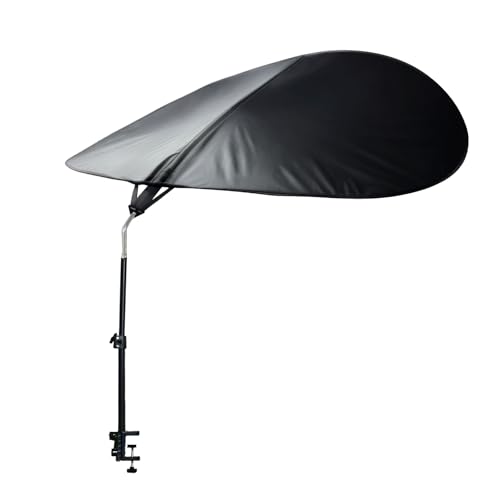
Large Size 52-Inch Office Cubicle Shade is a 52-inch round shade with leaf-shaped compartments designed to avoid a rod-threading installation step. The maker says it blocks 99% of light and includes an adjustable pole with tabletop retaining clips. That combination may suit buyers who prefer a round canopy and a simplified assembly approach. Its 52-inch diameter is smaller than the 65-inch options here, and the pole-height range is not given, so it is a less certain match if your setup requires a particular clearance or vertical reach.
Bottom line: Choose this for a 52-inch round canopy and simplified assembly.
BALAPET Adjustable-Angle Cubicle Shade

BALAPET Adjustable-Angle Cubicle Shade is distinguished by its adjustable angle and two mounting modes: directly on a desk or attached to a cubicle partition. The maker describes the material as light-blocking and the shade as foldable and portable. That flexibility makes it a fit for buyers whose light source or desk corner calls for a tilted canopy, or whose setup favors partition attachment.
Bottom line: Pick this if tilt adjustment or partition mounting is your priority.
Comastbo 65-by-47-Inch Desk Shade

Comastbo 65-by-47-Inch Desk Shade uses a 65-by-47-inch rectangular canopy rather than a round shade, with a desk-clamp mount. The maker says the fabric blocks 99% of light and is 96% flame-retardant, and cites NFPA 701 testing. It is intended to reduce overhead light and may also help shield a desk from cold airflow from a ceiling vent. Choose it when wide rectangular coverage and those maker-reported fabric properties fit your needs.
Bottom line: Choose this for a wide rectangular canopy and clamp mounting.
How to Choose a Cubicle Shade to Block Light
Start with the shape and dimensions of the area you want shaded, then match the mount and height range to your desk. Round shades are described by diameter; rectangular shades use two dimensions, so compare both edges with the desk area rather than treating one measurement as total coverage. A shade that blocks overhead light can also reduce ambient light around your workstation, so consider whether you need a broad canopy or targeted glare control. If you want to reposition coverage, look for stated rotation or angle adjustment. Measure the desk and overhead clearance before ordering, especially when a clamp or pole will occupy space near a monitor, partition, or ceiling fixture.
Round and Rectangular Cubicle Shade Coverage
Round and rectangular shades cover a workspace differently, even when one dimension appears similar. A round canopy’s diameter gives its widest span, while a rectangular canopy’s length and width show its two edge dimensions. Compare the shape with your desk layout: a round shade provides a curved perimeter, whereas a rectangle can align with desk edges. The figures below are the product sizes, not a promise that every point around the desk will be shaded; pole position and mounting location affect usable coverage.
| Shade format | Example size | Consider it when |
|---|---|---|
| Round | 52- or 65-inch diameter | You want circular coverage above a desk |
| Rectangular | 35 × 51 or 65 × 47 inches | You want coverage aligned to desk edges |
| Foldable, adjustable-angle | Cubicle-sized in use | You prioritize tilt or mounting flexibility |
Mounting and Height Adjustment
Mounting style determines where the shade can sit and how much desk or partition space it uses. Desk-clamp designs attach at an edge, while partition-mounted options attach to a cubicle wall; retaining clips are another tabletop approach. Adjustable height is useful when the light source or screen position changes, but the ranges differ: compare the full range with your needed clearance rather than just the maximum height. Rotational and angle adjustments change shade direction, not necessarily total coverage. Before selecting a clamp style, check the desk edge and partition arrangement, and leave the shade clear of hot lights or other heat sources.
Light Blocking and Fabric Claims
Light-blocking percentages are maker claims and are not interchangeable with a standardized measure of room darkness. A shade that blocks light directly overhead may not eliminate glare entering from a window or from uncovered sides, so position and canopy shape matter. The maker mentions Oxford fabric, light-blocking material, and flame-retardant fabric; those terms do not establish that every shade has the same construction or performance. For a product that cites a fire test, distinguish the cited claim from a guarantee that the canopy is fireproof. Keep fabric and support parts clear of heat-producing fixtures, and consider whether blocking overhead light will leave enough ambient light for the rest of your workspace.
Frequently Asked Questions
Will a cubicle shade block light from every direction?
No; a canopy positioned above a desk mainly targets light reaching the covered area. Light can still enter from uncovered sides or windows, so shade shape and placement affect glare control.
How do I measure for a desk canopy?
Measure the desk area you want covered in inches, then compare both dimensions with rectangular shades or the diameter with round shades. Include space for the mount and pole so they do not interfere with a partition or screen.
Does a height-adjustable shade help reduce screen glare?
Height adjustment can help reposition a shade relative to a screen and overhead light. The usable ranges differ, so compare the minimum and maximum height with your setup.
Can a cubicle shade attach to a partition?
Some designs support partition mounting, while others use a desk clamp or tabletop clips. Check the specific mounting method against your cubicle layout before choosing.
Does a light-blocking percentage mean a dark room?
No; a percentage claim describes the maker’s fabric performance, not the darkness of the whole workspace. Side openings, windows, and shade position still affect the light that reaches the desk.