
Qualcomm Atheros AR938X Wireless Network Adapter Compared

The NETELY NET-N600 NETELY NET-N600 AR938X PCIe is the closest match to a Qualcomm Atheros AR938X wireless network adapter because it uses that chipset in a dual-band PCIe card. Choose a different option if your computer needs an M.2 or USB adapter, or if you specifically need a different chipset.
Wireless network adapters add Wi-Fi through an internal card slot or an external USB port; confirm your computer’s available interface before choosing.
We earn a commission if you buy through links on this page. As an Amazon Associate I earn from qualifying purchases. Products are compared on manufacturer specifications, not hands-on testing.
- Best overall: NETELY NET-N600 AR938X PCIe – Uses the AR938X chipset and adds dual-band Wi-Fi through a desktop PCIe slot.
- Best for 802.11ac routers: FebSmart FS-N600 AR946X PCIe – The M.2 card supports 802.11ac, unlike the two 802.11n PCIe options.
- Best for Linux USB use: Deal4GO QCA9377 M.2 Wi-Fi Card – The USB adapter supports Linux monitor mode and packet injection.
| Product | Best for | Interface | Wi-Fi rate | Band support | Shop |
|---|---|---|---|---|---|
| NETELY NET-N600 AR938X PCIe | AR938X desktop fit | PCIe | 600 Mbps total | 2.4 and 5 GHz | Check Price on Amazon |
| FebSmart FS-N600 AR946X PCIe | Dual-band PCIe | PCIe | 600 Mbps total | 2.4 and 5 GHz | Check Price on Amazon |
| Deal4GO QCA9377 M.2 Wi-Fi Card | Laptop M.2 upgrade | M.2 NGFF E/A key | 433 Mbps at 5 GHz | 2.4 and 5 GHz | Check Price on Amazon |
| Deal4GO AR9271 USB Wi-Fi Adapter | Linux USB projects | USB | 150 Mbps | 2.4 GHz | Check Price on Amazon |
| TP-Link Nano AC600 USB Adapter | Compact USB Wi-Fi | USB | AC600 class | 2.4 and 5 GHz | Check Price on Amazon |
Qualcomm Atheros AR938X wireless network adapters and alternatives
Start with chipset and computer interface, then compare bands, wireless generation and operating-system support.
NETELY NET-N600 AR938X PCIe

The NETELY NET-N600 is the direct AR938X match here: it uses a Qualcomm Atheros AR938X 2T2R MIMO solution in a desktop PCIe card. The maker says the two external 3 dBi antennas and an amplifier on each antenna chain support reception and range; the card offers up to 300 Mbps on either 2.4 GHz or 5 GHz. Windows 11, 10, 8.1 and 8 are described as plug-and-play, while older Windows versions need a driver. Its limitation is the PCIe form factor, so it will not suit a laptop M.2 slot or USB-only setup.
Bottom line: Choose this if you specifically need an AR938X-based desktop PCIe adapter.
FebSmart FS-N600 AR946X PCIe
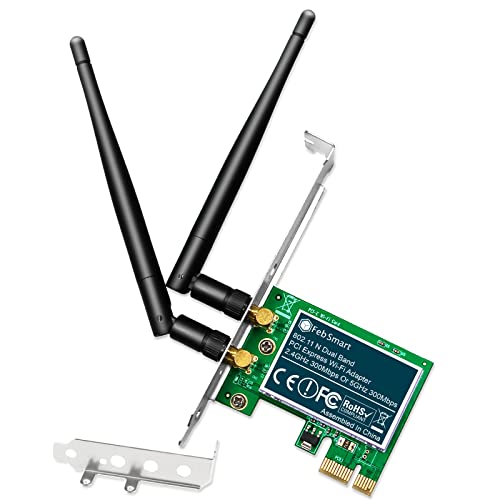
The FebSmart FS-N600 is the closest PCIe alternative, but it uses an AR946X rather than the requested AR938X chipset. It is a dual-band 802.11n card rated for 300 Mbps on each band, with two detachable 3 dBi antennas. The maker says it can connect to 802.11ax, ac, n, g, b or a routers, but that compatibility does not make the card an 802.11ac adapter. Its appeal is broad listed Windows support, including Windows Server; the limitation is the different chipset, which matters when replacing hardware for a specific AR938X driver or compatibility requirement.
Bottom line: Pick it when PCIe and dual-band 802.11n matter more than matching AR938X.
Deal4GO QCA9377 M.2 Wi-Fi Card
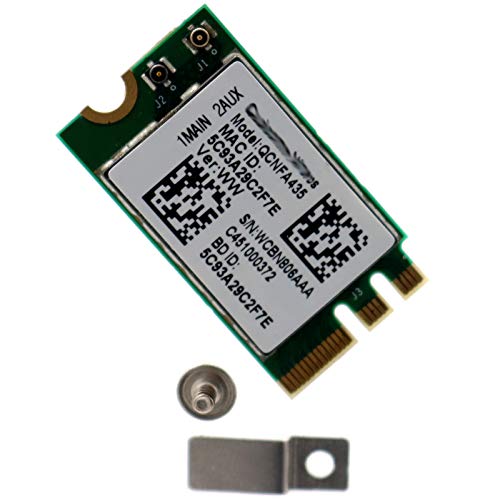
The Deal4GO QCNFA435 is a compact M.2 alternative rather than an AR938X card; it uses the QCA9377 and combines Wi-Fi with Bluetooth 4.1. Its maximum rates are 433 Mbps at 5 GHz and 150 Mbps at 2.4 GHz, and its NGFF E- or A-key connector must match the laptop’s socket. The maker identifies several Dell laptop models and also lists Windows 7 through 10 support. The important limitation is fit: it uses IPEX4 antenna connectors and is explicitly unsuitable for IBM/ThinkPad, Lenovo and HP laptops, so verify the exact model and socket before ordering.
Bottom line: Choose it for a compatible M.2 laptop that needs Wi-Fi and Bluetooth.
Deal4GO AR9271 USB Wi-Fi Adapter

The Deal4GO AR9271 trades dual-band desktop PCIe for a single-band USB adapter aimed at Linux wireless work. It supports 2.4 GHz 802.11b/g/n at up to 150 Mbps, and the maker says Linux distributions including Kali and Ubuntu support it natively without drivers. Monitor mode and packet injection are also listed for Linux. That makes it a distinct choice for a USB port or a Linux setup, not an AR938X replacement. Its clear limitation is that it does not support 802.11ac or 5 GHz, so it is a poor fit when the goal is higher-band dual-band Wi-Fi.
Bottom line: Pick it for Linux USB use where 2.4 GHz and monitor features are needed.
TP-Link Nano AC600 USB Adapter

The TP-Link Nano AC600 is the smallest-form-factor alternative in this group: a dual-band USB adapter designed to stay plugged in. The maker lists Windows 11, 10, 8.1, 8, 7 and XP plus Mac OS X 10.9–10.14, and notes that driver installation may be needed. Its AC600 designation makes it a different wireless generation and connection type from the AR938X PCIe 802.11n card. The maker does not break the AC600 rate into per-band figures, so do not treat that label as a guaranteed speed on either band; choose it for convenience, not chipset matching.
Bottom line: Choose it when a low-profile dual-band USB adapter matters more than AR938X.
How to choose a wireless network adapter
Match the adapter interface to an available slot before comparing wireless speed. Desktop PCIe cards such as NETELY NET-N600 AR938X PCIe and FebSmart FS-N600 AR946X PCIe need a compatible internal expansion slot, while M.2 cards need the correct key and USB models need only an open USB port. Next, distinguish 802.11n from 802.11ac: a card that connects to newer routers does not gain the newer standard’s capabilities merely by connecting. For an AR938X-specific replacement, chipset identity is decisive; for general Wi-Fi, interface, bands and operating-system support may matter more. A practical rule: if your machine has no free PCIe slot, skip both PCIe cards and look at an interface it actually supports.
PCIe, M.2 and USB fit differences
PCIe, M.2 and USB adapters are not interchangeable even when their Wi-Fi bands overlap. M.2 cards require a compatible socket key and antenna leads; the QCA9377 card here uses NGFF E or A key and IPEX4 antenna connectors. Desktop PCIe cards use antennas attached to the card, while USB adapters avoid opening the computer but can occupy a port. Laptop compatibility can be model-specific because the physical socket and antenna connections must match, and some laptop models may reject a card despite a similar connector. Before ordering an internal card, identify the exact computer model and slot type; connector appearance alone does not guarantee electrical or firmware compatibility.
Use this interface guide as a first filter:
| Computer need | Adapter type | Fit check |
|---|---|---|
| Desktop expansion slot | PCIe card | Available PCIe slot and antenna placement |
| Laptop internal replacement | M.2 NGFF | Key, antenna connectors and model compatibility |
| No internal installation | USB adapter | Open USB port and operating-system driver support |
Dual-band Wi-Fi speeds and standards
Dual-band means an adapter can use both 2.4 GHz and 5 GHz, but the maximum rate depends on the adapter’s wireless generation and configuration. The two 802.11n PCIe cards in this group are rated for 300 Mbps on each band, while the AR9271 is a 2.4 GHz-only 802.11n device rated up to 150 Mbps. The QCA9377 M.2 card lists 433 Mbps at 5 GHz and 150 Mbps at 2.4 GHz. These are maximum link-rate figures, not guaranteed internet throughput; distance, walls, interference, router capability and other network traffic affect actual results. If your router uses 5 GHz, a single-band 2.4 GHz adapter cannot connect on that band.
Operating-system and Linux compatibility
Operating-system support can determine whether an otherwise compatible card works without extra setup. The NET-N600 says Windows 11, 10, 8.1 and 8 are plug-and-play and identifies ATH9K for Linux; the AR9271 maker describes native Linux support for monitor mode and packet injection. Other products list particular Windows versions, but broad compatibility claims should be checked against the exact OS release and hardware. Linux users should verify the chipset’s driver support in their distribution, especially when a feature such as monitor mode is essential. For Windows, confirm whether the version needs a separate driver before installing an internal card, and keep a wired connection available during setup.
Frequently Asked Questions
Does the AR938X support 5 GHz Wi-Fi?
The NET-N600 based on AR938X supports both 2.4 GHz and 5 GHz, with a maximum of 300 Mbps on either band. The router and local signal conditions also affect the connection.
Is AR938X the same chipset as AR946X?
No. AR938X and AR946X are different Qualcomm Atheros chipset models, even though the cards described here both use dual-band 802.11n PCIe designs. Choose the AR938X model when chipset identity is a requirement.
Can a PCIe Wi-Fi card fit in a laptop?
A desktop PCIe card does not fit an M.2 laptop socket; these are different interfaces and physical formats. Laptop internal cards also need matching antenna connectors and model compatibility.
What does 2T2R MIMO mean on a Wi-Fi card?
2T2R means two transmit and two receive radio chains, commonly paired with two antennas. Antenna placement, router capability and interference affect real-world throughput, so the label alone does not promise a particular speed.
Will a Wi-Fi N adapter connect to an 802.11ac router?
An 802.11n adapter can connect to a router that also supports 802.11n, but it does not become an 802.11ac adapter. Check that the router has a compatible mode enabled and match the band the adapter supports.