
Google WiFi AC 1304: Models Compared by Fit

Google AC-1304 Single WiFi Point is the closest match for Google WiFi AC 1304 because its name identifies that model and a single Wi-Fi point. Choose Google WiFi NLS-1304-25, Renewed if you want the NLS-1304-25 renewed version, or Google WiFi AC1200, 1-Pack if you want a related AC1200 mesh point with coverage.
Google WiFi is a mesh networking system: compatible points work together to extend one home network rather than relying on a single router’s reach.
We earn a commission if you buy through links on this page. As an Amazon Associate I earn from qualifying purchases. Products are compared on manufacturer specifications, not hands-on testing.
- Best overall: Google AC-1304 Single WiFi Point – Its name explicitly identifies the AC-1304 single Wi-Fi point.
- Best for NLS-1304-25: Google WiFi NLS-1304-25, Renewed – The renewed 1-pack includes an app for setup and device controls.
- Best for stated coverage: Google WiFi AC1200, 1-Pack – The AC1200 1-pack gives a coverage figure of up to 1,500 square feet.
| Product | Best for | Model or type | Pack size | Coverage | Shop |
|---|---|---|---|---|---|
| Google AC-1304 Single WiFi Point | AC-1304 match | AC-1304 | Single point | — | Check Price on Amazon |
| Google WiFi NLS-1304-25, Renewed | App controls | NLS-1304-25 | 1-pack | Up to 1,500 sq ft | Check Price on Amazon |
| Google WiFi AC1200, 1-Pack | AC1200 alternative | AC1200 mesh point | 1-pack | Up to 1,500 sq ft | Check Price on Amazon |
Google WiFi AC 1304 and related models
Compare the exact AC-1304 options with a related AC1200 point by model and stated coverage.
Google AC-1304 Single WiFi Point
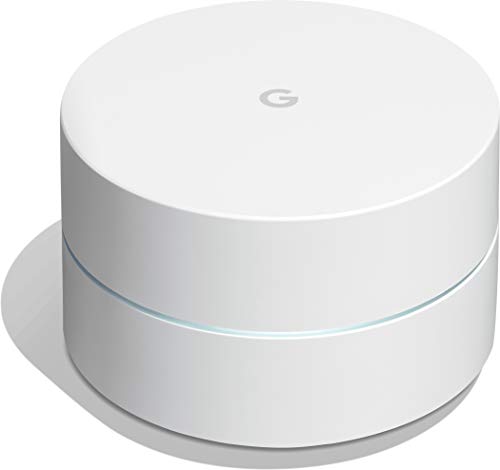
For a buyer searching specifically for AC-1304, this single-point Google WiFi option is the clearest model-name match. The refurbisher says the unit is function-tested, cleaned, inspected, and repackaged, and that relevant accessories are included; the box may be generic. A single mesh point suits a smaller space or an existing compatible mesh setup, but the product facts do not establish its coverage, so confirm that the unit’s included accessories and model match your setup before ordering. This is a refurbished unit, which matters if you specifically want a new device.
Bottom line: Pick this when AC-1304 model identity matters most and refurbished condition is acceptable.
Google WiFi NLS-1304-25, Renewed

Unlike the other AC-1304 option, this renewed NLS-1304-25 explicitly describes app-based setup and controls. Its single Wi-Fi point is rated for coverage up to 1,500 square feet, and the maker says a three-point setup covers up to 4,500 square feet; additional points can expand the network. The app can show connected devices, prioritize them, and pause Wi-Fi on children’s devices. This pick is a renewed 1-pack rather than a multi-point bundle, so larger or irregular homes may need additional compatible points.
Bottom line: Choose this when you want a renewed single point with app-based device controls.
Google WiFi AC1200, 1-Pack

This is the related AC1200 alternative rather than an explicitly named AC-1304 unit. The maker describes it as a scalable mesh system; one point replaces a router, and additional points can extend coverage. The coverage is up to 1,500 square feet for one point and up to 4,500 square feet for three, with setup through the Google Home app. Its coverage figures make it easier to compare against the NLS-1304-25, but the model designation differs from the exact AC-1304 options. Choose it only if AC1200 is acceptable for your intended network.
Bottom line: Choose this when the AC1200 designation is acceptable and the coverage suits your space.
How to choose a Google WiFi point
Choose by model match first, then by how many points your home needs. A mesh system uses multiple access points to extend a network; adding points can improve reach, but placement matters because each wireless hop still needs a usable connection to another point. For a single point, the coverage figures are up to 1,500 square feet; three points are rated up to 4,500 square feet. Those figures are ceilings rather than guaranteed coverage in every floor plan. As a practical rule, if the home has more than one floor or dense walls between rooms, plan to place a point on each area of use rather than expecting one point to cover distant rooms.
How mesh placement affects coverage
Place mesh points in open, central locations rather than inside cabinets or behind large appliances. A point needs to receive a good signal from the network while also being close enough to the devices it serves; putting a second point at the far edge of a dead zone can leave it with a weak connection of its own. Test from the rooms where you stream or work, and move a point nearer the main router if performance falls off sharply. Walls, floors, metal surfaces, and neighboring wireless networks can reduce usable range. Avoid placing Wi-Fi equipment near water or heat sources, and use its compatible power supply.
AC-1304 and AC1200 compared
The AC-1304 options are the closest matches for this search, while AC1200 is a related model designation. Product naming alone should not be treated as proof that different units are interchangeable or compatible with every existing network. Use this quick comparison to narrow the choice before checking your current setup.
| Choice | Use when | Coverage guidance |
|---|---|---|
| AC-1304 | Model identity is the priority | Confirm coverage for the specific unit |
| NLS-1304-25 renewed | You want app controls | Up to 1,500 sq ft per point |
| AC1200 | A related model works for you | Up to 1,500 sq ft per point |
For best results, count difficult rooms and floors as well as total square footage. A long, narrow home may need a different point layout from an open plan even at the same area.
What to check before setting up
Before replacing a router, check whether your internet service requires a modem or gateway; a Wi-Fi point distributes a home network but does not replace the service connection itself. Also check that any existing mesh points use a compatible system, since model family and setup software can matter even when devices share a brand. Set a unique Wi-Fi password and use the app’s device controls if you need to pause access on selected devices. Keep the router and points ventilated, dry, and on stable surfaces. If the network is slow, compare performance near the main point and at the farthest room before adding hardware; poor placement or interference may be the issue.
Frequently Asked Questions
How much area does one Google WiFi point cover?
The Google WiFi 1-packs here give a coverage figure of up to 1,500 square feet per point. Walls, floors, and interference can reduce usable coverage, so a divided or multi-floor home may need more than one point.
How many Google WiFi points do I need for my home?
For a home with several floors or dense walls, point placement and layout matter as much as total square footage.
Can a Google WiFi point replace my modem?
A Wi-Fi point provides wireless networking, but internet service may still require a modem or ISP gateway. Check your provider’s required connection equipment before removing existing hardware.
Where should I place a second mesh WiFi point?
Place a second point between the main point and the rooms with weak coverage, not at the farthest dead spot. A mesh point needs a usable signal from the rest of the network to extend it effectively.
Is AC1200 the same model as AC-1304?
The product names identify AC1200 and AC-1304 as different designations, so do not assume they are interchangeable based on the names alone. Confirm compatibility with your existing network before adding a point.