
Best Otoscope With Camera: 5 Options Compared

The Anykit Digital Otoscope suits most people who want a camera-equipped ear scope with a 4.5-inch screen, gyroscope and 32GB card for saved photos and video.
Choose a different option if you prefer phone viewing, a compact display-free tool or a built-in screen without a smartphone app; each uses a different viewing setup.
We earn a commission if you buy through links on this page. As an Amazon Associate I earn from qualifying purchases. Products are compared on manufacturer specifications, not hands-on testing.
- Best overall: Anykit Digital Otoscope – Its 4.5-inch screen, orientation-sensing gyroscope and included 32GB card support direct viewing and recording.
- Best for a narrow lens: Bebird Ultra 2K – A 3.6 mm flexible lens and 2K camera pair with visual tweezers, a dropper and 54 tips.
- Best for phone-free viewing: Family Digital Otoscope – The 1.38-inch screen shows images without an app or smartphone.
| Product | Best for | Viewing method | Camera resolution | Lens diameter | Shop |
|---|---|---|---|---|---|
| Anykit Digital Otoscope | Large-screen viewing | 4.5-inch screen | — | 3.9 mm | Check Price on Amazon |
| Bebird Ultra 2K | Flexible tool kit | Smartphone via 5G Wi-Fi | 2K | 3.6 mm | Check Price on Amazon |
| AnyScope Smartphone Otoscope | Phone compatibility | iPhone or Android | — | 3.9 mm | Check Price on Amazon |
| Family Digital Otoscope | Phone-free display | 1.38-inch IPS LCD | 1080P HD | — | Check Price on Amazon |
| BEBIRD R1 | Phone video capture | iOS or Android app | 1080P HD | — | Check Price on Amazon |
Otoscope With Camera Options
Choose among built-in displays and phone-connected cameras by matching the viewing method and lens size to your preference.
Anykit Digital Otoscope
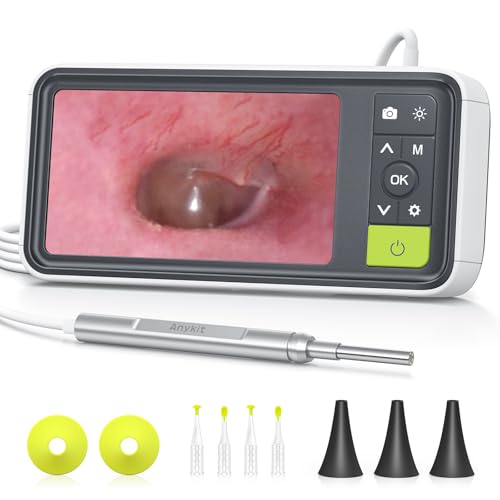
The 4.5-inch screen sets this model apart for buyers who want to view an ear image on the device rather than on a phone. Its 3.9 mm camera includes six lights, and a gyroscope detects orientation and rotation to help keep the image stable. A 32GB card supports saving photos and videos.
This suits people who value a larger onboard display and recording.
Bottom line: Pick this if a larger built-in screen and included storage matter most.
Bebird Ultra 2K

The 3.6 mm flexible lens is narrower than the 3.9 mm cameras here, while the 2K camera sends a real-time view to a smartphone over 5G Wi-Fi. This kit adds visual tweezers, a dropper, five scoop tips, a safety stopper and a precise scale; its 54 earwax tips are the largest tip count among these options.
It suits buyers who want a phone-based view alongside multiple cleaning accessories. Unlike the screen-equipped models, it relies on a smartphone for viewing, so it is a poor match for anyone who wants a self-contained display.
Bottom line: Choose this for a narrow flexible lens and a broad accessory set.
AnyScope Smartphone Otoscope

The AnyScope is designed for direct phone compatibility: it supports iPhones with iOS 9.0+ and Android 8.0+ devices with OTG and UVC functions. Its 3.9 mm lens supports full-screen and split-screen viewing, plus photo and video capture; it does not support PC use.
This model fits buyers who want to view on a compatible phone and compare images in split-screen mode. Android owners should confirm OTG support before ordering, and shoppers who prefer not to connect a phone should choose a built-in-screen model instead.
Bottom line: Pick this if you want phone viewing and split-screen comparison.
Family Digital Otoscope

The 1.38-inch IPS LCD screen makes this the phone-free option: viewing does not require an app or smartphone. It pairs a 1080P camera with four LED lights, 3x magnification, adjustable brightness, photo and video capture, and a 90-degree rotating head. Twelve silicone tips are included.
This suits households that want a compact display on the instrument and several tips. The screen is much smaller than the 4.5-inch display on Anykit Digital Otoscope, so buyers who prioritize a larger viewing area may prefer that design.
Bottom line: Choose this for an onboard screen without a phone app.
BEBIRD R1
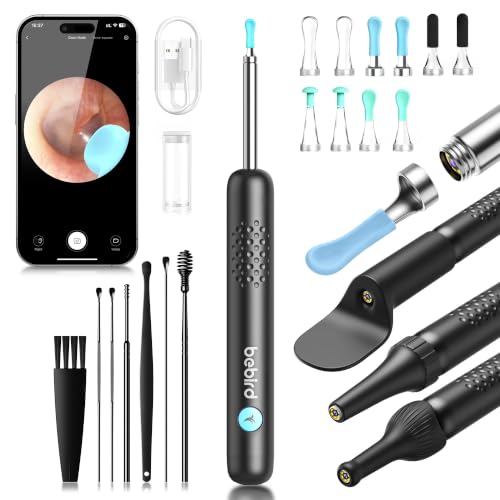
The BEBIRD R1 pairs a 1080P, 3-megapixel camera and six LED lights with the Bebird app, streaming at 20 frames per second to iOS or Android phones and tablets. It supports photos and video, and includes 10 replacement tips.
This is a straightforward fit for buyers who want a phone-based live view and recording. The maker gives no lens diameter, unlike the 3.6 mm and 3.9 mm options, so shoppers who need a specific lens size should check that measurement before selecting it.
Bottom line: Pick this for phone streaming and a 1080P camera.
How to Choose an Otoscope With a Camera
Start with the viewing method: a built-in screen works without a phone, while a Wi-Fi or app-connected model depends on a compatible device. The options here range from a 1.38-inch onboard screen to a 4.5-inch screen, with phone-based alternatives in between.
Lens diameter is another useful comparison: the sizes are 3.6 mm and 3.9 mm. A smaller number means a narrower lens, but it does not alone establish how the device fits an individual ear. Camera resolution also varies where provided, from 1080P HD to 2K; compare resolution only after confirming the viewing setup you want.
Otoscope Screens and Phone Compatibility
Choose a built-in display if you do not want to rely on a phone connection; choose phone viewing if app-based capture and a larger personal screen matter more. The screen-equipped options have displays of 1.38 inches and 4.5 inches. Phone-connected models use Wi-Fi or an app, and the AnyScope compatibility depends on operating system plus Android OTG and UVC support.
For Android, confirm OTG support when using the AnyScope because the product specifies it as a requirement. A smartphone-connected scope can be a poor fit if the phone is incompatible or unavailable during use. Consider saved video and image needs too: some models state photo/video capture, while only some list included memory storage.
Using an Ear Camera Safely
An ear camera is a viewing aid, not a reason to insert a tip deeply or force it against the ear canal. The ear canal is delicate, and the eardrum can be injured by probes or swabs; keep any tip at the entrance unless a clinician advises otherwise. A camera image can also be hard to interpret, so stop if there is pain, bleeding, discharge or sudden hearing change and seek medical care.
Use a stable hand and do not move a tool while its tip is in the canal. Attachments such as scoops and tweezers are still instruments, not a guarantee of safe removal. For children or anyone who cannot remain still, ask a clinician rather than attempting removal at home.
Cleaning and Sharing Otoscope Tips
Clean reusable ear tips between users and never share a tip without cleaning it, because earwax and skin debris can transfer between ears. Silicone tips should be removed from the device before cleaning, and the camera head should be kept away from liquid unless its water resistance is expressly confirmed.
Disposable tips should be discarded after use, while reusable accessories should be cleaned using the method specified for their material. Avoid household solvents and abrasive tools that could damage a lens coating or soften silicone. Keep the otoscope and small accessories out of children’s reach, since small tips can present a choking risk.
Frequently Asked Questions
Can I use an otoscope camera without a phone?
Yes, models with built-in screens can show the image without a phone. The options here include a 1.38-inch display and a 4.5-inch display.
What does a 3.6 mm otoscope lens mean?
The measurement is the lens diameter, not the camera resolution. Among these products, the lens diameters are 3.6 mm and 3.9 mm, so compare that size if a narrower lens is your priority.
Can an otoscope camera damage an eardrum?
Yes, inserting a probe too far or moving it against the canal can injure the ear or eardrum. Keep the tip at the canal entrance and stop if there is pain or bleeding.
Do phone otoscopes work with every Android device?
No, compatibility can require specific hardware or software support. The AnyScope requires Android 8.0+ with OTG and UVC functions, so confirm those capabilities before use.
Should I use an ear camera on a child?
A child who moves suddenly can be injured by a probe in the ear canal. Avoid inserting a tool into a child’s ear and ask a clinician about wax concerns.