
Atari With Built-In Games: Four Ways to Play

My Arcade Atari Gamestation Go suits most people seeking Atari with built-in games because it combines more than 200 games with a 7-inch display and TV output. Choose a different system if you want a compact pocket device, wireless TV joysticks, or a smaller plug-in console.
We earn a commission if you buy through links on this page. As an Amazon Associate I earn from qualifying purchases. Products are compared on manufacturer specifications, not hands-on testing.
- Best overall: My Arcade Atari Gamestation Go – It combines more than 200 games, a 7-inch display, and HDMI TV connection.
- Best for wireless TV play: My Arcade Atari Game Station Pro – Two wireless joysticks and HDMI connect the console to a TV.
- Best for pocket play: My Arcade Atari Pocket Player – The 2.8-inch handheld screen and 100 built-in games suit portable sessions.
- Best for simple TV setup: Atari Flashback 12 Gold – The mini console includes 130 games and 720p HDMI output.
| Product | Best for | Built-in games | Screen or output | Controls | Shop |
|---|---|---|---|---|---|
| My Arcade Atari Gamestation Go | Large portable screen | 200+ | 7-inch display; HDMI | Integrated controls | Check Price on Amazon |
| Atari Flashback 12 Gold | Compact TV console | 130 | 720p HDMI output | Two wired joysticks and paddles | Check Price on Amazon |
| My Arcade Atari Game Station Pro | Wireless TV controls | 200+ | HDMI TV connection | Two wireless joysticks | Check Price on Amazon |
| My Arcade Atari Pocket Player | Pocket-size play | 100 | 2.8-inch display | Built-in controls | Check Price on Amazon |
Atari Consoles With Built-In Games
Choose by where you plan to play and which controls feel right for the games you want.
My Arcade Atari Gamestation Go
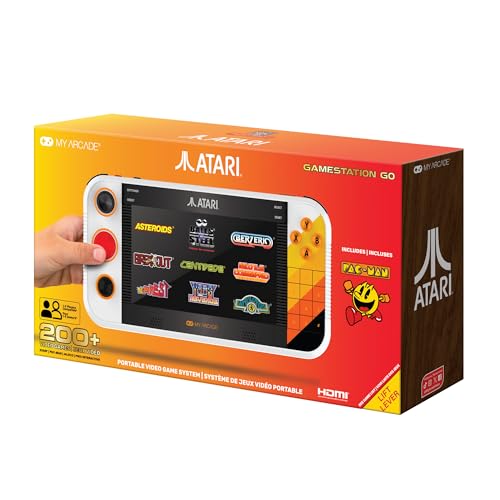
Among these systems, this one pairs a built-in screen with TV output, so it can work for handheld play or a larger display. The 7-inch full-color screen sits alongside a rechargeable battery, Wi-Fi, and an assortment of controls: a d-pad, trackball, paddle, numeric keypad, bumpers, and gamepad buttons. It includes more than 200 games, with titles spanning several Atari systems and other licensed catalogs. The trade-off is that its many control types may feel less straightforward if you want a familiar two-joystick setup.
Bottom line: Pick this if you want a built-in screen and varied controls in one system.
Atari Flashback 12 Gold

This mini console has the smallest footprint among the TV-focused options, measuring about 5.7 by 3.8 inches. It connects to an HD TV over HDMI at 720p and includes two wired joysticks and paddle controllers, plus save, load, and rewind functions. Its 130 built-in games include Atari 2600 classics and titles such as Pitfall and River Raid. The controllers are wired, so this is a less suitable choice if you want to play from across the room without cables.
Bottom line: Choose this for a compact HDMI console with wired joystick and paddle controls.
My Arcade Atari Game Station Pro

Two wireless joysticks distinguish this TV-connected system from the wired Flashback console. The joysticks use 2.4 GHz wireless connections and include paddles for paddle-style games; the console connects to a TV with HDMI and includes more than 200 built-in games. Game-save options are also included. Pac-Man and Galaga are not part of its game selection, so buyers specifically seeking either title should choose another system. A TV is required for play because the console does not have its own screen.
Bottom line: Pick this if wireless joystick play on a TV matters most.
My Arcade Atari Pocket Player

This is the pocket-sized option, with a 2.8-inch screen and 100 built-in games rather than the larger game counts and TV focus of the console units. A built-in speaker has volume control, and a 3.5 mm headphone jack supports private listening. It runs on four AA batteries or USB-C power, but batteries and USB-C cable are not included; the maker recommends standard non-rechargeable batteries. Its small display is a practical limit for anyone who prefers playing classic games on a television or a larger screen.
Bottom line: Choose this for self-contained portable Atari play on a small screen.
How to choose an Atari system with built-in games
Choose first between a built-in screen and TV play, then compare controls and game selection. A handheld is useful where a TV is unavailable; a TV console gives classic games more screen area but depends on an HDMI input. Joysticks suit directional games, while paddle controls are useful for games designed around rotational movement. Trackballs and keypads are specialized controls rather than necessities for every game. Before deciding, identify a few titles you expect to play: built-in libraries differ, and a large game count does not guarantee that a specific favorite is included. For shared room play, wireless controllers avoid controller cords; for a compact setup, wired controllers avoid managing batteries.
| Need | Look for |
|---|---|
| Play without a TV | Built-in screen |
| Play from a couch | Wireless TV controllers |
| Use paddle-style games | Included paddle control |
| Keep setup compact | Small HDMI console or handheld |
Screen size and TV connection
A 2.8-inch screen favors portability, while a 7-inch display gives handheld games more room. TV-connected systems use HDMI, but the screen resolution and console output are not the same as the original game resolution: classic Atari graphics were built for much lower-resolution displays. Old games commonly use a 4:3 image, so a modern widescreen TV may add side bars or stretch the image depending on its picture settings. If the image looks unusually wide, select the TV’s original or 4:3 aspect setting rather than stretching it to fill the screen. Choose a built-in-screen system if you lack an available HDMI display.
Joystick, paddle, and wireless controls
Control style matters because classic games were designed around different inputs. A joystick or d-pad handles directional movement; a paddle is a rotating control used for games that require fine horizontal positioning. Wireless controllers add freedom from console-to-couch cables, while wired controllers do not need their own wireless power management. Trackballs and numeric keypads cover other specialized game inputs. Check the control list against the games you care about instead of assuming that every controller suits every title. Keep a wireless controller’s play area clear and avoid placing the console behind furniture, which can obstruct a radio signal.
Game libraries and compatibility
Built-in game counts are not interchangeable with cartridge compatibility. A preloaded library is available without sourcing separate games, but a particular title may be absent even when the total count is high. Cartridge-based systems use a different approach: compatible cartridges may expand play, but the system needs the required games and compatible accessories. Classic Atari 2600 and 7800 titles can also differ in control needs, so confirm that the included controls fit the games you want. When a specific game is the deciding factor, verify its inclusion before choosing a system rather than relying on the overall count.
Frequently Asked Questions
Can Atari built-in games systems connect to a TV?
Some connect to a TV by HDMI, while handheld models have their own screens. Check for an HDMI output if television play is essential, and confirm the TV has an open HDMI input.
Why do old Atari games look stretched on a widescreen TV?
Many classic games use a 4:3 image, while modern TVs are widescreen. Set the TV’s picture mode to 4:3 or original aspect ratio to avoid stretching the image.
Do Atari paddle games work with a joystick?
Some paddle-style games need a paddle control for accurate rotation and positioning. If those games are a priority, choose a system that includes paddle controls rather than assuming a joystick is equivalent.
Are wireless Atari controllers charged by the console?
Wireless controller power arrangements vary by model, so check how the specific controller is powered before buying. A wired controller avoids wireless power needs but keeps the player tethered to the console.
Can built-in Atari game libraries be expanded?
A built-in library is a fixed set of preloaded games unless the system also supports another game format. Cartridge-compatible consoles can use compatible cartridges, but that differs from a preloaded-only system.