
Best 120mm PC Fans Compared by Speed and Cooling

The Noctua NF-P12 redux-1700 PWM suits most PC builders who want a single pressure-focused 120mm fan with PWM control and a 1,700 RPM maximum. Choose Thermalright TL-C12C-S 5-Pack or ARCTIC P12 Pro PST 5-Pack instead if you need five fans, or Thermalright TL-C12C-S 5-Pack if ARGB lighting is a priority.
We earn a commission if you buy through links on this page. As an Amazon Associate I earn from qualifying purchases. Products are compared on manufacturer specifications, not hands-on testing.
- Best overall: Noctua NF-P12 redux-1700 PWM – A pressure-focused 120mm fan with PWM control and a 1,700 RPM maximum.
- Best for ARGB builds: Thermalright TL-C12C-S 5-Pack – Five 120mm PWM fans with ARGB lighting.
- Best for high-speed radiator use: ARCTIC P12 Pro PST 5-Pack – Five pressure-focused fans with PWM control up to 3,000 RPM.
| Product | Best for | Maximum speed | Pack size | Lighting | Shop |
|---|---|---|---|---|---|
| Noctua NF-P12 redux-1700 PWM | Single fan cooling | 1,700 RPM | 1 fan | None specified | Check Price on Amazon |
| Thermalright TL-C12C-S 5-Pack | ARGB case builds | 1,550 RPM | 5 fans | ARGB | Check Price on Amazon |
| ARCTIC P12 Pro PST 5-Pack | High-speed radiators | 3,000 RPM | 5 fans | None specified | Check Price on Amazon |
| ARCTIC P12 5-Pack | Radiator value pack | 1,800 RPM | 5 fans | None specified | Check Price on Amazon |
Best 120mm PC Fans
Compare the fans by speed, quantity, and lighting to match your case or cooler setup.
Noctua NF-P12 redux-1700 PWM
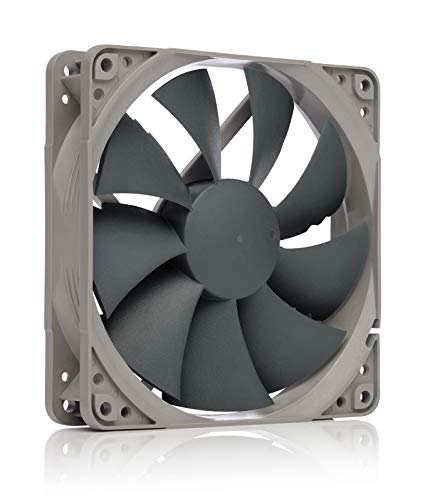
The Noctua NF-P12 redux-1700 PWM is the only single-fan option here, making it a fit when replacing one fan rather than populating a whole case. Its 120 x 120 x 25 mm frame, 4-pin PWM connector, and 1,700 RPM maximum suit air coolers, radiators, or chassis ventilation. Noctua says the pressure-optimized blade design balances static pressure and airflow; its maximum noise rating is 25.1 dB(A). The limitation is quantity: builders needing multiple matching fans should consider one of the five-packs instead.
Bottom line: Pick this for one versatile 120mm fan with PWM speed control.
Thermalright TL-C12C-S 5-Pack

The Thermalright TL-C12C-S five-pack is the only choice here that explicitly adds ARGB lighting, so it fits builders who want coordinated illumination across several fan positions. Each 120mm fan uses a 4-pin PWM cable and reaches 1,550 RPM; the included cable length is up to 55 cm for PWM series control. Its S-FDB bearing is designed to reduce blade shaking and noise. The tradeoff is a lower stated maximum speed than the other options, so choose another pack if maximum rotational speed is your priority.
Bottom line: Choose this five-pack when ARGB lighting matters as much as cooling.
ARCTIC P12 Pro PST 5-Pack
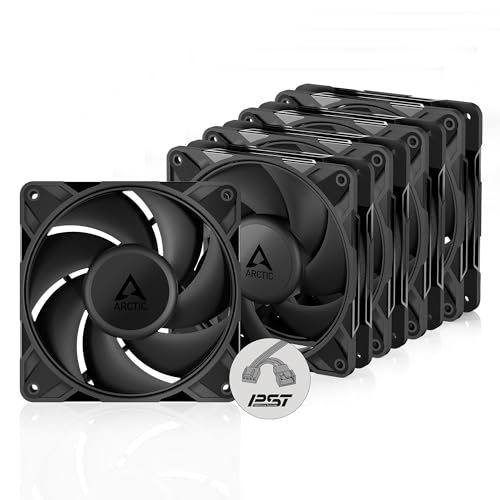
The ARCTIC P12 Pro PST five-pack reaches 3,000 RPM, the highest maximum speed among these choices, and includes a Y-cable splitter. Its pressure-focused design is intended for resistance from dense radiators, narrow panels, and mesh, which makes it the speed-oriented option for restrictive airflow paths. The 4-pin PWM control covers a wide range, and the fans stop below 5% PWM. That high maximum speed may be unnecessary for quiet, low-demand case ventilation, so a lower-speed option may be a better match there.
Bottom line: Pick this for radiator or panel resistance and a broad PWM range.
ARCTIC P12 5-Pack

The standard ARCTIC P12 five-pack provides a lower-speed alternative to the P12 Pro while retaining a pressure-focused design for heatsinks and radiators. Its maximum speed is 1,800 RPM, and the product features identify a Fluid Dynamic Bearing with an oil capsule intended to reduce lubricant leakage. This makes it a sensible fit when several radiator or case positions need fans without the Pro model’s 3,000 RPM ceiling.
Bottom line: Choose this multi-fan set for pressure-focused cooling at a moderate maximum speed.
How to choose a 120mm PC fan
Match the fan to airflow resistance before comparing maximum RPM: radiator fins and heatsink fins need pressure-focused designs, while open case positions place less resistance in the airflow path. These four options all identify pressure-oriented use or blade design, but their maximum speeds range from 1,550 to 3,000 RPM. A higher ceiling gives more speed range, not a guarantee of quieter operation or better results in every case. For one replacement, choose a single fan; for several positions, a five-pack may simplify matching. Also check whether your motherboard or hub can provide the connector and control type you need, especially before choosing a model where that capability is not explicit.
120mm fan size and mounting fit
A 120mm PC fan uses a nominal 120 x 120 mm frame, and the Noctua model specifies a 25mm thickness. Measure the available fan opening and clearance before ordering: a 120mm frame will not fit a 140mm-only mount without a compatible adapter, and a thick radiator or heatsink can obstruct nearby components. Check the case or cooler manual for mounting-hole spacing and clearance around the CPU cooler, memory, and graphics card. For a radiator, count the available mounting positions and confirm its thickness plus fan thickness fits the case. A five-pack is useful only when the system has enough compatible 120mm mounts.
PWM, fan speed, and noise
Four-pin PWM fans let a compatible motherboard or controller vary speed using a control signal; actual behavior depends on the board’s fan header and configured fan curve. Maximum speed alone does not tell you how loud a fan will be at a typical setting: the Noctua lists 25.1 dB(A) at its maximum, while the pack options do not provide comparable noise figures here. Use a lower speed target for routine case airflow and raise it when temperatures call for more cooling. PWM stop behavior is a separate feature: the P12 Pro says it can stop below 5% PWM, but do not assume other fans have the same stop threshold.
Choosing between single fans and five-packs
Pack size changes the practical choice more than the nominal frame size: one fan works for a single replacement, while five fans suit a case or radiator with several matching mounts. Count the open positions and decide whether the build needs lighting or additional control accessories before choosing. The Thermalright pack is the one with ARGB lighting; the P12 Pro includes a Y-cable splitter. A splitter can help connect multiple fans to one control path, but check the motherboard header’s current limit and total fan draw before connecting several motors to it. Keep the case airflow path open, with front intake and rear or top exhaust where the case design supports that arrangement.
Frequently Asked Questions
Can I use a 120mm fan on a radiator?
Yes, when the radiator has 120mm mounting positions and enough clearance for the fan thickness. Pressure-focused designs are suited to airflow through radiator fins, but confirm frame fit and surrounding component clearance first.
What does a four-pin PWM fan connector do?
A four-pin PWM connector allows compatible motherboard headers or controllers to adjust fan speed. The control range and fan curve depend on the connected hardware, so set a curve that responds to system temperature.
Is a 3,000 RPM fan always louder?
A 3,000 RPM maximum does not show how loud a fan runs at a lower commanded speed. Compare noise figures at matching speeds when available, and use a fan curve to avoid unnecessary high RPM during light workloads.
How many case fans should a PC have?
The right count depends on the case’s available mounts and component cooling needs; these options include a single fan and five-fan packs. As a starting layout, many cases support front intake with rear exhaust, but follow the case’s airflow layout and leave obstructed mounts unused.
Can I connect multiple PWM fans to one header?
A splitter can connect multiple fans to one header, but the motherboard header’s current limit and each fan’s electrical draw determine whether that is safe. Check those ratings before connecting several fans; the P12 Pro pack includes a Y-cable splitter.