
Mic for Car Stereo: 4 External Mics Compared

For a 3.5mm car stereo mic with flexible mounting, choose FingerLakes 3.5mm Mic Assembly: its 3-meter cable comes with both a dash mount and visor clip. Choose 3.5mm Mic with 2.5mm Adapter instead if your setup needs its included 2.5mm adapter, or ViaBecs 3.5mm TRS Mic if your head unit specifically calls for a 3-pole TRS connector.
An external car stereo microphone connects to a compatible mic input and can be positioned closer to the driver than a built-in mic; check your head unit’s jack and pinout before choosing.
We earn a commission if you buy through links on this page. As an Amazon Associate I earn from qualifying purchases. Products are compared on manufacturer specifications, not hands-on testing.
- Best overall: FingerLakes 3.5mm Mic Assembly – A 3-meter cable and both dash-mount and visor-clip options make placement flexible.
- Best for adapter flexibility: 3.5mm Mic with 2.5mm Adapter – Includes a 3.5mm-female-to-2.5mm-male adapter.
- Best for TRS input: ViaBecs 3.5mm TRS Mic – Specifies a 3-pole 3.5mm TRS connector.
| Product | Best for | Connector | Cable length | Mounting | Shop |
|---|---|---|---|---|---|
| FingerLakes 3.5mm Mic Assembly | Flexible mounting | 3.5mm | 3 m (9 ft) | Dash mount, visor clip | Check Price on Amazon |
| 3.5mm Mic with 2.5mm Adapter | Adapter flexibility | 3.5mm; 2.5mm adapter | 3 m (9.84 ft) | — | Check Price on Amazon |
| FingerLakes FL11 3.5mm Mic | Clip or adhesive | 3.5mm | 3 m (9 ft) | Clip, adhesive | Check Price on Amazon |
| ViaBecs 3.5mm TRS Mic | TRS input match | 3-pole 3.5mm TRS | 3 m (9.8 ft) | Clip, adhesive | Check Price on Amazon |
Mic for Car Stereo Options
Match the connector to your head unit first, then compare cable reach and mounting style.
FingerLakes 3.5mm Mic Assembly
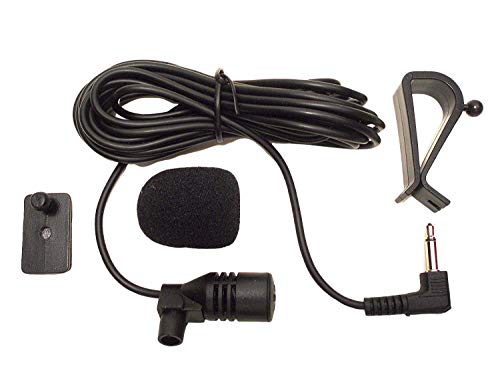
Mounting flexibility is the main distinction of this FingerLakes mic: the package includes a dash mount and visor clip. Its 3.5mm plug is intended for aftermarket radios with a 3.5mm mic input, and the cable measures 3 meters (9 feet). FingerLakes says its electret condenser cartridge is designed for sensitivity and noise resistance during voice transmission. This option suits a head unit with the matching mic jack and a driver who wants to choose between two mount styles. It will not fit a stereo that lacks a compatible microphone input.
Bottom line: Pick this if your stereo has a 3.5mm mic input and you want two mounting options.
3.5mm Mic with 2.5mm Adapter

The included 3.5mm-female-to-2.5mm-male adapter is the defining feature of this microphone. It also has a 3-meter (9.84-foot) cable and a mono omnidirectional condenser microphone. The maker names Pioneer, Kenwood, Boss, JVC, Sony, Jensen, and Alpine among compatible stereo brands, but the head unit still needs the matching microphone jack and pinout. Choose this model when the adapter addresses your input connection; the specifications do not identify a mounting clip or adhesive mount, so it may be less convenient if you need a mounting option.
Bottom line: Pick this when the included 2.5mm adapter suits your head unit’s mic connection.
FingerLakes FL11 3.5mm Mic
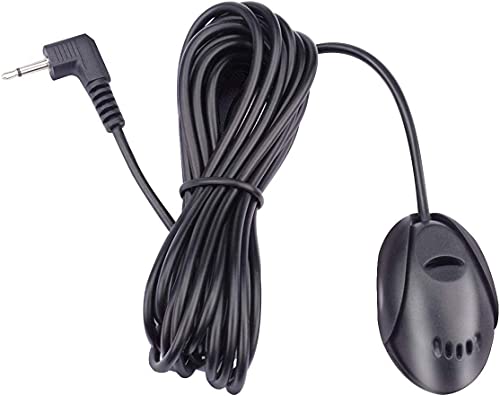
The FL11 distinguishes itself with more than one mounting approach: its microphone can be picked up from a clip or attached with a sticker. It uses a standard 3.5mm plug and a 3-meter (9-foot) cable. FingerLakes says its electret condenser and omnidirectional design support clear voice transmission. That combination suits a driver who wants to experiment with mic placement around the cabin. The key limitation is connector fit: a 3.5mm plug alone does not guarantee compatibility with every stereo, so verify that the head unit has a compatible microphone input.
Bottom line: Pick this if you want clip and adhesive placement options with a 3.5mm input.
ViaBecs 3.5mm TRS Mic

A specified 3-pole 3.5mm TRS connector sets this ViaBecs mic apart from options described only as 3.5mm. It has a 3-meter (9.8-foot) cable and includes a clip and adhesive mount. ViaBecs says the external mic is intended to improve voice pickup compared with built-in or dashboard-mounted microphones. It suits Android head units and Bluetooth stereos with a matching TRS microphone input. The connector description does not establish compatibility with every 3.5mm jack, so confirm the head unit’s mic input and pinout before choosing it.
Bottom line: Pick this if your head unit calls for a 3-pole 3.5mm TRS microphone.
How to Choose a Mic for Car Stereo
Start with the head unit’s microphone input, not just the presence of a 3.5mm jack. A stereo’s auxiliary input is for audio playback and may not accept a microphone; some head units also use a specific mic pinout. Check the stereo manual or rear-panel labels for a dedicated microphone input and connector requirements. A 3.5mm plug describes its diameter, while TRS describes three connector sections; those terms alone do not prove every stereo will work with every mic. If the manual specifies TRS, choose a product that explicitly names a 3-pole TRS plug. If the input is 2.5mm, an adapter helps only when its wiring also matches. Confirm the connector and pinout before ordering.
Where to Mount a Car Stereo Microphone
Place an external mic near the driver, with its opening unobstructed and aimed toward the speaking position. A visor or upper-dash area can be practical, but avoid locations that block the driver’s view or interfere with controls. Keep the microphone and cable out of airbag deployment zones; never route wiring across an A-pillar airbag cover or in front of a steering-wheel airbag. Route a 3-meter cable along trim edges rather than across pedals, seat tracks, or sharp edges, which can snag or damage insulation. Test call pickup while parked before securing adhesive mounts permanently, since moving the mic a short distance can change how much cabin noise it captures.
3.5mm, TRS, and Adapter Differences
Connector fit depends on both physical size and wiring. A 3.5mm plug is about 0.14 inch across, but a stereo’s 3.5mm auxiliary jack is not automatically a microphone input. TRS means tip, ring, and sleeve; a mic described as 3-pole TRS gives more connector detail, but the head unit’s pin assignment still matters. An adapter changes the plug’s shape, not necessarily its wiring, so verify compatibility rather than assuming any 2.5mm-to-3.5mm combination will work. Use this quick comparison to narrow the match:
| Head unit input | What to confirm | Choice cue |
|---|---|---|
| 3.5mm mic | Dedicated microphone jack and pinout | Choose a matching 3.5mm mic |
| 2.5mm mic | Adapter wiring compatibility | Consider a mic with a 2.5mm adapter |
| Auxiliary only | Whether a separate mic input exists | Do not treat aux as mic input |
Installing and Checking the Mic
Test the microphone before final cable routing: connect it to the dedicated input, make a parked call, and check whether the other person hears speech clearly. Confirm the stereo’s microphone setting is enabled if the head unit provides one. Secure loose cable so it cannot reach pedals or become trapped by a sliding seat, and keep it clear of airbag covers. Adhesive mounts need a clean, dry surface to hold; a clip can be easier to reposition during setup. If the mic does not work, check the selected input and connector compatibility before replacing it, because an adapter with the wrong pinout can prevent operation even when its plug fits.
Frequently Asked Questions
Can I plug a car microphone into the aux jack?
Usually, an auxiliary jack is an audio input for playback, not a microphone input. Check for a dedicated mic jack in the stereo manual or rear-panel labels before connecting an external mic.
Does every 3.5mm car mic fit every stereo?
No; a 3.5mm plug specifies its diameter, not a universal microphone pinout. Confirm that the stereo has a mic input and supports the mic’s connector wiring, especially when it calls for TRS.
Where should I position an external car microphone?
Position the mic near the driver with its opening unobstructed, such as near the visor or upper dash. Keep it out of the driver’s sightline and away from airbag deployment zones and controls.
How should I route a car microphone cable safely?
Route the cable along trim and keep it away from pedals, seat tracks, sharp edges, and airbag covers. A 3-meter cable gives routing reach, but should not be left loose where it can snag.
Why does a car stereo microphone sound muffled?
A blocked mic opening or placement far from the driver can reduce voice pickup. Check the mic position and the stereo’s mic-input compatibility while the vehicle is parked.