
REDTIGER 4K Dash Cam Options Compared by Camera Setup

The REDTIGER F7N Touch suits most drivers seeking a 4K front dash cam because it pairs front 4K with rear 1080P and includes a 128GB card. Choose the F77 V2 instead if rear 4K recording and built-in 256GB eMMC storage matter more.
A dash cam records video from cameras mounted in or around a vehicle; Three-Channel 4K Dash Cam is a different brand and adds an interior camera for cabin coverage.
We earn a commission if you buy through links on this page. As an Amazon Associate I earn from qualifying purchases. Products are compared on manufacturer specifications, not hands-on testing.
- Best overall: REDTIGER F7N Touch – Front 4K and rear 1080P recording come with a 128GB card, touchscreen, and voice control.
- Best for dual 4K: REDTIGER F77 V2 – Front and rear cameras both record 4K, with 256GB of built-in eMMC storage.
- Best for cabin coverage: Three-Channel 4K Dash Cam – Three-channel recording combines front 4K, rear 4K, and cabin 1080P video.
| Product | Best for | Camera resolution | Storage | Screen | Shop |
|---|---|---|---|---|---|
| REDTIGER F7N Touch | Everyday dual-camera | Front 4K, rear 1080P | 128GB card | Touchscreen | Check Price on Amazon |
| REDTIGER F77 V2 | Dual 4K recording | Front 4K, rear 4K | 256GB eMMC | 4-inch touchscreen | Check Price on Amazon |
| Three-Channel 4K Dash Cam | Cabin recording | Front 4K, rear 4K, cabin 1080P | 128GB card; supports 512GB | — | Check Price on Amazon |
REDTIGER 4K Dash Cams
Compare camera coverage and storage first, then weigh screen controls and whether cabin recording is useful.
REDTIGER F7N Touch
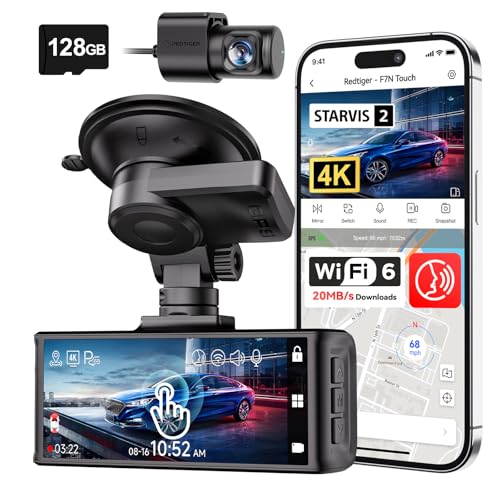
The F7N Touch pairs a 4K front camera with a 1080P rear camera, a practical split for drivers who prioritize front detail without requiring matching rear resolution. REDTIGER says its STARVIS 2 sensor, 170-degree front and 140-degree rear views, WDR, and HDR support visibility in varied lighting. Voice control and a touchscreen offer two ways to control functions, and GPS and loop recording are included among its features. The main limitation is the rear camera’s lower resolution than the F77 V2; choose another setup if rear 4K is a must.
Bottom line: Pick this if you want front 4K, rear coverage, and touchscreen controls.
REDTIGER F77 V2

The F77 V2 is the choice here for matching 4K resolution from front and rear cameras, rather than the F7N Touch’s lower-resolution rear view. REDTIGER says its two Sony STARVIS 2 IMX678 sensors record 4K at 30 frames per second, and it includes a 4-inch touchscreen, voice control, GPS tracking, and 5.8GHz Wi-Fi. Its 256GB eMMC storage is built in, so there is no card to install. That fixed storage format may not suit drivers who specifically want removable card storage or a cabin camera.
Bottom line: Choose this when 4K rear footage and built-in storage are priorities.
Three-Channel 4K Dash Cam

The three-channel option adds an interior view, making it the fit for rideshare drivers or anyone who needs cabin recording alongside front and rear coverage. Its front and rear cameras record 4K, while the cabin camera records 1080P; the viewing angles are 170 degrees front and 150 degrees for both rear and cabin. The maker says the cabin camera has four IR lights for dark interior recording. Unlike the REDTIGER models, this is not a REDTIGER product, so consider it only if cabin footage is more important than staying with that brand.
Bottom line: Pick this only if recording the cabin is part of your requirement.
How to choose a 4K dash cam
Choose by camera coverage and storage before comparing controls: front-only, front-and-rear, and three-channel systems record different parts of a drive. A 4K front camera captures more image detail than a 1080P front camera, but camera resolution alone does not guarantee readable plates; focus, exposure, lighting, and windshield cleanliness also matter. For a daily-driver setup, front 4K with a rear camera is a useful baseline; choose dual 4K when rear detail is equally important. If you need footage inside the vehicle, select a model with a cabin camera rather than expecting a rear-facing road camera to cover the interior. Confirm camera placement and wiring fit your vehicle before installation.
Dash cam storage and loop recording
Loop recording typically replaces the oldest unlocked video once storage fills, so stated capacity and clip length determine how far back routine footage remains. G-sensors can mark impact clips as protected, but a protected-file folder can also fill and limit continued recording if it is never reviewed. Memory cards used for continuous dash cam writing should be rated for sustained recording, commonly a high-endurance microSD card; check the camera’s supported capacity and card type. Built-in eMMC, as in one option here, avoids installing a removable card but is not interchangeable with one. For any storage system, review important clips promptly and verify that recording resumes after a power interruption.
Parking mode and safe installation
Parking mode can record while a vehicle is parked, but continuous operation generally requires power when the ignition is off. A hardwire kit connected to the fuse box is a common way to provide that power, and a low-voltage cutoff helps prevent excessive battery drain; verify the required kit and cutoff behavior for the specific camera and vehicle. Motion-triggered or impact-triggered parking recording can use less power than continuous recording, though the trigger and wake-up behavior vary. Route cables away from airbags, pedals, and steering components, and do not obstruct the driver’s view. If installing a fuse tap or hardwire connection is unfamiliar, use a qualified installer rather than guessing at a vehicle circuit.
What 4K, wide-angle, and night vision mean
4K describes image resolution, while a camera’s field of view describes how much of the scene it captures; neither number alone tells you whether a distant detail will be clear. Wider angles show more road at the edges but can make distant objects appear smaller. WDR and HDR are image-processing approaches intended to handle bright and dark areas in one scene, while infrared illumination is useful for cabin recording because it lights nearby interior details without relying on visible light. Night footage still depends on street lighting, windshield reflections, camera placement, and exposure. Clean the glass in front of the lens and position the camera below the tinted area to avoid avoidable glare or tint interference.
Frequently Asked Questions
Does a 4K dash cam record better at night?
Not automatically: 4K is a resolution, not a guarantee of night visibility. Sensor performance, exposure, glare, windshield cleanliness, and available light all affect whether details are clear.
How much storage does a dash cam need?
A 128GB card provides more recording room than a 64GB card at the same resolution and clip settings. Dual-channel 4K generally uses storage faster than a single lower-resolution camera, so check stated capacity and periodically clear protected clips you no longer need.
Can a dash cam record while the car is parked?
Parking recording usually needs power after the ignition is off, commonly through a hardwire connection. Use a compatible low-voltage cutoff to reduce the risk of draining the vehicle battery, and verify the camera’s parking mode power requirements.
Where should I mount a dash cam?
Mount the front camera high on the windshield near the rearview mirror while keeping the driver’s view clear. Keep the lens clear of tint and route wires away from airbags, pedals, and controls.
Do dash cams overwrite old video automatically?
Most dash cams use loop recording to overwrite the oldest unprotected footage when storage fills. Impact-locked clips may be retained separately, so review that folder and save important video elsewhere promptly.