
Wall Mounts for 98-Inch TVs: 5 Models Compared

For most 98-inch TVs, USX STAR Full-Motion 60–120-Inch Mount is a strong starting point because it supports up to 220 pounds, accepts VESA patterns up to 900 × 600 mm and swivels. Choose a different mount if you need tilt-only positioning, a longer extension, or a higher weight rating.
A wall mount connects a TV’s VESA mounting points to a bracket anchored to a wall; confirm your TV’s weight, VESA pattern and wall structure before choosing.
We earn a commission if you buy through links on this page. As an Amazon Associate I earn from qualifying purchases. Products are compared on manufacturer specifications, not hands-on testing.
- Best overall: USX STAR Full-Motion 60–120-Inch Mount – Supports TVs up to 220 pounds and a 900 × 600 mm VESA pattern, with full-motion adjustment.
- Best for tilt-only setups: Heavy-Duty Tilt 65–120-Inch Mount – Offers a tilt-style design for large TVs and supports up to 220 pounds.
- Best for higher capacity: monTEK Heavy-Duty 60–120-Inch Mount – Its 265-pound capacity exceeds the other mounts’ stated capacities.
| Product | Best for | TV size range | Weight capacity | Movement | Shop |
|---|---|---|---|---|---|
| USX STAR Full-Motion 60–120-Inch Mount | Flexible viewing | 60–120 inches | 220 lb | ±65° swivel, ±10° tilt | Check Price on Amazon |
| Heavy-Duty Tilt 65–120-Inch Mount | Tilt-only viewing | 65–120 inches | 220 lb | Tilt adjustment | Check Price on Amazon |
| USX MOUNT Full-Motion 60–120-Inch Mount | Longer extension | 60–120 inches | 220 lb | ±45° swivel, ±10° tilt | Check Price on Amazon |
| USX STAR Tool-Free Tilt 37–110-Inch Mount | Lower capacity TVs | 37–110 inches | 170 lb | ±60° swivel, tool-free tilt | Check Price on Amazon |
| monTEK Heavy-Duty 60–120-Inch Mount | Heavier televisions | 60–120 inches | 265 lb | ±60° swivel, tool-free tilt | Check Price on Amazon |
Wall mounts for 98-inch TVs
Compare screen range, capacity and movement, then check your TV and wall against the bracket’s fit requirements.
USX STAR Full-Motion 60–120-Inch Mount

USX STAR Full-Motion 60–120-Inch Mount combines a broad VESA range with substantial swivel adjustment, making it a flexible choice when viewers sit in different parts of a room. The bracket supports TVs up to 220 pounds and lists patterns from 200 × 100 mm through 900 × 600 mm. It fits wood-stud spacing of 12, 16, 18 or 24 inches, plus solid brick or concrete walls. The swivel range is ±65°, with ±10° tilt and ±3° leveling.
Bottom line: Choose this if you want broad swivel adjustment and your TV and wall match its fit.
Heavy-Duty Tilt 65–120-Inch Mount

Heavy-Duty Tilt 65–120-Inch Mount is the tilt-focused option among these mounts, suited to installations where a fixed viewing position matters more than swiveling the screen. It supports TVs up to 220 pounds and VESA patterns up to 900 × 600 mm. Its wood-stud spacing includes 16, 18, 24 and 32 inches; the specifications also specifies brick and concrete installation, and says not to install on drywall alone. The available features identify tilt adjustment but do not give its angle, so buyers who need a particular tilt range should confirm that before ordering.
Bottom line: Choose this for a large TV when tilt adjustment is enough and your stud spacing matches.
USX MOUNT Full-Motion 60–120-Inch Mount
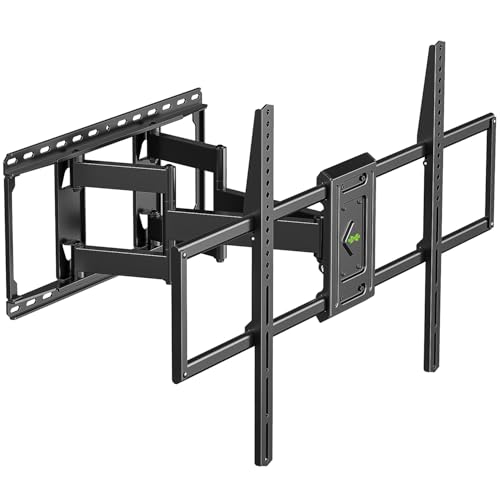
USX MOUNT Full-Motion 60–120-Inch Mount stands out for an extension of up to 28.11 inches, which can help when a TV needs to pull away from the wall for viewing-angle changes. Its dual articulating arms also retract to 3.07 inches, and the movement includes ±45° swivel and ±10° tilt. The bracket supports TVs up to 220 pounds and VESA patterns through 900 × 600 mm, with fit for 12–24-inch studs. The longer reach is useful only if the wall and room allow the arms to extend; check the intended placement and clearances before installation.
Bottom line: Pick this when you need a longer pull-out reach and can accommodate the articulated arms.
USX STAR Tool-Free Tilt 37–110-Inch Mount

USX STAR Tool-Free Tilt 37–110-Inch Mount pairs a tool-free tilt feature with a stated ±60° swivel, while its 170-pound capacity is lower than the other mounts compared here. It fits VESA patterns through 800 × 600 mm and lists compatibility with 8–24-inch wood studs, concrete and brick; drywall alone is excluded. Its extension is up to 23.19 inches, with a 2.68-inch retracted profile. The lower weight limit is the key constraint: choose it only if your TV’s weight, including any required accessories, stays within the mount’s capacity and its VESA pattern fits.
Bottom line: Choose this if its 170-pound limit covers your TV and tool-free tilt is useful.
monTEK Heavy-Duty 60–120-Inch Mount

monTEK Heavy-Duty 60–120-Inch Mount has the highest weight capacity in this group at 265 pounds, with an extension of up to 27.7 inches. It is designed for 60–120-inch TVs, supports VESA patterns up to 900 × 600 mm, and lists 12-, 16-, 18- and 24-inch wood-stud spacing. Its features also specify ±60° swivel, tool-free tilt and a 2.95-inch retracted distance. The 4× load-test claim is the maker’s performance claim; capacity and fit remain the practical checks. Confirm that your TV’s VESA pattern and wall structure match before selecting it.
Bottom line: Choose this if you need the highest capacity and its fit matches your TV and wall.
How to choose a wall mount for a 98-inch TV
Choose by TV weight, VESA pattern and wall structure before comparing movement. VESA is the spacing of the four mounting holes on the back of a TV, measured horizontally and vertically in millimeters; a 900 × 600 mm maximum does not guarantee fit if your TV uses a different pattern. Check the TV’s manual or rear label for its VESA pattern and weight without the stand, then compare both against the mount’s limits. A larger screen can make leverage and access more challenging, so leave room to reach cables and use the mount only within its capacity. For a TV heavier than 170 pounds, exclude any mount with a 170-pound rating. A higher rating is not a substitute for matching the VESA pattern or mounting the bracket correctly.
Check stud spacing and wall material
Anchor a large TV mount into the wall structure the mount allows, not drywall alone. Wood studs are commonly spaced 16 inches on center, but 24-inch spacing also occurs, and the five mounts here list differing supported spacing. Locate each stud and verify its center before drilling; do not assume a stud is where a prior wall fixture sits. Masonry installation calls for appropriate anchors, and the specifications distinguish brick or concrete support from drywall-only installation. For this 98-inch TV use, choose a mount whose spacing includes your actual supports; if the bracket cannot span them, do not improvise by fastening only into drywall. Keep the screen’s weight, mount arm leverage and fastener placement in mind, and have a qualified installer assess uncertain walls.
Full-motion, tilt and fixed positioning
Full-motion arms add swivel and extension, while a tilt mount changes the screen’s vertical angle without the same side-to-side range. A fixed mount keeps a TV close to the wall but does not solve off-angle seating; none of the five products here is described as fixed-only. Use a simple need-to-choice rule: for seating spread across a room, prioritize a swivel range; for a TV above eye level, compare tilt; for access behind the screen, compare the maximum extension. Longer arms need clear space and can increase leverage on the wall, so movement is not automatically better. The product features give retracted clearances and movement figures for several options, but confirm the chosen bracket’s actual positioning needs against your room layout.
| Viewing need | Mount feature to prioritize | Check before choosing |
|---|---|---|
| Seats at different angles | Swivel range | How far the screen must turn |
| High mounting position | Tilt adjustment | Required tilt angle |
| Reach behind the TV | Extension | Available room for arm movement |
Install a large TV mount safely
Large TVs are heavy and awkward to handle, so plan a two-person lift and keep the screen supported while attaching it to the wall plate. Confirm the wall is an approved material and the bracket’s fasteners engage the intended studs or suitable masonry anchors; never rely on drywall alone for a heavy mount. Before lifting, verify that the mount is level, the TV-side hardware matches the VESA holes, and the attachment points are secure. Route and connect cables with enough slack for the planned swivel or extension, without trapping them in the arms. Stop if a fastener spins, a wall surface cracks, or the bracket shifts under load; those are reasons to reassess the installation rather than continue.
Frequently Asked Questions
How do I find my 98-inch TV’s VESA pattern?
Measure the horizontal and vertical distance between the centers of the four mounting holes in millimeters. A pattern of 600 × 400 mm, for example, needs a mount that explicitly accommodates that pattern.
Can a 98-inch TV mount go into drywall alone?
No; a large TV mount needs to anchor into suitable wall structure, such as wood studs or masonry with appropriate anchors. Do not use drywall alone to support the load.
How much clearance does a full-motion mount need?
Allow enough space for the arms to extend and turn without hitting adjacent walls, furniture or cables. Measure the intended path against the mount’s maximum extension; the models here list extensions from 23.19 to 28.11 inches where specified.
Should I use the TV’s stand weight or total weight?
Compare the mount’s capacity with the TV’s weight as configured for wall mounting, without its stand. Include any accessory attached to the TV if it adds load, and stay under the mount’s limit.
What should I do if my studs are 24 inches apart?
Select a mount whose stud-spacing range includes 24 inches and confirm that the wall plate can be secured as directed. If its supported spacing does not include 24 inches, choose another compatible mount rather than relying on drywall anchors.