
Laptop Lying Down Stands: 3 Models Compared

Hifoxcc Foldable Laying Down Desk, Extra Large is the best fit for most people who want a laptop lying down stand because its 21-inch-wide surface is designed for bed or sofa use and has room for a laptop and accessories. Choose MagicHold 3-in-1 Rotating Stand instead if you need a floor-standing arm with a broad height range; Uncaged Ergonomics Adjustable Laptop Stand is a more general adjustable stand for bed, couch or desk use.
We earn a commission if you buy through links on this page. As an Amazon Associate I earn from qualifying purchases. Products are compared on manufacturer specifications, not hands-on testing.
- Best overall: Hifoxcc Foldable Laying Down Desk, Extra Large – Its 21-inch-wide surface and adjustable legs suit laid-back bed or sofa use.
- Best for floor use: MagicHold 3-in-1 Rotating Stand – The arm adjusts from 12.2 to 40.16 inches and rotates 360 degrees.
- Best for varied setups: Uncaged Ergonomics Adjustable Laptop Stand – The ventilated 18-by-11-inch panel adjusts from 2 to 21 inches high.
| Product | Best for | Surface or panel | Height adjustment | Rotation or tilt | Shop |
|---|---|---|---|---|---|
| Hifoxcc Foldable Laying Down Desk, Extra Large | Bed and sofa | 21 in wide | Adjustable; range not given | — | Check Price on Amazon |
| MagicHold 3-in-1 Rotating Stand | Floor-side reach | — | 12.2–40.16 in | 360° arm; 90° tray tilt | Check Price on Amazon |
| Uncaged Ergonomics Adjustable Laptop Stand | Mixed locations | 18 × 11 in panel | 2–21 in | 360° panel tilt | Check Price on Amazon |
Laptop lying down stands
Compare these options by where the stand sits, how far it adjusts, and how much room the tray provides.
Hifoxcc Foldable Laying Down Desk, Extra Large

Hifoxcc Foldable Laying Down Desk, Extra Large stands out for its broad, 21-inch-wide surface, which the maker says fits laptops up to 17 inches alongside smaller devices. Its four-section legs adjust for reclining on a sofa or lying in bed, and the product includes a mouse pad and retractable clips. Choose it when you want a wide tray rather than an arm that reaches up from the floor.
Bottom line: Pick this for a wide surface over a bed or sofa.
MagicHold 3-in-1 Rotating Stand
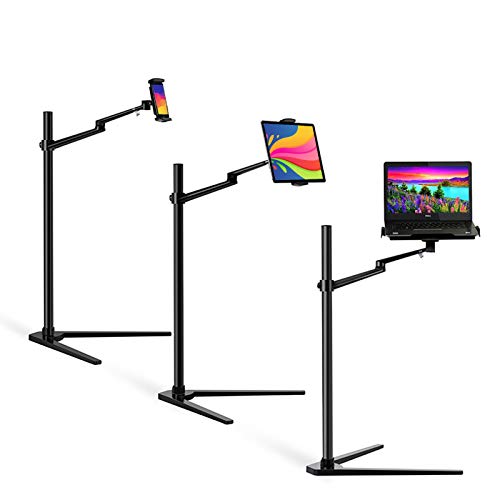
MagicHold 3-in-1 Rotating Stand differs from a tabletop lap desk with its height-adjustable arm, which the maker says ranges from 12.2 to 40.16 inches, plus a 360-degree arm joint and tray tilt up to 90 degrees. The maker lists compatibility with 13- to 17.3-inch laptops and 7- to 13-inch tablets or phones, with some device-mode limits. That reach makes it a candidate for positioning beside a bed or recliner rather than balancing a full-width desk across the lap.
Bottom line: Pick this when an adjustable floor-side arm matters most.
Uncaged Ergonomics Adjustable Laptop Stand

Uncaged Ergonomics Adjustable Laptop Stand is a general-purpose folding stand rather than a dedicated lying-down desk, but its 18-by-11-inch ventilated panel and 2-to-21-inch height adjustment can suit bed, couch or desk use. The maker says the panel tilts 360 degrees and is made of anodized aluminum to dissipate heat. This option makes sense if you also want to move between seated and standing desk setups. Its narrower panel than a 21-inch-wide bed desk may leave less room for a mouse or other gear, so compare the actual device footprint with the panel before choosing it.
Bottom line: Pick this for one stand across bed, couch and desk setups.
How to choose a laptop lying down stand
Start with the stand’s position: a tray across the bed or sofa and an arm that reaches from the floor solve different setup problems. Measure the distance from the floor or mattress to the intended tray position, then compare it with the stand’s adjustment range; if the required position falls outside that range, choose another style. Next, compare usable tray width with your laptop’s width, not just its screen diagonal, and leave room for any mouse or accessories. A screen diagonal does not tell you the full laptop footprint. For a laptop that vents through its underside, keep the intake clear; a solid surface or blanket can block airflow and trap heat.
Bed desk versus floor-standing arm
A bed desk puts its legs on the mattress or floor and supports a tray near the user, while a floor-standing arm holds a smaller tray from a base beside the bed. The tray style is useful when you want room for a laptop and accessories; the arm style is useful when you want to position a screen without placing a wide desk across your lap. Both setups need a stable base and a secure device rest. For any stand, match the laptop’s footprint to the support area and keep the keyboard from sliding when the tray tilts. Do not assume that a high tilt angle is safe for an unsecured laptop; use retaining edges or clips only if they fit the device.
| Setup need | Stand style | What to compare |
|---|---|---|
| Wide tray over bed or sofa | Legged bed desk | Surface width and leg height |
| Screen positioned beside furniture | Floor-standing arm | Reach, base placement and device support |
| Several locations including a desk | Folding adjustable stand | Height range, panel size and tilt |
Fit and positioning for a lying-down setup
Fit the stand to both your device and your body position: measure laptop width and depth, then check the usable panel dimensions and any edge stops. A 17-inch screen measurement is diagonal, so it cannot be compared directly with a tray’s width. Keep the screen in a comfortable viewing position and avoid bending your neck sharply to look down; a small change in pillow height or tray position can alter the viewing angle. Use a stand with enough reach to avoid pulling the device toward your face or stretching your arms. If the tray or arm cannot stay steady without leaning on it, reposition the base or select a different stand rather than adding weight to the tray.
Heat, stability and safe use
Keep laptop cooling openings unobstructed, especially when using a device on bedding: fabric can cover underside vents and restrict airflow. A ventilated panel can allow more airflow than a solid surface, but the laptop’s own vent placement still matters. Stability also changes with the stand’s extension and angle; an extended arm has more leverage, so place its base on a firm, level surface and avoid striking or pushing the tray. Keep drinks and loose cables away from the device, and do not balance a stand on an unstable mattress edge. For long sessions, change position regularly rather than holding one lying posture; a raised screen does not make a cramped neck or wrist position comfortable.
Frequently Asked Questions
Can I use a laptop on a bed without blocking its vents?
Yes, if the laptop’s air intakes and exhaust remain clear. Bedding can cover underside openings, so use a firm ventilated support and check where the laptop’s vents sit.
How do I measure whether a laptop fits a stand?
Measure the laptop’s width and depth, then compare both with the stand’s usable panel area. Screen size is measured diagonally and does not equal the laptop’s footprint.
Is a tilting laptop tray safe while lying down?
A tilt is only useful when the laptop stays securely supported. Keep the device behind a retaining lip or compatible clip, and avoid an angle that lets it slide toward your face.
Should a laptop screen be directly above my face?
No; avoid a position where the laptop could fall onto you. Keep the stand stable, secure the device, and position the screen so you are not sharply bending your neck to view it.
Can one laptop stand work on a bed and at a desk?
Some adjustable stands are intended for multiple locations, but the required height and base support differ. Compare the adjustment range with each setup’s measured height before relying on one stand for both.