
Mini USB B to USB C: Cable Fit and Length Compared

For a Mini B device connecting to a USB-C computer, Cable Matters Mini USB to USB-C, 3.3 ft is the direct match because it has Mini USB and USB-C connectors and a 3.3-foot cable. Choose JSAUX Mini USB to USB-C, 6.6 ft instead if you need more reach; 3 ft USB-A to Mini B Cable uses USB-A, not USB-C, so it suits a different host port.
We earn a commission if you buy through links on this page. As an Amazon Associate I earn from qualifying purchases. Products are compared on manufacturer specifications, not hands-on testing.
- Best overall: Cable Matters Mini USB to USB-C, 3.3 ft – Its Mini B-to-USB-C connection and 3.3-foot length suit a typical desk setup.
- Best for extra reach: JSAUX Mini USB to USB-C, 6.6 ft – The 6.6-foot braided cable provides twice the reach of the 3.3-foot option.
| Product | Best for | Host connector | Length | Charging claim | Shop |
|---|---|---|---|---|---|
| Cable Matters Mini USB to USB-C, 3.3 ft | Everyday connections | USB-C | 3.3 ft | 15 W | Check Price on Amazon |
| JSAUX Mini USB to USB-C, 6.6 ft | Extra cable reach | USB-C | 6.6 ft | 2.4 A | Check Price on Amazon |
| 3 ft USB-A to Mini B Cable | USB-A host ports | USB-A | 3 ft | 3 A max | Check Price on Amazon |
Mini USB B to USB C Cables Compared
Match the host-side connector first, then choose a cable length that reaches without pulling on the device port.
Cable Matters Mini USB to USB-C, 3.3 ft

This cable is the direct Mini B-to-USB-C option here, with a 3.3-foot reach for a computer or other USB-C host. It supports 480 Mbps data transfer, and the maker says it provides 15 W charging. The Mini B end is intended for compatible legacy devices such as cameras, GPS units, game controllers and dash cams. Its shorter length is useful when the device sits close to the host and reduces excess cable on a desk. Choose a longer cable if the device must sit farther away.
Bottom line: Pick this for a nearby Mini B device and a USB-C host.
JSAUX Mini USB to USB-C, 6.6 ft
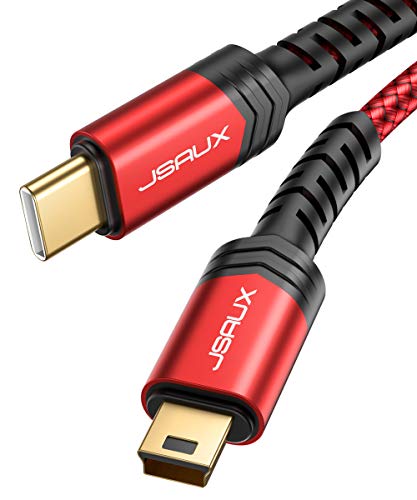
The 6.6-foot length gives this Mini B-to-USB-C cable more reach than the shorter option, making it useful when a GPS, camera or controller cannot sit next to the host. The maker claims 480 Mbps syncing and 2.4 A charging; its nylon-braided jacket and gold-plated connectors distinguish its construction. Compatibility examples include Garmin GPS receivers, dash cams, cameras and PS3 controllers with Mini B. The added length can leave more cable to manage when the device is close, so choose a shorter cord for a compact setup.
Bottom line: Choose this when a Mini B device needs a longer path to USB-C.
3 ft USB-A to Mini B Cable

This is a related alternative, not a USB-C cable: its host end is standard USB-A and its device end is Mini B. Choose it for a computer, hub or charger with USB-A when the Mini B device is a PS3 controller, MP3 player, camera, dash cam or GPS receiver. The maker claims up to 3 A charging and USB 2.0 data transfer up to 480 Mbps. At 3 feet, it is a short connection for nearby equipment. It will not plug directly into a USB-C-only host.
Bottom line: Pick this only if your host has USB-A rather than USB-C.
How to choose a Mini USB B to USB-C cable
Start by matching the host connector: a USB-C plug goes into the modern computer or charger, while the Mini B plug connects to the older device. USB Mini-B is a distinct connector from Micro-USB and USB-C, so compare the device port shape rather than relying on a general charging-cable label. For a device within about 3 feet of the host, a shorter lead is easier to route; choose a longer cable when the path requires more reach. Both USB-C options here claim 480 Mbps data transfer or syncing, which is USB 2.0 High-Speed throughput, not the faster rates associated with newer USB generations. Confirm that the Mini B plug matches your device before ordering.
USB-C to Mini B versus USB-A to Mini B
The host-end plug decides whether a cable works with your computer or power source. USB-C is reversible and fits modern USB-C ports; USB-A is the larger, non-reversible rectangular plug used by many older computers, hubs and chargers. Mini B at the other end does not make these host connectors interchangeable. Use this table to identify the cable by the port you have:
| Host port | Cable type | Choose when |
|---|---|---|
| USB-C | USB-C to Mini B | The host has a USB-C receptacle |
| USB-A | USB-A to Mini B | The host has a USB-A receptacle |
A USB-A-to-Mini B cable is a partial match for a USB-C search because it ends in the same device-side plug but cannot connect directly to a USB-C-only host. A separate adapter changes the connection setup, so select a cable whose host plug matches the port you plan to use.
Choosing cable length for cameras, GPS units and controllers
A 3-foot cable usually works for a device beside a laptop or desktop, while 6 feet or more can help when a dash cam, GPS or camera needs to sit farther from the host. Measure the route, including the path around furniture or a console, and leave slack so the cord does not pull on Mini B sockets. Excess length can tangle around controls or snag during movement, so avoid buying a longer cable than the route requires. For a vehicle installation, keep cables clear of pedals, steering components and hot surfaces; route wiring so it cannot interfere with driving.
Charging and data limits for Mini B cables
USB 2.0 High-Speed has a signaling rate of 480 Mbps, but actual file transfers are lower because of device and protocol overhead. A cable’s charging-current claim does not guarantee that a camera or controller accepts that current: charging depends on the host or charger, cable wiring and device charging circuit. The USB-C connector alone also does not mean USB Power Delivery or high-wattage charging is supported. For data syncing, use a host and Mini B device that both support data rather than a power-only port or cable, and avoid forcing a connector that does not align with its socket.
Frequently Asked Questions
Will a USB-C to Mini B cable charge a camera?
Yes, if the camera has a Mini B port and its charging circuit accepts power through that port. The cable’s current rating does not override the camera’s own charging limit.
Is Mini USB B the same as Micro-USB?
No. Mini B and Micro-USB use different plug shapes and are not interchangeable. Check the device receptacle visually before choosing a cable.
Can a USB-C to Mini B cable transfer photos?
It can when both the host and camera support data over their ports. USB 2.0 High-Speed signaling tops out at 480 Mbps, and real transfer speeds are lower.
How much cable length should I choose?
Measure the route from host to device and add enough slack to prevent tension at the connector. A 3-foot cable suits nearby devices, while a 6.6-foot cable reaches farther but leaves more cable to route.
Can I use a USB-A Mini B cable with a USB-C port?
Not directly, because USB-A and USB-C are different host connectors. Choose a USB-C-to-Mini-B cable for a USB-C port, or use a suitable adapter with the USB-A cable.