
Wireless Mouse Without USB Receiver: 3 Picks

Logitech M240 Bluetooth Mouse suits most people who need a wireless mouse without a USB receiver, with Bluetooth pairing, quiet clicks, and up to 18 months of battery life. Choose Logitech MX Anywhere 2S Bluetooth Edition for a 4,000-DPI resolution or Wegear Sculpted Bluetooth Mouse for six buttons and a sculpted grip.
A Bluetooth mouse connects directly to a compatible computer, so confirm that your device supports Bluetooth before choosing one; without it, these mice cannot connect as intended.
We earn a commission if you buy through links on this page. As an Amazon Associate I earn from qualifying purchases. Products are compared on manufacturer specifications, not hands-on testing.
- Best overall: Logitech M240 Bluetooth Mouse – Bluetooth pairing, quiet clicks, and up to 18 months of battery life.
- Best for high resolution: Logitech MX Anywhere 2S Bluetooth Edition – Its 4,000-DPI resolution suits buyers who want a specific tracking resolution.
- Best for extra controls: Wegear Sculpted Bluetooth Mouse – Six buttons and adjustable DPI offer more control options.
| Product | Best for | Resolution | Buttons | Battery life | Shop |
|---|---|---|---|---|---|
| Logitech M240 Bluetooth Mouse | Quiet everyday use | — | 3 | Up to 18 months | Check Price on Amazon |
| Logitech MX Anywhere 2S Bluetooth Edition | High-resolution tracking | 4,000 DPI | — | — | Check Price on Amazon |
| Wegear Sculpted Bluetooth Mouse | Extra buttons | Adjustable DPI | 6 | Up to 18 months | Check Price on Amazon |
Wireless mouse without USB receiver picks
These Bluetooth options differ most in resolution, controls, and battery life.
Logitech M240 Bluetooth Mouse
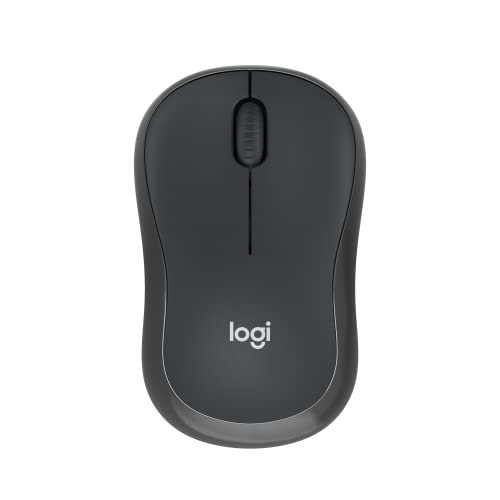
Logitech M240 Bluetooth Mouse stands out for quiet clicks and a battery life of up to 18 months. Bluetooth pairing connects it without a receiver, and its compact, ambidextrous shape is intended for either hand. The three buttons are not customizable, which makes this a straightforward choice for everyday pointing rather than assigning extra commands. The click sound is reduced by 90% while retaining the same click feel. Choose it for quiet work and simple controls; look elsewhere if you need side buttons or customizable buttons.
Bottom line: Pick this for quiet, uncomplicated Bluetooth use and long battery life.
Logitech MX Anywhere 2S Bluetooth Edition

Logitech MX Anywhere 2S Bluetooth Edition is the only option here with a 4,000-DPI resolution and Darkfield movement detection. Its Bluetooth connection avoids a USB receiver, and its wireless operating distance is 33 feet. It can control up to three Apple Mac and Windows laptops, a useful distinction for someone switching among computers. Its button count and battery life are not included in the specifications, so this is a better fit when tracking resolution and multi-computer control matter more than those comparisons. Confirm Bluetooth compatibility on each computer before relying on it.
Bottom line: Choose this when 4,000 DPI and switching among up to three computers matter.
Wegear Sculpted Bluetooth Mouse

Wegear Sculpted Bluetooth Mouse offers six buttons, adjustable DPI, and a sculpted grip, separating it from the simpler three-button option. Its Bluetooth 5.0 connection and Microsoft Swift Pair support are included features, and its name gives an 18-month battery-life claim. Its left, right, and scroll-wheel clicks are silent, and it can be used on surfaces including wood, leather, fabric, paper, and resin.
Bottom line: Pick this for six buttons, adjustable tracking, and a sculpted grip.
How to choose a Bluetooth mouse without a receiver
Start by confirming that the computer has Bluetooth, because a receiver-free mouse needs the computer’s radio to pair directly. Bluetooth is a short-range 2.4-GHz connection; walls, nearby wireless devices, and distance can affect reliability, so keep the mouse within the maker’s range where one is provided. Then decide whether you need basic pointing or extra controls: three buttons cover ordinary navigation, while side buttons can speed up browser back-and-forward actions. DPI describes pointer sensitivity; a higher DPI moves the pointer farther for the same hand movement, while adjustable DPI lets you change that behavior. For precise movement, favor an explicit resolution specification over an unspecified adjustable range.
Bluetooth pairing and computer compatibility
A Bluetooth mouse pairs through the computer’s Bluetooth settings rather than occupying a USB port. Put the mouse in pairing mode, select it in the computer’s Bluetooth device menu, and complete any on-screen prompt. Bluetooth support is the deciding condition: if the computer has no Bluetooth radio, a receiver-free Bluetooth mouse cannot connect directly. Swift Pair is a Microsoft feature named for easier pairing on compatible Windows devices, but it does not replace the need for Bluetooth. For multi-computer use, check the device-switching capability and verify that each computer is supported; a mouse’s ability to control several machines does not mean every operating system or switching workflow is interchangeable.
Mouse controls and tracking needs
Button count matters when you use browser navigation, shortcuts, or custom commands; extra buttons help only if their placement and software support suit your routine. DPI is a sensitivity measure rather than a guarantee of accuracy: at the same resolution, screen size and operating-system pointer settings also affect how far the pointer travels. A larger display or compact desk may call for a different sensitivity than a laptop used on the go. Use this comparison to match the feature to the job rather than treating more buttons or higher DPI as automatically better.
| Need | Feature to prioritize | Relevant pick |
|---|---|---|
| Quiet clicking | Quiet-click feature | Logitech M240 Bluetooth Mouse |
| Defined high resolution | 4,000 DPI | Logitech MX Anywhere 2S Bluetooth Edition |
| Extra navigation controls | Six buttons | Wegear Sculpted Bluetooth Mouse |
Mouse shape, hand comfort, and travel
Shape and size affect how naturally a mouse fits, so compare its form with your hand and the way you hold it. An ambidextrous design is intended for either hand, while a sculpted grip can favor a particular hand position; neither description guarantees a comfortable fit for every person. For travel, compact dimensions make a mouse easier to pack, but very small mice may feel cramped during long sessions. A practical decision rule is to choose a sculpted grip if you specifically want a contoured palm rest, and an ambidextrous shape if switching hands or sharing the mouse matters more. Test the fit in your hand when possible.
Frequently Asked Questions
Can a Bluetooth mouse work without a USB port?
Yes, a Bluetooth mouse connects through the computer’s Bluetooth radio and does not need a USB receiver. The computer still needs Bluetooth support and must be able to pair with the mouse.
What happens if my computer has no Bluetooth?
A receiver-free Bluetooth mouse cannot connect directly to a computer with no Bluetooth radio. Check the computer’s specifications or system settings before choosing one; the models are presented as Bluetooth mice without a receiver.
Is a higher DPI always better for a mouse?
No; higher DPI moves the pointer farther for the same hand motion, but the right sensitivity depends on screen size, pointer settings, and preference. Choose an explicit DPI figure when you need a known resolution, or adjustable DPI when you want to tune sensitivity.
How many mouse buttons do I need?
Three buttons are enough for basic pointing and scrolling, while side buttons can add browser navigation or other commands. Choose six buttons when extra controls matter and you are willing to use or configure them.
Does Bluetooth mouse range affect reliability?
Yes, distance and obstacles can weaken a Bluetooth connection, and nearby wireless activity can contribute to interference. Keep the mouse close to the computer; one option here gives an operating distance of 33 feet, though actual conditions can affect range.