
GT 730 2GB for Gaming: 3 Models Compared

The ASUS GT 730 2GB with GDDR5 is the strongest fit here for light gaming because its faster memory type separates it from the DDR3 alternative. A GT 730 is an older, entry-level graphics card, so buyers focused on newer, demanding games should choose a more capable GPU instead.
For casual or older games, check each game’s minimum GPU requirement and your monitor connections before choosing; 2GB of memory by itself does not guarantee playable performance.
We earn a commission if you buy through links on this page. As an Amazon Associate I earn from qualifying purchases. Products are compared on manufacturer specifications, not hands-on testing.
- Best overall: ASUS GT 730 2GB GDDR5 – Its 2GB GDDR5 memory distinguishes it from the DDR3 GT 730.
- Best for DVI and HDMI: GIGABYTE GT 730 2GB DDR3 – It provides DVI-D, HDMI, and D-Sub outputs with 2GB DDR3 memory.
- Best for multiple HDMI displays: ASUS GT 730 2GB GDDR5 4x HDMI – Four HDMI ports support up to four high-definition displays.
| Product | Best for | Memory | Display outputs | Cooling | Shop |
|---|---|---|---|---|---|
| ASUS GT 730 2GB GDDR5 | Light gaming, quiet PCs | 2GB GDDR5 | DVI-D, VGA, HDMI | Passive | Check Price on Amazon |
| GIGABYTE GT 730 2GB DDR3 | Basic display setups | 2GB DDR3 | DVI-D, HDMI, D-Sub | — | Check Price on Amazon |
| ASUS GT 730 2GB GDDR5 4x HDMI | Multi-HDMI displays | 2GB GDDR5 | 4x HDMI | Passive | Check Price on Amazon |
GT 730 2GB graphics cards
Compare memory type, ports, and cooling, then check your game requirements and case before choosing.
ASUS GT 730 2GB GDDR5

This card is the GDDR5 option among the 2GB GT 730 models here, making it the most sensible starting point for light gaming. Passive cooling avoids a fan, which suits a quiet home-theater or office PC. The trade-off is that passive cooling relies on case airflow, and a GT 730 is not a good match for demanding newer games. Check that your case can accommodate its 6.5-inch length and that your display uses a supported output.
Bottom line: Choose this for light gaming in a quiet PC when GDDR5 and its three output types fit your setup.
GIGABYTE GT 730 2GB DDR3
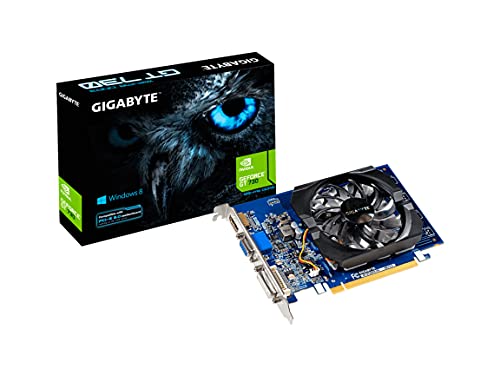
GIGABYTE gives a 902 MHz core clock and a 64-bit memory interface; the card uses a PCI Express 2.0 x8 bus interface. Those specifications suit a basic display upgrade or older, less demanding games better than modern graphics-heavy play. The core clock alone cannot tell you how a particular game will run. Confirm the required slot and output type, especially if replacing a card in an older computer.
Bottom line: Pick this for basic display needs or older games if its DDR3 memory and ports suit your system.
ASUS GT 730 2GB GDDR5 4x HDMI

Four HDMI ports make this ASUS card the distinct choice for a setup with several HDMI displays; the other 2GB cards here offer fewer or different outputs. It has 2GB of GDDR5 memory, a single-slot design, and passive cooling, so it can suit a compact, quiet system with multiple screens. ASUS says it supports up to four high-definition displays, but multiple outputs do not make the GPU faster for games. Its gaming limits remain those of an entry-level GT 730, so check game requirements before buying if gaming is the priority. Verify your case clearance and display connections.
Bottom line: Choose this when four HDMI connections matter more than gaming performance.
How to judge GT 730 gaming suitability
A GT 730 2GB is best treated as an option for light or older games, not a reliable choice for demanding new releases. Game requirements name a minimum GPU for a reason: compare that exact model against the GT 730 rather than assuming any card with 2GB of memory will qualify. Graphics memory stores textures and other data, but the GPU’s processing capability and memory bandwidth also affect rendering. GDDR5 and DDR3 are not interchangeable measures of gaming speed. If a game requires a GPU newer or more capable than the GT 730, extra memory capacity will not make this card meet the requirement. Prioritize a stronger graphics card if modern gaming is the main goal.
GT 730 memory types and ports
Memory type and display outputs are the clearest differences between these 2GB GT 730 cards. GDDR5 distinguishes the ASUS cards from the GIGABYTE card’s DDR3, while port layouts determine which screens can connect directly. This table highlights the practical choice rather than treating memory capacity as a performance ranking.
| Need | Choose | Reason |
|---|---|---|
| GDDR5 in a standard 2GB card | ASUS GT 730 2GB GDDR5 | 2GB GDDR5 and three output types |
| DVI-D, HDMI, and D-Sub | GIGABYTE GT 730 2GB DDR3 | Includes all three connections |
| Several HDMI displays | ASUS GT 730 2GB GDDR5 4x HDMI | Four HDMI ports |
Before choosing, match the card’s connector to the monitor cable or adapter you already have. Resolution support and gaming speed are separate questions: a card may output a high-resolution desktop without being suitable for demanding games at that resolution.
Check case fit and airflow
Measure available card length and slot clearance before ordering; the ASUS GDDR5 card is 6.5 inches long, while the GIGABYTE card is about 6.6 inches long. A single-slot card still needs an open rear bracket and an available compatible PCIe slot. Passive cards have no fan to move air across the heatsink, so nearby airflow matters even when the GPU is used mainly for display output. Avoid blocking the heatsink with cables or another card. For gaming, sustained graphics load makes case airflow more important than it is during basic desktop use. Confirm connector placement and case clearance together, since a card that fits in length can still be obstructed by the case or adjacent components.
Common GT 730 gaming mistakes
Do not use 2GB of VRAM as a stand-in for overall gaming capability. A game’s GPU requirement, the card’s memory type, resolution, and graphics settings all matter, and lowering resolution or detail cannot overcome every hardware limitation. Another common mistake is overlooking monitor connectivity: a GT 730 with the wrong port may require an adapter, and adapter support depends on the signal types involved. Check the exact game requirement and the physical output before committing to a card. If your target games require a newer GPU, choose a newer graphics card rather than relying on the GT 730 name or a larger memory figure.
Frequently Asked Questions
Can a GT 730 2GB run modern games?
A GT 730 2GB is generally a poor fit for demanding modern games because the GPU is entry-level and older. Compare the game’s minimum GPU requirement with the exact GT 730 model, and do not treat 2GB of VRAM as proof of compatibility.
Does GDDR5 make a GT 730 faster than DDR3?
GDDR5 has higher memory bandwidth than DDR3 in comparable graphics-card configurations, which can help avoid a memory bottleneck. It does not change the GT 730 into a higher-tier GPU, so the specific game’s requirements still decide suitability.
Is 2GB of graphics memory enough for gaming?
Two gigabytes can be enough for older or less demanding games, but it can constrain newer games that use larger textures or require more video memory. Check each game’s minimum requirements and remember that GPU capability matters along with memory capacity.
Can a GT 730 support multiple monitors?
Yes, the GT 730 cards have multiple display outputs, and the four-HDMI ASUS model says it supports up to four high-definition displays. Check that your monitors’ connectors match the card, since resolution output does not indicate gaming performance.
Will a passive GT 730 need case airflow?
Yes, passive cooling depends on air moving through the case because the card has no fan of its own. Keep the heatsink unobstructed and avoid placing it against another component that blocks airflow, especially during sustained graphics workloads.