
MageGee MK-Box Keyboard: 4 Models Compared by Fit

MageGee MK-Box 68-Key is the closest fit for shoppers seeking the MageGee MK-Box: its 68-key layout keeps separate arrow keys and F1–F12 while using linear red switches. Choose another model if you want wireless connectivity, a 61-key ultra-compact layout, or a full-size number pad.
A compact keyboard saves desk space by removing keys or combining functions, but layouts differ in which controls remain dedicated. Compare the keys you use most before choosing.
We earn a commission if you buy through links on this page. As an Amazon Associate I earn from qualifying purchases. Products are compared on manufacturer specifications, not hands-on testing.
- Best overall: MageGee MK-Box 68-Key – The 68-key layout includes separate arrow keys and F1–F12.
- Best for a tiny footprint: MageGee TS91 61-Key – Its 61-key layout is smaller and its maker says the circuit board is IPX4 certified.
- Best for wireless use: MageGee GK950 81-Key – It supports Bluetooth, 2.4 GHz wireless, and USB-C wired connections.
- Best for a number pad: MageGee Retro 104-Key – Its 104-key full-size layout includes a number pad and F1–F12.
| Product | Best for | Keys | Layout | Connection | Shop |
|---|---|---|---|---|---|
| MageGee MK-Box 68-Key | Compact dedicated keys | 68 | Compact with arrows | Wired | Check Price on Amazon |
| MageGee TS91 61-Key | Smallest wired layout | 61 | 60% compact | Wired | Check Price on Amazon |
| MageGee GK950 81-Key | Wireless flexibility | 81 | Compact | Bluetooth, 2.4 GHz, USB-C | Check Price on Amazon |
| MageGee Retro 104-Key | Full-size typing | 104 | Full-size with number pad | Wired | Check Price on Amazon |
MageGee MK-Box Keyboard and Related Keyboards
Compare key count, layout, and connection type to find a MageGee keyboard that fits your desk and typing habits.
MageGee MK-Box 68-Key

Unlike the smaller 61-key option, this compact keyboard retains separate arrow keys and F1–F12. It uses linear red mechanical switches, which the maker characterizes as smooth, with no tactile bump, and has blue LED backlighting with about 16 lighting modes. The maker also says it has full anti-ghosting. Its 12.13-inch length and 3.98-inch width suit a desk where a full-size board would take too much space but dedicated navigation keys still matter. The tradeoff is a wired connection, so choose another option if you need wireless pairing.
Bottom line: Pick this if you want a compact wired board with dedicated arrows and function keys.
MageGee TS91 61-Key
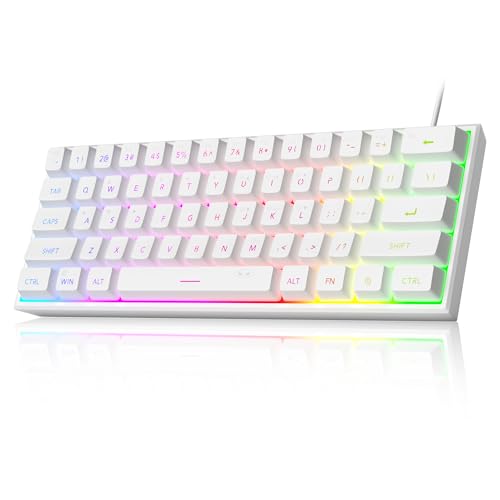
This 61-key keyboard is the smallest layout among these choices, unlike the 68-key MK-Box with separate arrow keys. Its maker describes the board as having RGB backlighting with adjustable brightness and breathing speed, plus an IPX4-certified circuit board. At 11.50 inches long and about 4.02 inches wide, it is a fit for users prioritizing a compact footprint over dedicated navigation keys. It is described as mechanical-feeling rather than as a mechanical-switch model, so buyers who specifically want mechanical switches should favor a different option.
Bottom line: Choose this if minimizing keyboard length matters more than dedicated arrow keys.
MageGee GK950 81-Key

Unlike the wired compact models, this 81-key board offers Bluetooth, 2.4 GHz wireless, and USB-C wired modes. The maker describes it as mechanical-feel and gives it a 4,000 mAh rechargeable battery, a control knob, RGB backlighting, and 26-key anti-ghosting. Its 13.15-inch length and 5.74-inch width mean it takes more desk depth than the MK-Box. This is a more suitable fit when switching among a computer, tablet, or other devices matters more than reproducing the MK-Box layout; the mechanical-feel description may not satisfy buyers seeking a specifically mechanical switch type.
Bottom line: Pick this when multi-mode connectivity is more important than a narrow footprint.
MageGee Retro 104-Key

This full-size board is the only choice here with a number pad, unlike the compact MK-Box. It has 104 keys, blue switches, round retro-style keycaps, rainbow backlighting, and a magnetic wrist rest. The maker describes the blue switches as clicky. At 17.09 inches long, it needs substantially more horizontal desk space than the compact options, but keeps the standard number-pad layout useful for frequent numeric entry. Its wired connection and larger footprint are drawbacks for users who need wireless use or are trying to free up desk area.
Bottom line: Choose this if a dedicated number pad and full-size key layout are priorities.
How to Choose a Compact Keyboard Layout
Choose by the keys you need dedicated, not by the percentage label alone. A common 60% layout has about 61 keys and omits dedicated arrow keys and the function row; those controls are commonly accessed through Fn-layer combinations. A 65% layout often keeps arrow keys and has roughly 放 keys, but counts vary by model. The MK-Box has 68 keys and separate arrows and F1–F12, so its actual key arrangement matters more than calling it simply a 60% board. If you use arrows or function keys every day, prioritize dedicated keys; if desk width is the main constraint, a 61-key board can be smaller. Measure available desk space and check keyboard length as well as key count.
| Need | Layout to consider | Tradeoff |
|---|---|---|
| Dedicated arrows and function row | 68-key compact | More space than 61-key layouts |
| Small footprint | 61-key compact | More reliance on Fn layers |
| Frequent numeric entry | 104-key full-size | Largest desk footprint |
Mechanical Switch Feel and Key Terms
Linear switches move without a tactile bump, while tactile switches provide a noticeable bump and clicky switches add an audible click. Red is commonly used as a linear switch color, and blue commonly identifies a clicky style, but switch colors are not a universal specification; confirm the switch type rather than relying on color alone. A “mechanical-feel” keyboard is not necessarily the same as one specified with mechanical switches. That distinction matters if switch construction and feel are central to your choice. Key travel and actuation force also affect typing feel, but they are not interchangeable measures: travel is how far a key moves, while actuation force is the pressure needed to register a press.
Wired and Wireless Keyboard Connections
Wired keyboards avoid the need to recharge a built-in battery, while wireless boards add flexibility but require attention to connection mode and charging. Bluetooth pairs without a dedicated 2.4 GHz receiver; a 2.4 GHz keyboard typically uses a receiver, and USB-C wired mode connects by cable. A tri-mode keyboard can offer all three, but switching among devices still depends on the keyboard’s supported pairing controls. For a fixed desktop setup, wired is simple; for moving between a laptop and tablet, multiple connection modes can be useful. Check which connection you intend to use and whether the target device supports it before ordering. Battery capacity in milliamp-hours does not by itself establish runtime, because power use and lighting settings affect battery life.
Backlighting, Water Resistance, and Care
Backlighting helps make keys easier to see in dim surroundings, but it does not change the keyboard’s layout or switch type. More lighting modes add customization rather than a guarantee of brighter output, and illumination can affect battery use on rechargeable models. An IPX4 rating means protection against splashing water under specified test conditions; it does not mean a keyboard is waterproof or safe to submerge. Keep drinks away from electronics when possible, and disconnect a wired keyboard before cleaning it. Use a soft, dry cloth for routine surface dust, and avoid pouring liquid onto keys. For any spill, stop using the keyboard and let it dry fully before reconnecting; do not assume a splash rating protects every component or situation.
Frequently Asked Questions
Does the MK-Box have separate arrow keys?
Yes, the 68-key MK-Box has separate arrow keys and F1–F12. That makes it different from many 61-key layouts, which commonly put navigation and function controls on Fn layers.
Are red keyboard switches linear or clicky?
Red switches are commonly linear, meaning they move without a tactile bump. Switch colors are not universal, so verify the specified switch type when the feel matters.
What does IPX4 mean for a keyboard?
IPX4 refers to protection against splashing water, not submersion or complete waterproofing. Keep liquids away from the keyboard and disconnect it before cleaning.
How much desk space does a full-size keyboard need?
A full-size keyboard is typically around 17 to 18 inches wide, though exact dimensions vary. Measure the usable desk width and account for a mouse area before choosing one.
Can a wireless keyboard connect to multiple devices?
A tri-mode keyboard can support Bluetooth, 2.4 GHz, and wired USB-C connections, but that does not guarantee simultaneous multi-device control. Check the supported switching method and pairing capacity for your setup.