
Thermal Glue for CPU: 4 Compounds Compared by Use

For a CPU heatsink that needs to stay bonded, WANJAO 100 g Thermal Adhesive is the thermal adhesive here; for a conventional removable heatsink, choose a thermal paste such as ARCTIC MX-6 4 g. The deciding factor is whether you need a bond or just a heat-transfer interface.
Choose a different compound if your goal is standard CPU maintenance rather than adhesion: paste fills microscopic gaps between contacting surfaces, while adhesive can make later heatsink removal difficult.
We earn a commission if you buy through links on this page. As an Amazon Associate I earn from qualifying purchases. Products are compared on manufacturer specifications, not hands-on testing.
- Best overall: WANJAO 100 g Thermal Adhesive – It is the only silicone thermal adhesive, intended for CPU and other component bonding.
- Best for routine CPU cooling: ARCTIC MX-6 4 g – The 4 g nonconductive paste is positioned for CPUs, GPUs, laptops, and consoles.
- Best for precise application: 12.8 W/mK Thermal Paste 4 g – Its 4 g syringe is designed for controlled application, and its formula is nonconductive.
| Product | Best for | Type | Quantity | Electrical property | Shop |
|---|---|---|---|---|---|
| WANJAO 100 g Thermal Adhesive | Bonded components | Silicone adhesive | 100 g | — | Check Price on Amazon |
| ARCTIC MX-6 4 g | Routine CPU cooling | Thermal paste | 4 g | Nonconductive | Check Price on Amazon |
| 12.8 W/mK Thermal Paste 4 g | Syringe application | Thermal paste | 4 g | Nonconductive | Check Price on Amazon |
| BSFF Thermal Paste 1.8 g | Small repair jobs | Thermal paste | 1.8 g | Nonconductive | Check Price on Amazon |
Thermal Glue for CPU and Paste Compounds
Choose adhesive when a component needs bonding, or paste when a heatsink is held in place mechanically.
WANJAO 100 g Thermal Adhesive

Unlike the other compounds here, this WANJAO product is described as a silicone adhesive glue for CPU, GPU, printer, and chipset applications. Its 100 g container is much larger than the 1.8 g and 4 g paste options, so it suits repeated work or multiple components better than a single routine CPU service. Adhesive is the right category only when the heatsink or component needs bonding; for a mechanically retained CPU cooler, removable paste is usually the more appropriate interface.
Bottom line: Choose this when bonding, rather than removable thermal contact, is required.
ARCTIC MX-6 4 g

For a conventional CPU cooler that clamps onto the processor, ARCTIC MX-6 is the clearest paste choice in this group; it is not an adhesive. The 4 g compound is also intended for consoles, laptops, graphics cards, and direct-die GPU cooling. The maker says its thermal resistance is measurably lower than MX-4 and that the paste is neither electrically conductive nor capacitive. Its limitation is functional: paste does not bond parts together, so a heatsink that relies on adhesive retention needs a different product. Pick it for a standard service where the cooler remains mechanically secured.
Bottom line: Choose it for nonconductive paste on a mechanically secured CPU cooler.
12.8 W/mK Thermal Paste 4 g
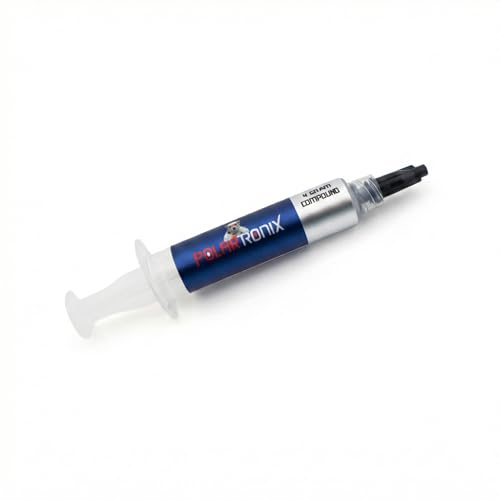
The syringe distinguishes this 4 g paste from the other conventional paste option, giving a controlled way to dispense compound on a CPU or GPU. The maker gives a thermal conductivity rating of 12.8 W/mK and identifies the formula as nonconductive. It is intended for laptops, desktops, graphics cards, and several game consoles, although the maker excludes PS5 use. This is still paste rather than glue: it fills the interface between surfaces but is not a bonding agent. Choose it when controlled dispensing and the device compatibility matter; skip it if the task specifically requires a cured adhesive bond.
Bottom line: Choose it for syringe-dispensed paste on a compatible CPU or GPU.
BSFF Thermal Paste 1.8 g

BSFF is the smallest paste quantity here at 1.8 g and includes a toolkit, making it a compact option for a limited CPU, GPU, or IC-chip service. The maker says the formula uses carbon microparticles, is metal-free and nonconductive, and is designed for durable heat transfer. Those are maker performance claims, not a reason to use it as glue: this compound does not replace a mechanical heatsink mount or adhesive. Its smaller package may be less suitable for repeated jobs than the 4 g compounds. Choose it when a small amount and included toolkit fit the repair task.
Bottom line: Choose it for a small paste application where the toolkit is useful.
How to choose CPU thermal glue or paste
Choose by the job: paste transfers heat between surfaces that are already clamped together, while thermal adhesive bonds components that lack a mechanical fastener. CPU coolers normally use a bracket or screws, so thermal paste is the usual interface. Adhesives are more common for small heatsinks on components without mounting hardware. Before applying any compound, shut down and unplug the computer; disconnecting power reduces the risk of accidental electrical damage while working near the motherboard. A practical rule is to use glue only when the part needs adhesive retention; if the cooler has a clip, bracket, or screws, use paste instead. Adhesive can make a later repair or cooler replacement harder.
How much CPU thermal paste to apply
A single pea-sized dot, about 4 to 5 mm across, is a common starting point for a desktop CPU with an integrated heat spreader. The mounting pressure of the cooler spreads the paste across the contact surface, so a thick layer or multiple large lines can squeeze out around the edges. Smaller processors may need less, while direct-die cooling has different contact geometry and requires care to cover the exposed die without excess. Keep compound off the motherboard and socket. Clean old paste from both contact surfaces with a lint-free material and high-concentration isopropyl alcohol, then let the surfaces dry fully before applying new paste.
Thermal paste versus thermal adhesive
Thermal paste is a nonbonding interface material; thermal adhesive is intended to attach parts as well as transfer heat. That difference controls both installation and later service: a mechanically held CPU cooler can be removed, while adhesive may resist separation or make delicate components vulnerable during removal. The product type alone does not establish whether a compound is safe around exposed electronics, so check the electrical property before use where a spill could reach circuitry. Avoid treating a CPU thermal paste as a substitute for missing brackets or screws. The table gives the practical choice by mounting need.
| Mounting situation | Compound type | Reason |
|---|---|---|
| CPU cooler held by a bracket or screws | Thermal paste | Transfers heat without bonding the parts |
| Small heatsink requires adhesive retention | Thermal adhesive | Bonds the component and interface |
| Unsure whether the compound is conductive | Verify before applying | A spill near circuitry can create risk |
Common CPU compound application mistakes
The most common avoidable mistake is using adhesive where a removable paste interface is needed, which can complicate future cooler removal. Another is applying too much paste: excess can spread beyond the contact area, while a very thick layer may interfere with an even interface. A dry or contaminated contact surface also undermines proper contact, so remove residue before adding fresh compound. Use only a compatible compound and avoid mixing old and new materials. When cleaning or applying compound, keep the computer powered off and unplugged; do not pry against the CPU socket or nearby board components.
Frequently Asked Questions
Does thermal glue replace CPU cooler screws?
Thermal adhesive can bond a component, but it is not a general replacement for a CPU cooler’s designed mounting hardware. Use the cooler’s bracket or screws when provided; adhesive can make later removal difficult.
How often should CPU thermal paste be replaced?
There is no single interval that fits every desktop, because heat, duty cycle, and cooler removal affect the interface. Replace paste when removing the cooler or when troubleshooting temperatures after checking airflow and fan operation.
Can I use thermal paste on a laptop CPU?
Many laptop CPUs use thermal paste at the heatsink contact, but access and cooler layout vary by model. Use a small amount and avoid disturbing thermal pads, which serve separate gaps around nearby components.
Is nonconductive thermal paste completely risk-free?
Nonconductive paste lowers the risk of an electrical short if a small amount reaches nearby circuitry, but it can still contaminate connectors or surfaces. Power off and unplug the device, and apply only enough to cover the contact area.
Can thermal adhesive be removed from a CPU later?
Adhesive is intended to bond, so removal can be harder than lifting a cooler from paste. Do not twist or pry aggressively against a processor or socket; decide whether future serviceability matters before using an adhesive.