
Starlink Booster for House: 3 Wi-Fi Options Compared

For extending Starlink Wi-Fi around a house, AX1800 Outdoor Wi-Fi 6 Extender is the outdoor-focused choice, while Tenda A18 V4.0 AC1200 Extender is an indoor dual-band repeater; the deciding factor is whether the weak area is inside or outside. Choose Starlink Point-to-Point CPE550 Bridge instead when the goal is a point-to-point link to a separate building, not broader coverage from a household repeater.
We earn a commission if you buy through links on this page. As an Amazon Associate I earn from qualifying purchases. Products are compared on manufacturer specifications, not hands-on testing.
- Best overall: AX1800 Outdoor Wi-Fi 6 Extender – Outdoor access point design and dual-band Wi-Fi suit extending coverage beyond the house.
- Best for indoor rooms: Tenda A18 V4.0 AC1200 Extender – Dual-band repeater format is aimed at filling indoor Wi-Fi gaps.
- Best for a separate building: Starlink Point-to-Point CPE550 Bridge – A two-unit point-to-point bridge is designed to connect remote buildings.
| Product | Best for | Type | Wi-Fi speed | Ethernet | Shop |
|---|---|---|---|---|---|
| AX1800 Outdoor Wi-Fi 6 Extender | Outdoor coverage | Outdoor extender/access point | Up to 1,800 Mbps combined | 2 Gigabit ports | Check Price on Amazon |
| Tenda A18 V4.0 AC1200 Extender | Indoor dead zones | Indoor dual-band repeater | Up to 1,167 Mbps combined | 1 Ethernet port | Check Price on Amazon |
| Starlink Point-to-Point CPE550 Bridge | Remote buildings | Two-unit point-to-point bridge | Up to 100 Mbps | — | Check Price on Amazon |
Starlink boosters for house Wi-Fi
Match the device to the location of the weak signal and whether the connection needs to reach another building.
AX1800 Outdoor Wi-Fi 6 Extender

For outdoor areas around a house, this weather-resistant Wi-Fi 6 extender is the most directly targeted option in this group. It has dual-band speeds up to 1,800 Mbps, six 8 dBi antennas, and two Gigabit Ethernet ports. The maker says it works with Starlink and other routers; actual range depends on placement and obstructions. Its outdoor form and PoE support suit patios, yards, and similar spaces better than a plug-in indoor repeater. The limitation is that outdoor coverage may not solve weak Wi-Fi inside rooms separated by dense walls.
Bottom line: Pick this when the dead zone is outdoors and the installation can support an outdoor access point.
Tenda A18 V4.0 AC1200 Extender
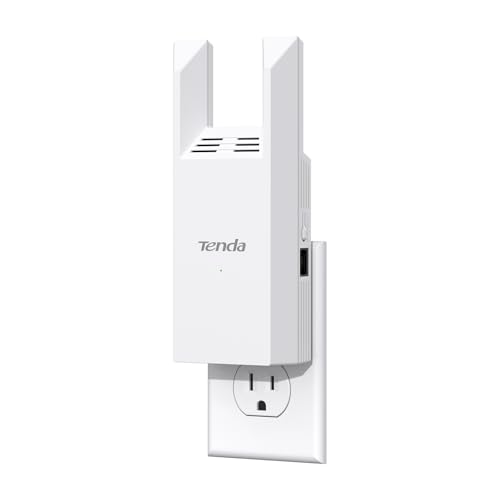
For an indoor dead zone, this plug-in dual-band repeater offers a simpler fit than an outdoor access point or a building-to-building bridge. Its advertised combined rate is up to 1,167 Mbps: 867 Mbps on 5 GHz and 300 Mbps on 2.4 GHz, with one Ethernet port. The maker claims coverage up to 1,300 square feet and support for up to 23 devices. A repeater needs a usable signal where it is placed, so putting it inside the dead zone itself can leave it with a weak connection to the router.
Bottom line: Choose this for a straightforward indoor extension where a strong source signal is available.
Starlink Point-to-Point CPE550 Bridge

When Wi-Fi needs to reach a detached garage, barn, or shop, this two-unit point-to-point bridge addresses a different problem from room-to-room coverage. The product is presented for Starlink Gen 3 routers, Starlink Mini, and Starlink Gen 2 with an Ethernet Adapter, and its size is identified as a 100 Mbps CPE550 kit with wall mounts. A point-to-point link sends a network connection between locations; the remote end needs a secondary Wi-Fi router to provide local wireless coverage. This is less suitable for simply improving a weak signal in another room.
Bottom line: Pick this for a separate building when a bridge link, rather than an indoor repeater, is needed.
How to choose a Starlink booster for a house
Choose by where the weak signal is and how the extender connects back to the Starlink router. An indoor repeater is intended for rooms within the house; an outdoor access point serves yards and patios; a point-to-point bridge connects distinct buildings. Place a repeater where the router signal is still usable, not at the far edge of the dead zone. The 2.4 GHz band generally reaches farther through walls than 5 GHz, while 5 GHz can offer higher data rates nearby. A decision rule: if the target is a separate building, choose a bridge-style link rather than expecting a room repeater to cover the distance. Walls, floors, and building materials all affect usable range.
Indoor versus outdoor Starlink Wi-Fi coverage
Indoor extenders and outdoor access points solve different coverage problems, so location should decide between them. A repeater receives and retransmits Wi-Fi, and that extra wireless hop can reduce available throughput because the device uses airtime to communicate with both the router and clients. An access point connected over Ethernet avoids that wireless relay for its backhaul. Outdoor-rated hardware is intended for exposed placement, but installation still needs suitable power and cable routing. For a distant structure, a point-to-point bridge sends the network between two endpoints; it is not a substitute for a local Wi-Fi router at the far end. The table separates these approaches by the coverage task they fit.
| Coverage need | Suitable device type | Key placement consideration |
|---|---|---|
| Another indoor room | Indoor repeater | Place within a usable router signal |
| Yard or patio | Outdoor access point/extender | Use appropriate outdoor installation |
| Detached building | Point-to-point bridge | Plan for a receiving endpoint and local Wi-Fi |
Where to place a Wi-Fi extender
Place an extender between the router and the weak area, with enough signal at the extender to relay. A location with a clear signal is more useful than one that is physically closest to the dead zone; a halfway point is a practical starting place, not a guaranteed optimum. Keep in mind that 5 GHz is more easily attenuated by walls than 2.4 GHz, so a location that works for one band may not work as well for the other. Avoid hiding an extender inside a cabinet or behind large obstructions. For outdoor coverage, positioning and the building wall between the access point and router can matter as much as antenna count.
Starlink booster setup and safety
Set up a repeater by first establishing its connection to the router, then checking signal in the target area; moving it a few feet can change the result. Wired access points and bridges require an Ethernet path and compatible power arrangement, such as the PoE support claimed for the outdoor extender. Outdoor electronics need weather-appropriate placement and secure cable entry; keep connections protected from water and do not route cables where they can be pinched or tripped over. A Wi-Fi extender does not increase the internet plan’s bandwidth: it improves local network reach, and the Starlink connection remains the upstream limit. For a bridge, confirm the receiving side has the equipment needed to provide Wi-Fi locally.
Frequently Asked Questions
Will a Wi-Fi extender increase Starlink internet speed?
A Wi-Fi extender improves local wireless coverage, not the bandwidth supplied by the internet connection. A wireless repeater can also use airtime for its link back to the router, reducing throughput available to devices.
Where should I put a Starlink Wi-Fi extender?
Start between the router and the weak area, where the extender still receives a usable signal. The midpoint is only a starting point because walls, floors, and nearby obstructions affect reception.
Is 2.4 GHz or 5 GHz better through house walls?
The 2.4 GHz band generally carries farther through walls, while 5 GHz can provide higher rates at closer range. Thick walls or multiple floors can change which band works better in a particular room.
Can a point-to-point bridge connect a house to a barn?
A point-to-point bridge is intended to carry a network between separate locations. The far end may need a secondary Wi-Fi router or access point to serve devices inside the barn.
Can an outdoor Wi-Fi extender stay outside year-round?
Only use an extender designed for outdoor conditions and install its cables and connections to suit the exposure. An outdoor rating does not remove the need to protect cable entry points and follow the device’s power requirements.