
TP-Link Deco AXE5300: XE5300 and Alternatives Compared

TP-Link Deco XE5300 3-Pack is the direct match for the TP-Link Deco AXE5300 search because its model name identifies an AXE5300 tri-band Wi-Fi 6E system in a three-pack. Choose an XE75 or X55 instead if you need stated coverage figures or, for the X55, Ethernet-backhaul support.
Mesh systems use multiple nodes to extend a home network; walls and placement affect coverage. Compare the pack size and Wi-Fi generation against your floor plan and device needs.
We earn a commission if you buy through links on this page. As an Amazon Associate I earn from qualifying purchases. Products are compared on manufacturer specifications, not hands-on testing.
- Best overall: TP-Link Deco XE5300 3-Pack – The only three-pack carrying the XE5300 model name and Wi-Fi 6E tri-band designation.
- Best for larger coverage claims: TP-Link Deco XE75 3-Pack – The XE75 three-pack claims coverage up to 7,200 sq. ft. and AXE5400 total speed.
- Best for a smaller home: TP-Link Deco XE75 2-Pack – The XE75 two-pack claims coverage up to 5,500 sq. ft.
- Best for Wi-Fi 6: TP-Link Deco X55 3-Pack – The X55 three-pack claims coverage up to 6,500 sq. ft. and has three Gigabit ports per unit.
| Product | Best for | Pack size | Claimed coverage | Wi-Fi type | Shop |
|---|---|---|---|---|---|
| TP-Link Deco XE5300 3-Pack | XE5300 shoppers | 3-pack | — | Tri-band Wi-Fi 6E | Check Price on Amazon |
| TP-Link Deco XE75 3-Pack | Large coverage claim | 3-pack | Up to 7,200 sq. ft. | Tri-band Wi-Fi 6E | Check Price on Amazon |
| TP-Link Deco XE75 2-Pack | Two-node setup | 2-pack | Up to 5,500 sq. ft. | Tri-band Wi-Fi 6E | Check Price on Amazon |
| TP-Link Deco X55 3-Pack | Wi-Fi 6 mesh | 3-pack | Up to 6,500 sq. ft. | Wi-Fi 6 | Check Price on Amazon |
TP-Link Deco AXE5300 and mesh alternatives
Compare the XE5300 by model, then weigh the alternatives by node count, Wi-Fi generation and the coverage claims that match your home.
TP-Link Deco XE5300 3-Pack

TP-Link Deco XE5300 3-Pack is the exact model match for shoppers searching for the Deco AXE5300: the name identifies the XE5300 as an AXE5300 tri-band Wi-Fi 6E system, supplied as a three-pack. Each unit measures 8 inches high, 8 inches long and 10 inches wide. That makes this option the clearest fit when matching the model matters more than comparing published speed or coverage figures.
Bottom line: Pick this if matching the XE5300 model and getting a three-node Wi-Fi 6E system are your priorities.
TP-Link Deco XE75 3-Pack

TP-Link Deco XE75 3-Pack is an XE75 alternative, not the XE5300, and its coverage is the largest among these options: up to 7,200 sq. ft. The manufacturer claims AXE5400 total speeds up to 5,400 Mbps across its 6 GHz, 5 GHz and 2.4 GHz bands, and says it can connect up to 200 devices. Its 6 GHz band can serve as backhaul by default or be switched to Wi-Fi network mode for compatible devices. The extra coverage claim is useful for a larger floor plan, but the figure is a maximum claim rather than a guarantee for every home.
Bottom line: Choose this when the XE5300 model match is less important than a three-pack with a larger stated coverage area.
TP-Link Deco XE75 2-Pack
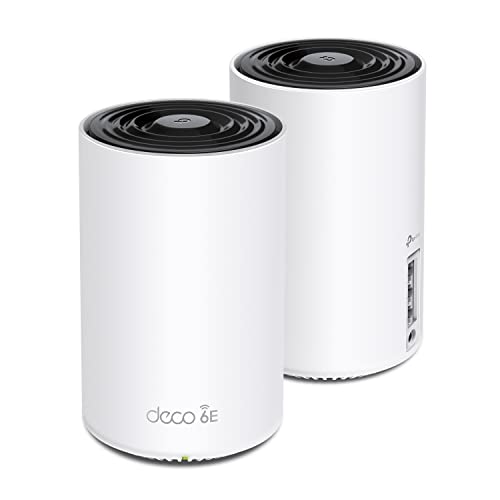
TP-Link Deco XE75 2-Pack keeps the XE75’s tri-band Wi-Fi 6E features in a two-node package, making it distinct from the three-pack systems here. The manufacturer claims coverage up to 5,500 sq. ft. and total speeds up to 5,400 Mbps across the 6 GHz, 5 GHz and 2.4 GHz bands. Its 6 GHz band can be used for node backhaul by default or switched to a network band for compatible devices. This option suits a home where two nodes are enough; buyers with a spread-out or obstructed floor plan may need more nodes than this pack provides.
Bottom line: Choose this when you want XE75 features in a two-node pack and its coverage claim fits your layout.
TP-Link Deco X55 3-Pack

TP-Link Deco X55 3-Pack is the non-6E alternative: it uses Wi-Fi 6 rather than the Wi-Fi 6E of the XE5300 and XE75 systems. The manufacturer claims coverage up to 6,500 sq. ft. and support for up to 150 devices. Each unit has three Gigabit Ethernet ports, and the system supports Ethernet backhaul, which can connect nodes over wired cabling instead of relying only on a wireless node link. The tradeoff is the lack of a 6 GHz band; choose this only if Wi-Fi 6 meets your device and network needs.
Bottom line: Pick this if Wi-Fi 6 is sufficient and three Ethernet ports per unit matter to your setup.
How to choose a Deco mesh system
Start with Wi-Fi generation and the number of nodes your layout needs, not the largest coverage number alone. Wi-Fi 6E adds access to the 6 GHz band for compatible devices; Wi-Fi 6 systems such as the X55 do not use that band. A three-pack supplies one more node than a two-pack, but walls, floors and interference can reduce real-world reach. As a practical rule, consider a two-pack for a compact, open layout and a three-pack when the home has separated wings or multiple floors; treat those as starting points, not coverage guarantees. The XE5300 name is the direct model match here, while XE75 and X55 are alternatives. Confirm the exact coverage and port requirements that matter to your home before choosing.
What the 6 GHz band changes
Wi-Fi 6E adds 6 GHz alongside the 2.4 GHz and 5 GHz bands, but 6 GHz generally has less reach through walls than lower-frequency Wi-Fi. The XE75 systems can use 6 GHz for backhaul by default or switch it to serve compatible client devices, according to the manufacturer. Backhaul is the connection between mesh nodes; a dedicated band can leave other bands available for devices, while Ethernet backhaul uses a wired connection between nodes. A useful decision rule is to favor node placement and a usable node-to-node signal over placing a mesh unit at the farthest dead zone. A node cannot extend a strong connection if its own link back to the network is weak.
Coverage claims and mesh placement
Coverage figures are maximum claims, not room-by-room guarantees; floor area, construction materials, neighboring networks and node placement all affect usable signal. Put the main node in an open, central location, then place satellite nodes between it and weak-signal areas rather than at the edge of coverage. Concrete, brick, metal and dense cabinetry can obstruct or weaken Wi-Fi, so a layout with several barriers may need more nodes than an open plan of the same area. For a long or multi-floor home, compare node count and wired-backhaul needs before relying on a square-foot figure. If a room needs stable service but sits behind multiple walls, test placement before assuming an advertised area will reach it.
Mesh setup and wired backhaul
Mesh nodes work together under one home network name, with devices typically connecting to the node that offers the most suitable link as they move around. Ethernet backhaul connects nodes with network cable and can reduce dependence on wireless links, but the X55 is the only option here whose specifications explicitly identify Ethernet backhaul support. Its three Gigabit ports per unit can also connect wired devices, subject to the network layout. Avoid placing a node inside a cabinet or directly behind a television, where obstacles can weaken the radio path. A wired run is most useful when nodes are separated by thick walls or floors; where cabling is impractical, keep the wireless node-to-node path reasonably open.
Frequently Asked Questions
Does Wi-Fi 6E work with older Wi-Fi devices?
Yes, Wi-Fi 6E mesh systems can serve older Wi-Fi devices on compatible bands, while only Wi-Fi 6E-capable devices can use 6 GHz. The XE75 can use its 6 GHz band for backhaul by default or switch it to network mode for compatible clients.
Is a two-pack enough for a whole home?
A two-pack can suit a compact, open home, but the XE75 two-pack’s up-to-5,500-square-foot claim is not a guarantee for every layout. Thick walls, multiple floors and placement obstacles can reduce coverage, so prioritize a strong link between nodes.
Does 6 GHz travel through walls well?
No; 6 GHz generally loses signal through walls more quickly than lower-frequency Wi-Fi bands. Place a node where it still has a clear, reliable connection to the primary node rather than at the far edge of a dead zone.
What is Ethernet backhaul on a mesh system?
Ethernet backhaul links mesh nodes with network cable instead of relying on a wireless node-to-node connection. The X55 fields specify Ethernet backhaul support and three Gigabit ports per unit; confirm cabling and port needs for your planned setup.
Can Wi-Fi 6 and Wi-Fi 6E devices share one mesh network?
Yes, a Wi-Fi 6E system can serve Wi-Fi 6 devices on compatible bands, but Wi-Fi 6 devices cannot connect over 6 GHz. Choose a 6E system when at least some devices can use that band or when its other system features fit your needs.