
Best Backlit Wireless Keyboard and Mouse Combos Compared

The Trueque KM42Pro suits most people looking for a backlit wireless keyboard and mouse combo because it pairs a full-size layout with rechargeable devices and one shared receiver. Choose another set if large-print keys, a wrist rest, an ergonomic wave shape or Bluetooth and wired modes matter more.
We earn a commission if you buy through links on this page. As an Amazon Associate I earn from qualifying purchases. Products are compared on manufacturer specifications, not hands-on testing.
- Best overall: Trueque KM42Pro Full-Size Combo – Full-size keyboard, rechargeable keyboard and mouse, and one 2.4GHz receiver.
- Best for large-print keys: Large-Print 7-Color Wireless Combo – Large letters combine with seven backlight colors and three brightness levels.
- Best for wrist support: SABLUTE Typewriter Backlit Combo – The detachable magnetic wrist rest has soft sponge padding.
- Best for connection options: Tri-Mode RGB Backlit Combo – Offers Bluetooth, 2.4GHz wireless and USB-C wired modes.
| Product | Best for | Layout or key style | Connection | Distinct feature | Shop |
|---|---|---|---|---|---|
| Trueque KM42Pro Full-Size Combo | Everyday desk use | Full-size | 2.4GHz USB receiver | 3 keyboard brightness levels | Check Price on Amazon |
| Large-Print 7-Color Wireless Combo | Large-print typing | Large-print keys | Wireless USB receiver | 7 backlight colors | Check Price on Amazon |
| SABLUTE Typewriter Backlit Combo | Wrist-rest support | Round typewriter keys | 2.4GHz wireless | Magnetic wrist rest | Check Price on Amazon |
| Tri-Mode RGB Backlit Combo | Multi-mode pairing | 104-key full-size | Bluetooth, 2.4GHz, USB-C | 2000 mAh keyboard battery | Check Price on Amazon |
Backlit wireless keyboard and mouse combos
Compare key style, connection options and comfort features to find the set that fits your workspace.
Trueque KM42Pro Full-Size Combo

One shared receiver and a standard full-size layout make this set a straightforward fit for a desk with limited USB ports. The keyboard has rainbow backlighting with three brightness levels, while the mouse offers 15 switchable lighting effects. Both devices recharge by USB-C and can be used while charging; auto-sleep and on/off switches help manage power between sessions. The trade-off is a single 2.4GHz connection method, so this set is less suitable for someone who needs Bluetooth pairing or a wired mode.
Bottom line: Choose this set for a full-size layout and a single receiver for both devices.
Large-Print 7-Color Wireless Combo

Large-print keys set this combo apart for people who prefer oversized lettering rather than a decorative key shape. The keyboard offers seven backlight colors and three brightness levels, and the receiver connects both keyboard and mouse. The maker says it is compatible with Windows and Mac OS, while noting multimedia keys may not fully work with Mac OS. The limitation is that the available features describe 2.4GHz wireless use, not Bluetooth or a wired connection, so choose another set if you need those modes.
Bottom line: Pick this if oversized lettering is more important than alternative connection modes.
SABLUTE Typewriter Backlit Combo

A detachable magnetic wrist rest and round typewriter-style keys distinguish this set from the conventional full-size and large-print options. The keyboard has seven soft backlight colors, while the mouse provides 11 lighting modes; the body is described as spill-resistant. The wrist rest has soft sponge padding and a skin-friendly outer surface, making this the fit to consider when wrist support is a priority. The trade-off is the retro round-key layout, which may not suit someone who prefers standard-shaped keycaps. It measures 17.1 inches long and 6.3 inches wide.
Bottom line: Choose this when a detachable wrist rest and round keys suit your typing setup.
Tri-Mode RGB Backlit Combo
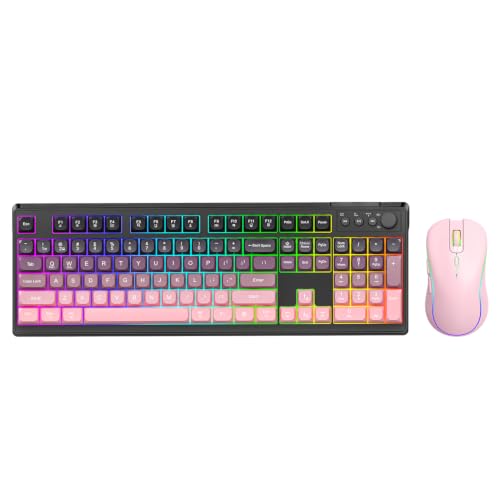
Three connection modes make this combo the option for switching between Bluetooth, 2.4GHz wireless and USB-C wired use. Its 104-key full-size keyboard has a number pad, removable floating keycaps and an RGB backlight with a media knob. The keyboard battery is 2000 mAh and the mouse battery is 600 mAh; the maker says use can reach 50 hours with the light on. That runtime depends on the described lighting condition, and the set is the clearest match for someone who values connection flexibility over a specified wrist-rest or large-print feature.
Bottom line: Pick this for Bluetooth, wireless and wired connection choices in one set.
How to choose a backlit wireless combo
Start with the feature that changes daily use: key visibility, connection type or wrist support. Backlit keyboards commonly use fixed-color or RGB lighting, and some offer brightness settings; more lighting modes do not necessarily mean clearer lettering. For a number-heavy desk job, favor a full-size layout with a number pad. For dim workspaces, large-print illuminated keys can make legends easier to distinguish. If you move between devices, choose Bluetooth or a multi-mode set; a 2.4GHz receiver typically occupies a USB port. A practical rule is to choose a shared receiver when you have one free USB-A port, and prioritize Bluetooth when you need to keep that port available.
Keyboard layouts and lighting styles
Full-size keyboards typically use a 104- or 105-key layout with a number pad, while compact models save desk width by removing keys or the number pad. Round typewriter keys change the feel and appearance, and large-print caps emphasize readable legends; neither style is automatically better for every typist. Backlighting illuminates key legends, but it does not replace adequate room lighting or correct screen glare. RGB effects usually offer color choices, while single-color backlights keep the display simpler. Compare the number of brightness settings and whether the keys themselves are illuminated, not just the surrounding deck. For a dim room, choose adjustable brightness and light-up legends rather than lighting effects alone.
Wireless connections and charging
Most 2.4GHz keyboard-and-mouse sets pair through a USB receiver, while Bluetooth can connect directly to compatible computers and tablets. Tri-mode sets add a wired option, useful when charging or when wireless use is inconvenient. A shared receiver can reduce port use, but check whether your device has the needed USB-A port or requires an adapter. Rechargeable sets avoid disposable batteries but need charging access; USB-C is common for charging and wired data, though not every USB-C cable or port supports every function. For a setup without a spare USB-A port, pick a confirmed Bluetooth mode. Keep the receiver accessible rather than behind a metal obstruction, which can weaken wireless reception.
Comfort, desk fit and safe setup
Wrist rests support the hands while typing, but a rest that is too high can bend the wrists upward. Keep forearms roughly level with the keyboard and take a short movement break about every 30 minutes during long sessions. A wide full-size combo can occupy over 17 inches of desk length, so measure the usable surface before choosing a set with an attached or detachable rest. Keep drinks away from electronics even when a keyboard is described as spill-resistant; that term does not make a device waterproof. Use the on/off switch or sleep behavior between sessions, and disconnect a device before cleaning it. Avoid spraying cleaner directly onto keys or mouse openings.
Frequently Asked Questions
Do backlit keyboard keys help in a dark room?
Illuminated legends can make key labels easier to see in low light, especially when the letters themselves light up. Keep some room lighting on to reduce eye strain and screen glare.
Is Bluetooth better than a 2.4GHz receiver?
Bluetooth avoids using a USB receiver and works with compatible devices that support it. A 2.4GHz set needs its receiver connected, so choose it when the computer has an available USB port and the set’s pairing is simpler for your setup.
How wide is a full-size keyboard typically?
A full-size keyboard is commonly about 17 to 18 inches wide, though models vary with key spacing and added controls. Measure the desk area before choosing a set with a wrist rest or mouse alongside it.
How often should I charge a rechargeable keyboard?
Charge a rechargeable keyboard when its battery indicator signals low power or typing becomes unreliable. Runtime changes with backlight brightness and use; turning the lights down can reduce power demand.
Can I use a spill-resistant keyboard near drinks?
Spill-resistant does not mean waterproof, and liquid can still damage a keyboard or its receiver. Keep drinks away from electronics and disconnect power before cleaning a spill.