
C Type to Audio Jack: 4 USB-C Options Compared

For a USB-C phone that needs a 3.5 mm connection, JXMOX USB-C to 3.5 mm Cable, 4 ft is the straightforward pick because its 4-foot cable connects directly to a headphone or aux input. Choose USB-C to 3.5 mm Female Adapter, 2-Pack instead if you need a compact female-jack adapter in a two-pack, rather than a cable with a 3.5 mm plug.
USB-C audio adapters convert digital audio from a device for a standard 3.5 mm connection; device support can vary, so confirm compatibility with your phone before ordering.
We earn a commission if you buy through links on this page. As an Amazon Associate I earn from qualifying purchases. Products are compared on manufacturer specifications, not hands-on testing.
- Best overall: JXMOX USB-C to 3.5 mm Cable, 4 ft – A 4-foot cable provides direct USB-C-to-3.5 mm connection for headphones and aux inputs.
- Best for a two-pack: USB-C to 3.5 mm Female Adapter, 2-Pack – Includes two USB-C adapters with a female 3.5 mm jack.
- Best for higher-resolution audio: Seulliya USB-C to 3.5 mm Cable – Claims support for up to 24-bit/48 kHz stereo output.
| Product | Best for | Format | Cable length | Audio support | Shop |
|---|---|---|---|---|---|
| JXMOX USB-C to 3.5 mm Cable, 4 ft | Direct cable connection | Male-to-male cable | 4 ft | DAC; Hi-Fi claim | Check Price on Amazon |
| Seulliya USB-C to 3.5 mm Cable | High-resolution audio | Direct cable | — | Up to 24-bit/48 kHz | Check Price on Amazon |
| USB-C to 3.5 mm Female Adapter, 2-Pack | Two-device setups | Female-jack adapter | — | DAC; Hi-Fi claim | Check Price on Amazon |
| Seulliya USB-C to 3.5 mm Cable, 3.3 ft | Short cable runs | Direct cable | 3.3 ft | Up to 16-bit/48 kHz | Check Price on Amazon |
USB-C to audio jack cables and adapters
Choose between a direct cable and a female-jack adapter based on the connection your headphones or stereo requires.
JXMOX USB-C to 3.5 mm Cable, 4 ft
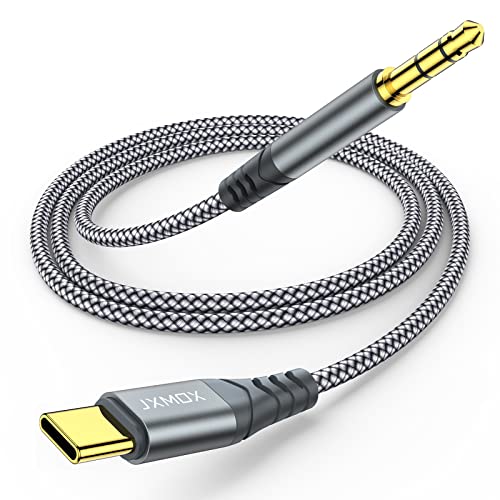
JXMOX USB-C to 3.5 mm Cable, 4 ft is a direct cable rather than a separate adapter, with a USB-C connector at one end and a 3.5 mm plug at the other. Its 4-foot length suits a phone connected to a car stereo or wired headphones when that reach is enough. The nylon-braided cable has a strain-relief design, and the maker says it withstands more than 12,000 bends and uses a DAC chip for high-definition audio. Choose another format if your headphones end in a 3.5 mm plug and need a female jack.
Bottom line: Pick this when a 4-foot direct cable reaches your 3.5 mm input.
Seulliya USB-C to 3.5 mm Cable

Seulliya USB-C to 3.5 mm Cable stands out for its audio format: the maker says its DAC supports up to 24-bit/48 kHz stereo output. The direct cable connects USB-C devices to a standard 3.5 mm headphone or aux input, making it an option for listeners who want that particular format claim and do not need a specified cable reach. The maker also says it meets MFi certification requirements and uses an original terminal and smart chip.
Bottom line: Choose this if its 24-bit/48 kHz claim is a priority and reach works for your setup.
USB-C to 3.5 mm Female Adapter, 2-Pack

USB-C to 3.5 mm Female Adapter, 2-Pack differs from the direct cables by providing a female 3.5 mm jack, so you can connect existing headphones or an aux cable with a male plug. The package contains two adapters, useful when you want one for a spare device or location. The maker claims a DAC chip delivers high-definition audio and noise reduction.
Bottom line: Pick this when you need a female jack for existing 3.5 mm plugs and want two adapters.
Seulliya USB-C to 3.5 mm Cable, 3.3 ft

Seulliya USB-C to 3.5 mm Cable, 3.3 ft gives a defined 3.3-foot cable length and a maximum of 16-bit/48 kHz, making it the choice for a shorter, specified run rather than the 4-foot option. Its USB-C-to-3.5 mm cable connects to car audio, speakers, or headphones with a standard jack. The maker says it is plug and play and requires no software or drivers. The shorter reach can constrain placement, so measure the distance from the USB-C device to the audio input before choosing this cord.
Bottom line: Choose this for a 3.3-foot run and 16-bit/48 kHz audio support.
How to choose a USB-C to 3.5 mm connection
Start by matching the jack gender and cable format to the device you already own: a direct cable ends in a 3.5 mm plug, while an adapter with a female jack accepts a separate plug. USB-C audio accessories may include a digital-to-analog converter (DAC), which converts digital signal from the phone into analog audio for traditional headphones or aux inputs. A DAC-equipped accessory is important when the phone does not output analog audio over USB-C. Check whether the phone maker supports USB audio accessories, and confirm the exact phone model because a broad compatibility claim does not establish every model.
Use a measurable reach rule: measure the path between the phone and stereo, then choose a cord at least 6 inches longer to allow slack and routing. A female adapter is a better match when your existing headphone cable already reaches.
USB-C cable and female adapter formats
A direct USB-C-to-3.5 mm cable is one piece; a female adapter is a short connector that lets a separate 3.5 mm plug connect to USB-C. The right option depends on whether you need reach or want to reuse a headphone cord. For a car stereo, first check whether the stereo has a 3.5 mm aux input; USB-C-to-3.5 mm does not connect to a USB-A-only port.
| Need | Choose | Why |
|---|---|---|
| Extra reach | Direct cable | One cable runs between the device and input |
| Reuse wired headphones | Female-jack adapter | Accepts their existing 3.5 mm plug |
| Known audio format claim | Compare stated DAC support | Maximum bit depth and sample rate differ |
Choose by connection first; audio format claims do not solve a mismatch in plug type.
Check device and stereo compatibility
USB-C describes the connector, not guaranteed audio compatibility. Some phones support digital audio through USB-C while others may need a specific DAC arrangement; an accessory’s compatibility list should include the exact phone family and generation. A 3.5 mm car-audio connection also requires an aux input, not merely a USB charging port. Before ordering, confirm both ends: the phone’s USB-C port must support audio accessories, and the receiving equipment must accept a standard 3.5 mm plug.
For wired headphones with an in-line microphone or controls, compatibility can vary by phone and adapter; the product facts here do not establish microphone or control support. Verify those functions if you rely on them. Keep the cord clear of vehicle controls and do not route it where it can interfere with driving.
Audio resolution and cable reach
Bit depth and sample rate describe digital audio format support, not a guarantee that every source will sound better. A 48 kHz maximum is common for phone audio accessories, while the bit-depth figure distinguishes the limits among these options. The headphones, audio source, phone output, and any software processing also affect the result.
Measure cord reach before choosing between a 3.3-foot, 4-foot, or unspecified-length cable. A shorter cable can keep a phone close to a console, while a longer one allows more placement flexibility; extra slack should be secured so it cannot snag. For headphones used while walking, keep the cord away from moving equipment and avoid pulling the connector sideways, which can stress the phone port.
Frequently Asked Questions
Will a USB-C to 3.5 mm adapter work with every phone?
No, the phone must support audio through its USB-C port, and compatibility can vary by model. Confirm the exact phone generation in the accessory’s compatibility claims before relying on it.
What does a DAC do in a USB-C audio adapter?
A digital-to-analog converter changes digital audio from a USB-C device into an analog signal for 3.5 mm headphones or aux inputs. Check that the adapter includes the DAC arrangement your phone requires.
Can I connect a USB-C audio cable to a car stereo?
Yes, if the stereo has a 3.5 mm aux input and the phone supports USB-C audio output. A USB charging port alone is not the same as an aux input.
Does 24-bit/48 kHz always sound better than 16-bit/48 kHz?
No, those numbers describe supported digital format limits rather than guaranteed audible quality. The source recording, phone output, and headphones also affect playback.
How long should a USB-C audio cable be?
Choose a cable at least 6 inches longer than the measured path between the phone and the 3.5 mm input. The extra slack helps routing, but secure it away from controls or snag points.