
Richmat Adjustable Bed Remote: 4 Models Compared

Richmat HJH5 2-Button Remote is the closest match for a general Richmat adjustable bed remote because it is an OEM 5-pin wired handset for head-section recline. Choose a different replacement if your bed needs wireless control, a different model, or more functions.
These remotes are model-specific controls for adjustable bed bases; matching the old handset’s model, buttons, and connector matters more than the Richmat name alone.
We earn a commission if you buy through links on this page. As an Amazon Associate I earn from qualifying purchases. Products are compared on manufacturer specifications, not hands-on testing.
- Best overall: Richmat HJH5 2-Button Remote – It is an OEM 5-pin wired remote with two buttons for head-section recline.
- Best for HJH55: PZL Richmat HJH55 IR Remote – It is a replacement IR remote compatible with Richmat HJH55, but requires pairing.
- Best for Milemont or Lucid: HJH13D Wireless for Milemont or Lucid – It is a wireless HJH13D option restricted to Milemont and Lucid beds and an exact button match.
- Best for specified HJH13D serials: Ecdtrans HJH13D Remote – It is restricted to HJH13D remotes with serial number 8H13D0192 or 8H13D0092.
| Product | Best for | Connection | Compatibility | Key restriction | Shop |
|---|---|---|---|---|---|
| Richmat HJH5 2-Button Remote | Wired head control | 5-pin wired | Richmat adjustable beds | Head recline only | Check Price on Amazon |
| PZL Richmat HJH55 IR Remote | HJH55 wireless replacement | IR wireless | Richmat HJH55 | Match button version | Check Price on Amazon |
| HJH13D Wireless for Milemont or Lucid | Milemont or Lucid | Wireless | HJH13D; Milemont or Lucid | Exact button layout | Check Price on Amazon |
| Ecdtrans HJH13D Remote | Specified HJH13D serials | Wireless | HJH13D | 8H13D0192 or 8H13D0092 | Check Price on Amazon |
Richmat adjustable bed remotes
Match the bed’s existing remote and control box before choosing a replacement.
Richmat HJH5 2-Button Remote
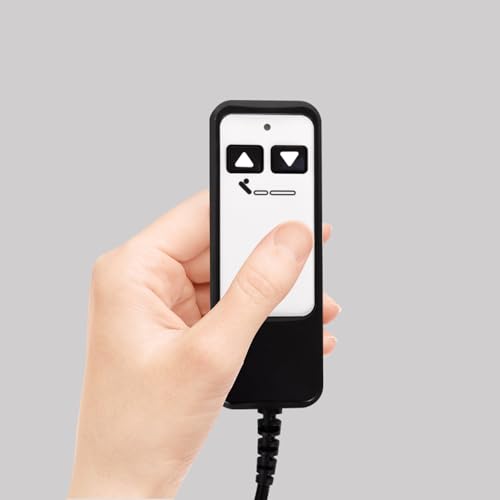
Richmat HJH5 2-Button Remote is the only wired option here, with a 5-pin connector and two buttons for raising or lowering the head section. Its 5-foot cord gives some reach from the bed frame, and a removable clip can hang the handset on the frame. The maker says to power off before replacing it, then reconnect power and check the indicator light.
This is the straightforward choice when the existing handset is wired and only controls head recline. It does not offer foot-section or wireless control, so it is not a match for a bed whose remote operates those functions.
Bottom line: Choose this if your bed uses a 5-pin wired handset and needs head-section control only.
PZL Richmat HJH55 IR Remote

PZL Richmat HJH55 IR Remote is the only option here identified for the HJH55 model and uses an infrared remote rather than a corded handset. The maker says it must be paired before use, and cautions that the remote comes in versions with different buttons and functions. Check that the replacement’s button arrangement matches the old remote before committing to this model.
This can suit an HJH55 owner who wants an IR backup or replacement. Batteries and instructions are not included, and the required pairing steps are not provided with the package, so buyers who need included setup guidance may prefer another route.
Bottom line: Choose this for an HJH55 bed when the replacement version matches the original buttons.
HJH13D Wireless for Milemont or Lucid

HJH13D Wireless for Milemont or Lucid is the HJH13D option with a clearly limited brand fit: it is intended for Milemont and Lucid adjustable beds, not other brands. The old handset must have the same buttons in the same positions, since the maker warns that different HJH13D versions cannot substitute for one another. Pairing is also required; several methods are provided for setup.
This remote suits owners who can confirm both the bed brand and exact button layout. Its narrow compatibility is a real limitation for other Richmat-powered beds, even if their remotes also carry an HJH13D model number.
Bottom line: Choose this only for a Milemont or Lucid bed with the exact HJH13D button layout.
Ecdtrans HJH13D Remote

Ecdtrans HJH13D Remote narrows HJH13D compatibility by serial number: the maker says it fits remotes numbered 8H13D0192 or 8H13D0092. Button arrangement still matters because multiple versions of HJH13D have different functions. Unlike the other HJH13D option here, this model’s fit rule is based on those two serial numbers rather than naming bed brands.
This is a possible replacement when the original handset’s serial matches and its buttons align. The strict serial and button checks make it a poor choice when the old remote cannot be identified; verify both before ordering.
Bottom line: Choose this when the original HJH13D remote has one of the two matching serial numbers.
How to choose a Richmat adjustable bed remote
Start with the old handset’s model, connector, and button layout; the Richmat name by itself does not establish compatibility. A wired handset needs a matching plug and pin arrangement, while a wireless remote must be made for the bed’s control system and paired if required. Compare every button position, not just the number of buttons, because HJH13D versions can assign different functions. A practical rule: if the connector or button layout differs from the original, do not assume the remote will work. For HJH13D replacements, also check the model-specific limits, including named bed brands or serial numbers. Choose a remote only after those checks agree.
Wired and wireless Richmat remotes
Wired handsets connect directly to the bed system, so connector type and pin count are key fit checks; the HJH5 here has a 5-pin plug and a 5-foot cord. Wireless replacements avoid a cord but add model and pairing checks: the HJH55 option is infrared, while the HJH13D options are described as wireless. Infrared remotes generally need a clear path to their receiver, so avoid blocking the receiver area when operating one. Do not treat the words “wireless” or “Richmat” as enough to identify a match. First decide whether the original bed uses a cord, then compare model and buttons; mixing up connection types is a common replacement mistake.
What to check before replacing a Richmat remote
Read the model and serial markings on the old remote, then compare them with the replacement’s compatibility limits. A Richmat HJH13D remote is not automatically interchangeable with another HJH13D version: button functions and positions must match, and the two HJH13D products here have different fit rules. For a wired replacement, compare the plug and pin count before connecting it. For a wireless unit, confirm whether pairing is needed and identify the setup method for the bed system. Power off before plugging in a wired replacement, as the HJH5 maker directs. Do not force a connector or keep testing a remote that does not match; confirm the correct handset first.
Pairing and safe operation
Pairing is a separate step from selecting a compatible wireless remote: the HJH55 and HJH13D options here require pairing, while their setup methods differ. Keep the handset close to the bed’s receiver during pairing and avoid pressing multiple controls unless the model’s pairing procedure specifically calls for it. When replacing a wired handset, power off the bed before changing the connection, then restore power and check that the handset responds as expected. Adjustable beds move heavy sections; keep hands, pets, and loose bedding clear of hinges and moving gaps during operation. Stop if the bed moves unexpectedly, and resolve the remote or pairing mismatch before further use.
Frequently Asked Questions
How can I identify my Richmat bed remote model?
Look for the model and any serial number printed on the handset, then compare the button layout and connector with the replacement. For example, the Ecdtrans HJH13D remote here specifies serial numbers 8H13D0192 and 8H13D0092.
Do Richmat adjustable bed remotes need pairing?
Some wireless replacements do; both the HJH55 and HJH13D options here require pairing. A wired replacement such as the 5-pin HJH5 connects by cable instead.
Can one HJH13D remote replace another HJH13D remote?
Not necessarily: HJH13D versions can have different button functions and positions. Match the complete layout and check any brand or serial-number restriction before choosing one.
What does a 5-pin bed remote connector mean?
It identifies a wired plug with five pins, as used by the HJH5 remote here. Compare the old handset’s connector and pin count rather than relying on the model name alone.
Is an infrared bed remote different from a wireless remote?
Infrared is one kind of wireless control and generally needs a clear path to the receiver. The HJH55 replacement is identified as IR, while the HJH13D options are described as wireless.