
Retina MacBook 2017 Keyboard Replacements Compared

Willhom A1706/A1707 US Keyboard is the closest fit for most Retina MacBook Pro owners looking for a 2017 keyboard, with US-layout options for 13-inch A1706 and 15-inch A1707 models. Owners of the 12-inch Retina MacBook need Willhom A1534 US Keyboard instead, while MacBook Air A1466 is not a Retina model.
Identify the model number on the computer before choosing: 2017 MacBooks use different keyboard assemblies, and a similar screen size does not establish compatibility.
We earn a commission if you buy through links on this page. As an Amazon Associate I earn from qualifying purchases. Products are compared on manufacturer specifications, not hands-on testing.
- Best overall: Willhom A1706/A1707 US Keyboard – Fits listed Retina MacBook Pro 13-inch A1706 and 15-inch A1707 models from 2016–2017.
- Best for 12-inch MacBook: Willhom A1534 US Keyboard – Fits the US-layout A1534 Retina MacBook from 2016–2017 and includes installation screws and a screwdriver.
- Best for keyboard protection: CaseBuy Silicone Keyboard Cover – A silicone cover fits several older MacBook Air and Retina MacBook Pro models, but it does not replace a keyboard.
| Product | Best for | Compatible model | Keyboard layout or type | Included parts | Shop |
|---|---|---|---|---|---|
| Willhom A1706/A1707 US Keyboard | MacBook Pro | A1706, A1707 | US layout | Keyboard | Check Price on Amazon |
| Willhom A1534 US Keyboard | 12-inch MacBook | A1534 | US layout | Screws, screwdriver | Check Price on Amazon |
| HAWSON A1466/A1369 Keyboard | MacBook Air | A1466, A1369 | US layout | Screws, screwdriver | Check Price on Amazon |
| HAWSON A1398 Keyboard | Older MacBook Pro | A1398 | US layout | Screws, screwdriver | Check Price on Amazon |
| CaseBuy Silicone Keyboard Cover | Keyboard protection | A1369, A1466, A1425, A1502, A1398 | Cover | Silicone | Check Price on Amazon |
Retina MacBook 2017 Keyboard Options
Match the model number and layout first; replacement keyboards and protective covers serve different purposes.
Willhom A1706/A1707 US Keyboard

For a 2017 Retina MacBook Pro, the key distinction is model number: this US-layout keyboard is listed for 13-inch A1706 and 15-inch A1707 models, including specified Mid 2017 configurations. It also covers Late 2016 configurations, so the fit is not determined by screen size alone. Choose it when the computer’s model number matches one of those chassis and the existing upper case is US layout. The product is a keyboard only; buyers seeking a 12-inch A1534 part should choose a different fit.
Bottom line: Choose this for a matching US-layout A1706 or A1707 MacBook Pro.
Willhom A1534 US Keyboard

For the 12-inch Retina MacBook, this A1534 replacement is the distinct fit; it is not the keyboard for a Retina MacBook Pro. It is a US English keyboard intended for a US-layout upper case, and the package includes installation screws and a screwdriver. The keyboard on this model is riveted in place, so replacing it involves removing the rivets before installing the replacement. The fit covers Early 2016 through Mid 2017 models, not the 2015 A1534.
Bottom line: Choose this for a 2016–2017 US-layout 12-inch A1534 MacBook.
HAWSON A1466/A1369 Keyboard
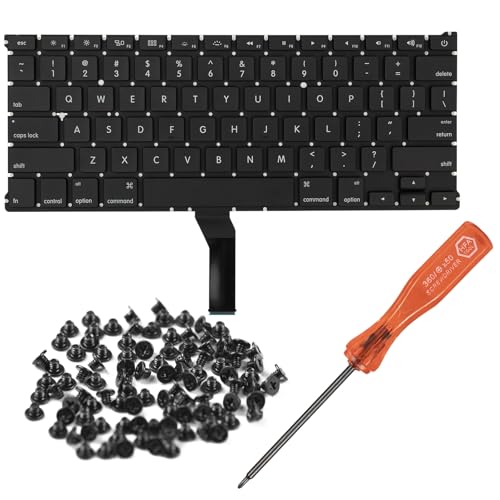
Unlike the Retina MacBook parts, this keyboard is for the older MacBook Air A1466 and A1369, covering Mid 2011 through Mid 2017 US-layout models. It comes with keyboard screws and a screwdriver, but not a backlight. The part may suit an owner searching broadly for a 2017 MacBook keyboard, yet A1466 is not a Retina MacBook; do not choose it for an A1706, A1707, or A1534. Installation requires laptop disassembly, so it is best for someone comfortable with that work.
Bottom line: Choose this only for a US-layout A1466 or A1369 MacBook Air.
HAWSON A1398 Keyboard
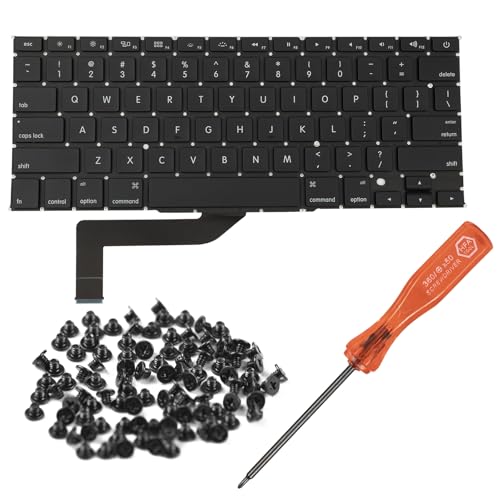
This replacement is for the 15-inch Retina MacBook Pro A1398, but its fit ends at Mid 2015, making it an older-generation alternative rather than a match for 2017 models. It includes keyboard screws and a screwdriver, and does not include a backlight. Check the A-number on the computer before considering it: the 15-inch A1707 introduced for the 2016–2017 generation uses a different keyboard fit. Replacing a laptop keyboard requires disassembly, so this part is better suited to a technically experienced repairer.
Bottom line: Choose this for an older US-layout 15-inch A1398, not a 2017 A1707.
CaseBuy Silicone Keyboard Cover

This is a silicone keyboard cover, not a replacement keyboard, and its compatibility list notably excludes the 2016–2017 A1706 and A1708 MacBook Pro. It fits older MacBook Air A1369/A1466 and specified Retina MacBook Pro A1425, A1502, and A1398 models, among others. Choose it only if the goal is a removable cover for one of those listed models, rather than repair of a malfunctioning keyboard. A cover cannot restore a failed key switch, and the compatibility should be checked against the exact model before use.
Bottom line: Choose this only for protection on one of its older models.
How to identify the right Retina MacBook keyboard
Start with the model number, not the screen size or the year alone. A 2017 13-inch Retina MacBook Pro may be A1706, while a 15-inch model may be A1707; the 12-inch Retina MacBook is A1534. Those are separate keyboard fits. The older 15-inch Retina MacBook Pro A1398 and non-Retina MacBook Air A1466 are not interchangeable with them. Read the A-number from the underside or the system’s model information, then compare it with the keyboard’s compatibility range. Also match the keyboard layout: a US keyboard is intended for a US-layout upper case, and physical key arrangement is not made compatible just by software settings. If the model number is unclear, verify it before ordering rather than relying on a year label.
Replacement keyboard or keyboard cover
A replacement keyboard addresses failed or damaged keys; a silicone cover sits over a working keyboard for surface protection. The distinction matters because a cover cannot repair a switch or restore key input. Covers are model-specific: even two MacBook Pro models with the same display size can differ in chassis and key spacing. A keyboard replacement is a more involved repair, particularly on the 12-inch A1534, whose original keyboard is riveted in place. Use this comparison to separate the choices by task. For any repair, power the computer down and disconnect its battery before internal work; a metal tool or loose fastener contacting a powered board can cause damage. If disassembly is unfamiliar, a repair professional is the safer option.
The model and goal give a simple choice:
| Need | Model clue | Part type |
|---|---|---|
| Replace MacBook Pro keyboard | A1706 or A1707 | US keyboard replacement |
| Replace 12-inch MacBook keyboard | A1534, 2016–2017 | US keyboard replacement |
| Protect older supported keyboard | Check cover’s model list | Silicone cover |
What to check before beginning a keyboard repair
Confirm the exact model and keyboard layout before opening the computer; a 13-inch screen does not guarantee A1706 compatibility, and US and other layouts use different physical key arrangements. Keyboard replacement can require extensive disassembly, and the A1534 keyboard is riveted to the upper case, so removing it is not a simple key-by-key swap. Keep screws organized as they come out because small laptop fasteners can be easy to mix up. Work with the computer powered off, disconnect the battery, and avoid static discharge by using appropriate ESD precautions. Stop if a cable, fastener, or board component resists; forcing a connector can damage its socket. Buyers without laptop-repair experience should consider professional service rather than treating the included screwdriver as proof the job is simple.
Frequently Asked Questions
How do I find my MacBook model number?
Look for the A-number printed on the underside of the MacBook or in macOS system information. A1706, A1707, and A1534 refer to different 2016–2017 keyboard fits, so match the full model before selecting a part.
Can I replace a single MacBook keycap?
A replacement keyboard is not automatically a source of compatible keycaps. Keycap and switch mechanisms can differ between models, so confirm the exact keyboard mechanism before attempting a single-key repair.
Is the A1534 keyboard difficult to replace?
The A1534 keyboard is riveted in place, so removal involves taking out the rivets before fitting the replacement. That makes this a more involved repair than replacing a removable keycap; inexperienced repairers should consider professional service.
Does a keyboard cover fix keys that do not work?
No, a silicone cover protects the surface but does not repair a failed key switch or restore input. For nonworking keys, first verify the computer’s model and consider diagnosis of the keyboard assembly.
Do US and international MacBook keyboards fit the same?
A US-layout replacement is intended for a US-layout upper case, so do not assume another layout will match physically. Check both the A-number and the existing key layout before choosing a replacement.