
Single DIN With Android Auto: 5 Screen Styles Compared

For most drivers, 6.5-Inch Incell Single DIN Stereo is the most flexible choice because it supports wired and wireless Android Auto and has a 6.5-inch screen. Choose a different option if you want a larger floating display, a specific screen size, or wireless-only phone integration.
A single DIN stereo uses a compact dash opening, while some models add a larger screen that extends beyond the chassis; measure your dash and check for vent or button obstruction before choosing.
We earn a commission if you buy through links on this page. As an Amazon Associate I earn from qualifying purchases. Products are compared on manufacturer specifications, not hands-on testing.
- Best overall: 6.5-Inch Incell Single DIN Stereo – Offers both wired and wireless Android Auto with a 6.5-inch touchscreen.
- Best for a large display: PLZ 10.1-Inch Floating Single DIN Stereo – Pairs a 10.1-inch adjustable touchscreen with wired and wireless Android Auto.
- Best for a 6.9-inch screen: 6.9-Inch Wireless Single DIN Stereo – Combines wireless Android Auto with a 6.9-inch touchscreen.
| Product | Best for | Screen size | Android Auto connection | Backup camera | Shop |
|---|---|---|---|---|---|
| 6.5-Inch Incell Single DIN Stereo | Wired or wireless | 6.5 inches | Wired and wireless | 1080P camera | Check Price on Amazon |
| 6.9-Inch Wireless Single DIN Stereo | 6.9-inch screen | 6.9 inches | Wireless | Camera included | Check Price on Amazon |
| 6.36-Inch Wireless Single DIN Stereo | Compact touchscreen | 6.36 inches | Wireless | Camera included | Check Price on Amazon |
| PLZ 10.1-Inch Floating Single DIN Stereo | Adjustable large screen | 10.1 inches | Wired and wireless | Camera included | Check Price on Amazon |
| Haudio 10.1-Inch Android 13 Floating Stereo | Rotatable display | 10.1 inches | Wireless | Camera included | Check Price on Amazon |
Single DIN Radios With Android Auto
Compare the screen layout and phone-connection options before deciding which stereo suits your dashboard.
6.5-Inch Incell Single DIN Stereo

6.5-Inch Incell Single DIN Stereo stands out for offering Android Auto over either a wired or wireless connection, so it suits drivers who want a choice between plugging in and connecting without a cable. Its 6.5-inch InCell touchscreen is paired with Bluetooth 6.0, USB Type-C fast charging, voice control, and an included external microphone. The stereo also includes a 1080P backup camera. Buyers who want a larger display should compare the 10.1-inch floating-screen options instead; the 6.5-inch screen is the smaller-format choice here.
Bottom line: Choose this if you want wired and wireless Android Auto in a moderate-size touchscreen.
6.9-Inch Wireless Single DIN Stereo

6.9-Inch Wireless Single DIN Stereo has a 6.9-inch touchscreen and wireless Android Auto, placing its display between the 6.5-inch model and the 10.1-inch floating screens. The product name also identifies Bluetooth, USB Type-C fast charging, a 1080P backup camera, mirror link, and steering-wheel control support. Its installation caveat matters: a single DIN unit can block vents or dash buttons in some vehicles, and the unit is for 12-volt automotive DC systems rather than 24-volt systems. Choose another option if wired Android Auto is a priority.
Bottom line: Pick this for a 6.9-inch screen and wireless phone connection in a 12-volt vehicle.
6.36-Inch Wireless Single DIN Stereo

6.36-Inch Wireless Single DIN Stereo has the smallest touchscreen in this group at 6.36 inches, alongside wireless Android Auto and an included backup camera. Its feature set also includes voice control, a 10-band EQ, steering-wheel control, FM radio, and USB-C. The included camera is described as waterproof and equipped with 12 LED lights. This is a sensible fit when a more compact display is preferred, but its feature set does not give a wired Android Auto option; choose a model that explicitly offers wired connectivity if you want that setup.
Bottom line: Choose this when a 6.36-inch display and wireless Android Auto suit your priorities.
PLZ 10.1-Inch Floating Single DIN Stereo
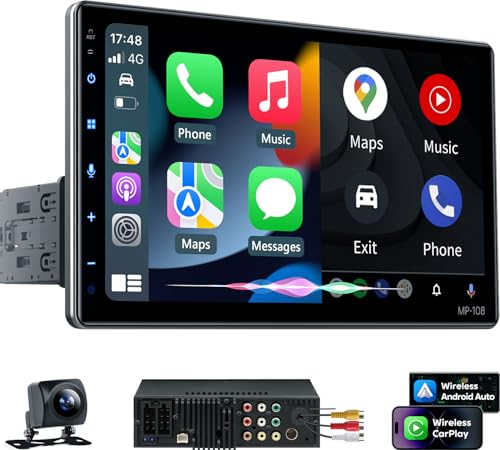
PLZ 10.1-Inch Floating Single DIN Stereo combines a single DIN receiver with a 10.1-inch IPS touchscreen that adjusts to different viewing angles, making it the large-screen choice for drivers who want wired or wireless Android Auto. It also includes Bluetooth 5.3, a backup camera, FM/AM radio, steering-wheel control support, and two subwoofer outputs. The display is much larger than the conventional compact face of a single DIN receiver, so check dash clearance and whether it could obstruct vents or controls before ordering. Its screen may be too prominent for a low-profile installation.
Bottom line: Pick this for an adjustable 10.1-inch display and a choice of wired or wireless Android Auto.
Haudio 10.1-Inch Android 13 Floating Stereo

Haudio 10.1-Inch Android 13 Floating Stereo is the other 10.1-inch option, with a rotatable IPS floating touchscreen that can switch between portrait and landscape orientations. Android Auto connects wirelessly, and the stereo also includes Android 13, 2GB of RAM, 32GB of storage, Wi-Fi, Bluetooth, mirror link, and an AHD camera. Those built-in Android features distinguish it from simpler receiver-focused choices. The large screen and stated dimensions make dash clearance especially important; choose a smaller display if space around the receiver is tight.
Bottom line: Choose this if you want a rotatable 10.1-inch screen and built-in Android features.
How to Choose a Single DIN Android Auto Stereo
Choose first by phone connection and then by screen layout. Wired Android Auto connects through a USB cable, while wireless Android Auto pairs without that cable; wireless convenience can depend on a compatible phone and vehicle setup. Among these options, some support both methods and others specify wireless connection. Screen sizes range from 6.36 to 10.1 inches, but a bigger screen does not change the receiver’s single DIN form factor. For a flush, compact look, favor the smallest display; for a larger view, consider a floating or adjustable screen and check the dash space around it.
Backup cameras, voice control, Bluetooth, and steering-wheel controls are useful secondary filters. Check whether camera and control compatibility match the vehicle before selecting based on those features alone.
Single DIN Screen Fit and Dash Clearance
A single DIN receiver is designed around a standard opening roughly 2 inches tall and 7 inches wide, but a large floating display extends beyond that opening. The stereo body and the screen therefore need separate clearance checks: measure the opening, then look for nearby vents, hazard switches, climate controls, and trim that may interfere with screen movement. With less than about 2 inches of open height above the receiver, a 10-inch floating screen may be difficult to position without blocking something; measure the actual path before choosing.
Dashboard depth, wiring access, and vehicle-specific mounting hardware also affect installation. Do not assume that a single DIN label guarantees a fit in every vehicle; confirm opening dimensions and obstruction risk first.
Wired, Wireless, and Floating-Screen Types
Wired Android Auto uses a phone cable for the connection and charging, while wireless Android Auto avoids a cable during normal pairing. Wired models can be preferable when you want a direct connection; wireless models reduce cable handling. A floating screen is mounted above the receiver chassis and can provide a larger view, but it occupies dashboard space beyond the single DIN opening. A compact touchscreen keeps the face smaller, while rotating and adjustable screens allow alternative viewing angles.
Use this decision guide to narrow the type before comparing extras:
| Priority | Type to consider | Check before choosing |
|---|---|---|
| Smaller face | 6.36- to 6.9-inch touchscreen | Dash opening and screen visibility |
| Connection flexibility | Wired and wireless Android Auto | Phone compatibility and cable path |
| Large adjustable view | 10.1-inch floating display | Vents, controls, and screen clearance |
Installation and Safe Use
Disconnect the vehicle battery before working on stereo wiring, and use the correct vehicle-specific harness rather than guessing at wire functions. A 12-volt receiver must not be connected to a 24-volt vehicle system; the 6.9-inch option here explicitly limits compatibility to 12-volt automotive DC. Incorrect wiring can cause equipment damage, so match each connection to the wiring diagram and vehicle harness.
Set up navigation, voice control, and camera views while parked rather than while moving. A backup camera is an aid, not a substitute for checking mirrors and surroundings, and a large screen should not obstruct vents, switches, or the driver’s view.
Frequently Asked Questions
What does single DIN mean in a car stereo?
Single DIN refers to a receiver format designed around an opening roughly 2 inches tall and 7 inches wide. A floating screen can be much larger than the receiver opening, so check both the dash opening and the screen’s movement clearance.
Can Android Auto work without a USB cable?
Yes, a stereo and phone that support wireless Android Auto can connect without a USB cable. Wireless connection requires compatible devices, while wired Android Auto uses a cable and can also keep the phone charging.
Will a single DIN stereo fit every vehicle?
No, vehicle dashboards differ in opening dimensions, depth, wiring, and surrounding trim. Measure the opening and check whether the stereo or an extended screen could obstruct vents or controls before installing.
Does a backup camera replace checking around the car?
No, a backup camera supplements direct checks and mirror use rather than replacing them. Check the area around the vehicle before reversing, since a camera view may not show every obstacle.
Can I install a 12-volt stereo in a 24-volt vehicle?
No, a 12-volt-only stereo should not be connected to a 24-volt vehicle system. Verify the vehicle’s electrical system and the receiver’s voltage requirement before installation.