
Kodak Dock Plus 4PASS: Printer, Refills and Cases

For most people seeking the Kodak Dock Plus 4PASS, KODAK Dock Plus 4PASS Printer is the direct match: it prints 4×6-inch photos and docks a compatible smartphone for charging while printing. Choose KODAK Dock 4×6 Refill, 80 Sheets if you already own a compatible printer and need paper and cartridge refills; RIYADAone Dock Plus Printer Case or ALKOO Dock Plus 4PASS Hard Case are storage cases, not printers.
Kodak EasyShare Printer Dock PLUS is an older EasyShare camera dock, so it suits a different camera-based setup rather than the Dock Plus 4PASS system.
We earn a commission if you buy through links on this page. As an Amazon Associate I earn from qualifying purchases. Products are compared on manufacturer specifications, not hands-on testing.
- Best overall: KODAK Dock Plus 4PASS Printer – The printer itself makes 4×6-inch prints and docks a compatible smartphone.
- Best for refills: KODAK Dock 4×6 Refill, 80 Sheets – The refill pack provides 80 sheets and is compatible with Dock Plus and Dock Era.
- Best for organized storage: ALKOO Dock Plus 4PASS Hard Case – The molded case has room for paper, cartridges, a tray and a power adapter.
| Product | Best for | Product type | Fit or capacity | Shop |
|---|---|---|---|---|
| KODAK Dock Plus 4PASS Printer | Printing from phones | 4×6-inch printer | 50 sheets | Check Price on Amazon |
| KODAK Dock 4×6 Refill, 80 Sheets | Printer replenishment | Paper and cartridge refill | 80 sheets | Check Price on Amazon |
| RIYADAone Dock Plus Printer Case | Portable printer storage | Hard-shell case | Dock Plus / Dock Premium | Check Price on Amazon |
| ALKOO Dock Plus 4PASS Hard Case | Accessory organization | Custom-molded hard case | Dock Plus 4PASS | Check Price on Amazon |
| Kodak EasyShare Printer Dock PLUS | EasyShare camera printing | Camera printer dock | Up to 4×6-inch prints | Check Price on Amazon |
Kodak Dock Plus 4PASS Products
Choose a printer, compatible refill pack or storage case according to what your current setup needs.
KODAK Dock Plus 4PASS Printer
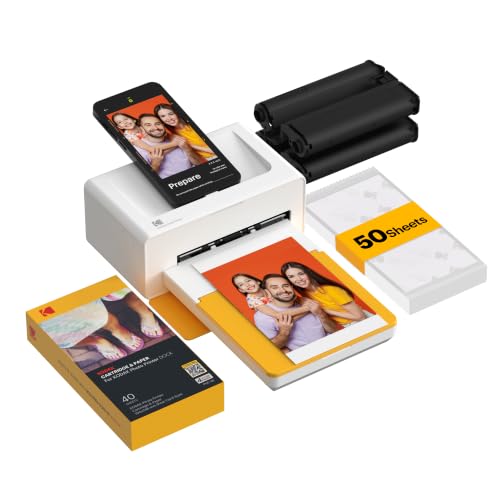
KODAK Dock Plus 4PASS Printer is the direct Dock Plus 4PASS printer, rather than a refill or carrying case. It makes 4×6-inch prints and has an integrated smartphone docking station that can charge a compatible phone while printing. The maker says its 4PASS process lays down three color layers and a protective clear layer, with prints taking about 55 seconds and resisting water, fingerprints and fading. The included pack is 50 sheets. This is the right choice when you need the printer itself; buyers who already have a compatible Dock Plus can instead consider a refill pack.
Bottom line: Choose this if you need the Dock Plus printer and want to print 4×6-inch photos from a compatible phone.
KODAK Dock 4×6 Refill, 80 Sheets

KODAK Dock 4×6 Refill, 80 Sheets supplies consumables for compatible Kodak Dock printers; it is not a standalone printer. The pack contains 80 sheets and a combination ink cartridge, and it is compatible with Dock Plus and Dock Era. The maker describes its process as dye diffusion transfer with a laminated fourth layer. That makes this a practical replenishment option for someone who already owns a compatible printer and wants a larger pack than the 50-sheet bundle included with KODAK Dock Plus 4PASS Printer. Confirm your printer model matches the refill compatibility before ordering, since this pack is not described as a universal 4×6 photo refill.
Bottom line: Pick this when your Dock Plus or Dock Era needs an 80-sheet paper-and-cartridge refill.
RIYADAone Dock Plus Printer Case

RIYADAone Dock Plus Printer Case is a protective storage case shaped for the Kodak Dock Plus 4PASS or Dock Premium 4×6 printer, not a printing device. Its EVA and nylon exterior and removable baffle provide a different storage approach from the custom-molded organizer in ALKOO Dock Plus 4PASS Hard Case. The product features also mention a mesh bag organizer. This option suits a buyer who wants a case for transporting or storing the printer. Check that your exact printer model and included accessories fit the case before choosing it, particularly if you plan to carry more than the printer.
Bottom line: Choose this for a hard-shell case intended for Dock Plus 4PASS or Dock Premium printers.
ALKOO Dock Plus 4PASS Hard Case

Unlike RIYADAone Dock Plus Printer Case, ALKOO Dock Plus 4PASS Hard Case emphasizes dedicated spaces for printer accessories as well as a custom-molded fit for the Dock Plus 4PASS. It is a case only, with a mesh pocket sized for more than 200 sheets or 100 refill packs, plus space for two ink cartridges, a paper tray and a power adapter. The maker specifies compatibility with Dock Plus 4PASS and excludes Dock ERA Plus. Choose it when keeping supplies together is more important than buying printing hardware; the case does not include a printer or refills.
Bottom line: Pick this case if you have the Dock Plus 4PASS and want to store its supplies together.
Kodak EasyShare Printer Dock PLUS

Kodak EasyShare Printer Dock PLUS is a Kodak EasyShare camera printer dock, an older and different setup from the smartphone-focused Dock Plus 4PASS. It prints borderless photos up to 4×6 inches, supports PictBridge-enabled digital cameras and can print wirelessly from a cell phone. The maker says a docked EasyShare camera battery recharges in about 3.5 hours and a print takes as little as 60 seconds. This model suits someone with compatible EasyShare gear; it is not the Dock Plus 4PASS printer or its refill system.
Bottom line: Choose this only if you want the EasyShare camera dock rather than the Dock Plus 4PASS system.
How to choose a Kodak Dock Plus 4PASS product
Start by deciding whether you need the printer, consumables or storage: only KODAK Dock Plus 4PASS Printer is the Dock Plus 4PASS printer, while KODAK Dock 4×6 Refill, 80 Sheets is a refill and RIYADAone Dock Plus Printer Case and ALKOO Dock Plus 4PASS Hard Case are cases. A dye-sublimation photo printer transfers color in successive passes and typically pairs its photo paper with a color cartridge or ribbon; the Dock Plus pack in this selection has 50 sheets, while the compatible refill has 80. If you already own the printer, choose the refill rather than buying another device. If you need printing hardware, select the printer. Cases solve transport and organization needs, not printing needs; the older Kodak EasyShare Printer Dock PLUS belongs to the EasyShare camera-dock category.
What 4PASS printing means for 4×6 photos
Four-pass dye-sublimation printing builds a photo through color layers and a clear finishing layer, rather than depositing a single ink image in one pass. The Dock Plus 4PASS maker describes three color layers plus clear lamination and about 55 seconds per print. This method is designed around consumables matched to the printer, so generic 4×6 sheets alone are not a substitute for a compatible paper-and-cartridge refill. Standard 4×6-inch photo paper has a 3:2 aspect ratio; photos with a different shape may be cropped or leave borders depending on print settings. Review the image crop before printing important compositions.
How to choose a Kodak printer case
Match the case to the exact printer model before deciding based on storage capacity. RIYADAone Dock Plus Printer Case is identified for Dock Plus 4PASS or Dock Premium printers, while ALKOO Dock Plus 4PASS Hard Case is custom molded for Dock Plus 4PASS and expressly excludes Dock ERA Plus. The second case gives specific accessory capacity: more than 200 sheets or 100 refill packs in its mesh pocket, plus two cartridges and room for the tray and adapter. A case sized around the printer may not hold every accessory at once. Measure the printer and compare its shape with the interior layout, especially if carrying the power adapter or a paper tray.
Refill and print handling basics
Use the paper and cartridge combination intended for the printer; dye-sublimation systems need both the image-forming material and compatible photo paper for each print cycle. Keep unused sheets clean and dry, since dust or moisture can affect the printable surface. Handle finished photos by the edges until fully cool and dry, even when the maker describes them as water and fingerprint resistant. Replace the refill when the printer indicates the consumables are depleted, rather than attempting to reuse an exhausted cartridge. For images with faces near the edge, check the crop and orientation first: a borderless 4×6 output can trim content that does not match the print’s proportions.
Frequently Asked Questions
How long does the Dock Plus 4PASS take per photo?
The Dock Plus 4PASS maker gives an approximate print time of 55 seconds for a 4×6-inch photo. Actual time can vary with the job and connection.
Can I use the 80-sheet refill with Dock Plus?
Yes, the 80-sheet Kodak Dock refill is identified as compatible with Dock Plus and Dock Era. Match the refill to the printer model rather than assuming all 4×6 paper cartridges fit.
Does the Dock Plus 4PASS charge a phone?
The printer has an integrated docking station that charges a compatible smartphone while printing. Confirm that your phone is compatible with the dock before relying on the charging function.
Are the Kodak Dock Plus cases interchangeable?
The cases do not have identical compatibility claims: one fits Dock Plus 4PASS or Dock Premium, while the other is for Dock Plus 4PASS and excludes Dock ERA Plus. Check your exact printer model and accessory load against the case before ordering.
What is the difference between Dock Plus and EasyShare Printer Dock?
Dock Plus 4PASS is presented as a smartphone-docking 4×6 printer, while the EasyShare Printer Dock is designed around compatible EasyShare cameras and PictBridge cameras. Choose based on the device you plan to print from.