
Microphone High Fidelity Car: 5 Options Compared

For most drivers, ViaBecs 3.5 mm TRS Car Microphone is the most straightforward high-fidelity car microphone choice because it has a 3-pole 3.5 mm TRS connector and a 3-meter cable. Drivers whose head unit needs a 2.5 mm connection should choose an adapter-equipped alternative, while anyone whose stereo lacks a microphone input will need a different setup.
External car microphones connect to a compatible head unit and can be positioned nearer the driver than a built-in mic.
We earn a commission if you buy through links on this page. As an Amazon Associate I earn from qualifying purchases. Products are compared on manufacturer specifications, not hands-on testing.
- Best overall: ViaBecs 3.5 mm TRS Car Microphone – Its 3-pole 3.5 mm TRS connector and 3-meter cable are clearly specified.
- Best for adapter fit: 3.5 mm Car Mic with 2.5 mm Adapter – It includes a 3.5 mm female-to-2.5 mm male adapter.
- Best for flexible mounting: FingerLakes 3.5 mm Microphone Assembly – It includes both a dash mount and a visor clip.
| Product | Best for | Connector | Mounting | Shop |
|---|---|---|---|---|
| ViaBecs 3.5 mm TRS Car Microphone | TRS head units | 3-pole 3.5 mm TRS | Clip and adhesive mount | Check Price on Amazon |
| FingerLakes 3.5 mm Microphone Assembly | Clip or dash mounting | 3.5 mm | Dash mount and visor clip | Check Price on Amazon |
| 3.5 mm Car Mic with 2.5 mm Adapter | Adapter-equipped radios | 3.5 mm; 2.5 mm adapter | — | Check Price on Amazon |
| FingerLakes FL11 3.5 mm External Mic | Omnidirectional pickup | 3.5 mm jack | Clip and adhesive | Check Price on Amazon |
| NewTH 3.5 mm Mic with 2.5 mm Adapter | Adapter and long reach | 3.5 mm; 2.5 mm adapter | — | Check Price on Amazon |
High-Fidelity Car Microphones
Compare the connector, cable and mounting details before choosing a microphone for your head unit.
ViaBecs 3.5 mm TRS Car Microphone

ViaBecs 3.5 mm TRS Car Microphone is the clearest match for a head unit that accepts a 3-pole 3.5 mm TRS microphone plug. The maker says positioning the mic closer to the driver can improve voice pickup compared with a factory-installed or dashboard-mounted microphone. Its 3-meter cable allows routing across the dash, A-pillar, headliner or center console, and the package includes a clip and adhesive mount. This suits owners who want placement flexibility without adding a connector adapter. The key limitation is connector fit: a 2.5 mm input or a different microphone wiring standard may require another option.
Bottom line: Choose this if your stereo has a 3-pole 3.5 mm TRS microphone input.
FingerLakes 3.5 mm Microphone Assembly
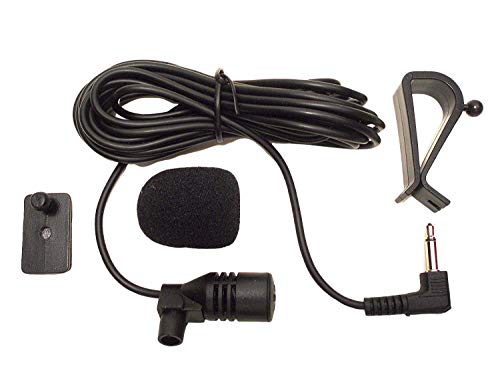
FingerLakes 3.5 mm Microphone Assembly stands out for including both a dash mount and a visor clip, so the driver can select a mounting position. Its 3.5 mm plug is intended for car radios with a 3.5 mm microphone input, and the cable measures 3 meters (9 feet). The maker describes the electret condenser cartridge as high-sensitivity and anti-noise, with fast data transmission intended to keep voice clear and stable while driving. This is a fit for a compatible 3.5 mm head unit when either mounting style is useful. It does not include a 2.5 mm adapter, so check the stereo input before choosing it.
Bottom line: Choose this for a compatible 3.5 mm input and a choice of visor or dash mounting.
3.5 mm Car Mic with 2.5 mm Adapter

3.5 mm Car Mic with 2.5 mm Adapter differs from the other options by including a 3.5 mm female-to-2.5 mm male adapter. That makes it a candidate for a head unit with the matching 2.5 mm microphone jack, as well as compatible 3.5 mm receivers. Its 3-meter cable gives routing reach, and the maker describes the mono omnidirectional condenser mic as high-sensitivity and anti-noise for hands-free calling. This suits drivers whose radio connector matches one of the two included formats. Connector size alone does not guarantee compatibility, so verify the head unit’s microphone input and wiring before installation.
Bottom line: Choose this if your radio uses the compatible 2.5 mm jack and you need the included adapter.
FingerLakes FL11 3.5 mm External Mic
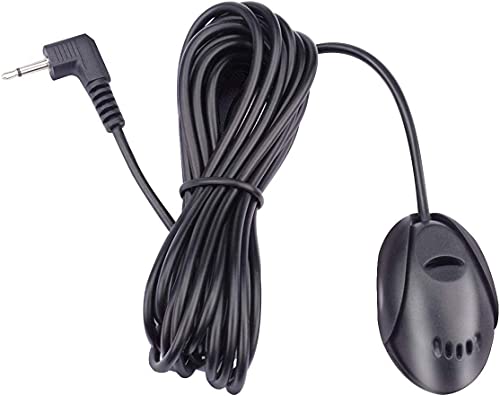
FingerLakes FL11 3.5 mm External Mic specifies an omnidirectional design and a 3.5 mm jack, distinguishing it for buyers seeking pickup from more than one direction. Its 3-meter cable supports longer routing, and the microphone can be lifted from its clip to change position. The maker says the electret condenser cartridge has high sensitivity and anti-noise capability, and describes the mic as plug and play. The adhesive mounting option is intended for surfaces such as a wall, glass or car interior. This model is for a compatible 3.5 mm input; no 2.5 mm adapter is included, which matters for radios with that smaller jack.
Bottom line: Choose this for a compatible 3.5 mm stereo and clip-based repositioning.
NewTH 3.5 mm Mic with 2.5 mm Adapter

NewTH 3.5 mm Mic with 2.5 mm Adapter pairs a 3.5 mm microphone connection with a 2.5 mm male adapter, distinguishing it for buyers whose head unit uses the smaller jack. The cable is described as 3 meters (9.45 feet), and the maker identifies an electret condenser cartridge with high sensitivity and anti-noise capability. It is intended for compatible receivers from several audio brands and head units with CarPlay or Android Auto, but those software features alone do not confirm a microphone jack match. Choose it when the physical input and adapter arrangement suit the radio. A mounting clip or adhesive mount is not identified among its features.
Bottom line: Choose this when your compatible head unit needs the included 2.5 mm adapter.
How to choose a high-fidelity car microphone
Start with the head unit’s microphone jack, not the stereo’s Bluetooth or smartphone features. A 3.5 mm plug and a 2.5 mm plug are different sizes, and a plug adapter only helps when the mic and radio wiring are also compatible. These options use 3-meter (about 10-foot) cables, enough to route around a dashboard and toward an A-pillar or headliner in many vehicles. The route itself matters: keep the cable clear of pedals, steering components, airbags and sharp trim edges. A mic near the driver may pick up speech more directly, but placement can also expose it to airflow or road noise. Prioritize a connector match first, then decide whether cable reach and included mounting hardware suit your cabin.
Where to place an external car microphone
Mount an external mic near the driver’s speaking position, usually on a visor, upper dash or headliner edge, rather than behind trim or low in the footwell. A closer position can improve the voice-to-background balance, while a spot directly in a vent’s airflow can add wind noise. Keep the mic and its cable outside airbag deployment paths; curtain airbags commonly deploy along the roof edge and A-pillars. Route wire behind trim only where it cannot snag, cross a pedal, or interfere with steering. Start with a temporary clip position and make a test call before securing adhesive mounts. Adhesive can lose grip on dusty, textured or hot surfaces, so clean the mounting area and check the hold before driving.
3.5 mm and 2.5 mm car microphone connections
Connector size is the first fit check: a 3.5 mm plug is about 0.14 inch across, while a 2.5 mm plug is about 0.10 inch. Adapters change physical plug size but do not guarantee the microphone’s pinout or electrical compatibility with a radio. A head unit may use a mono mic input, a proprietary socket, or require a mic wired for a particular standard. Check the radio’s manual or the markings by its external mic port for the connector and mic requirements before ordering. A simple comparison helps separate fit from cable convenience:
| Head unit input | What to match | Selection rule |
|---|---|---|
| 3.5 mm microphone jack | 3.5 mm microphone connector and compatible wiring | Choose a direct-fit option |
| 2.5 mm microphone jack | 2.5 mm plug or compatible adapter and wiring | Choose an adapter-equipped option |
| No external mic jack | Compatible interface for that radio | Do not assume Bluetooth means mic compatibility |
With an uncertain jack or pinout, confirm compatibility before installing the mic.
How to reduce noise on hands-free calls
Microphone placement and cabin noise affect call clarity as much as the microphone’s advertised sensitivity. Keep the capsule unobstructed and point it toward the driver when its design allows; avoid mounting it beside a vent, speaker or loose trim that vibrates. Many vehicle cabins become noisier at highway speed, so test a call at idle and at a safe, legal driving speed with a passenger. If callers hear excessive road or wind noise, move the mic farther from airflow and closer to the driver’s mouth. Secure extra cable under trim rather than coiling it near pedals or controls. Do not adjust or reroute equipment while driving.
Frequently Asked Questions
Will a 3.5 mm car microphone work with any stereo?
No; the stereo needs a compatible external microphone input. Confirm both the jack size and microphone wiring, because a matching 3.5 mm plug alone does not prove electrical compatibility.
How long should a car microphone cable be?
A 3-meter cable is about 9.8 feet and is commonly enough for routing from a head unit to a visor or upper windshield area in many cars. Measure the planned path and leave a little slack without letting wire reach the pedals or steering.
Where should I mount a hands-free car microphone?
A visor, upper dash or headliner edge near the driver is a practical starting point. Keep it clear of vents and outside airbag deployment paths, then test call clarity before fixing the mount permanently.
Can I use a 2.5 mm adapter on a 3.5 mm mic?
A size adapter can connect different plug diameters only when the microphone wiring and radio input are compatible too. Check the head unit’s mic requirements; a phone-style audio adapter is not automatically a car mic adapter.
Does an external mic improve Bluetooth call quality?
An external mic can improve voice pickup when it is compatible and positioned closer to the driver than a built-in microphone. Wind, road noise, cabin acoustics and the radio’s own processing still affect the call.