
Best Endoscope Camera for Android: 3 Scopes Compared

DEPSTECH NTC55 Dual-Lens 2K Endoscope suits most Android users because its dual lenses offer front and side views, with a 2560×1440-pixel resolution. Choose a single-lens scope instead if one forward-facing view is enough or you want a 16.4-foot cable.
An endoscope camera is a small wired inspection camera that sends live images to a phone; Android compatibility depends on both the phone connection and the required app.
We earn a commission if you buy through links on this page. As an Amazon Associate I earn from qualifying purchases. Products are compared on manufacturer specifications, not hands-on testing.
- Best overall: DEPSTECH NTC55 Dual-Lens 2K Endoscope – Dual front-and-side lenses provide two viewing perspectives, and the product specifies 2560×1440-pixel resolution.
- Best for a 16.4-foot cable: 16.4-ft Single-Lens Endoscope – The product specifies a 16.4-foot semi-rigid cable and compatibility with Android 7+.
- Best for connector options: EASTBEAR 16.4-ft Single-Lens Endoscope – The product includes Lightning, Micro-USB and Type-C connectors and supports Android 4.2+.
| Product | Best for | Resolution | Lens setup | Shop |
|---|---|---|---|---|
| DEPSTECH NTC55 Dual-Lens 2K Endoscope | Two viewing angles | 2560×1440 pixels | Dual | Check Price on Amazon |
| 16.4-ft Single-Lens Endoscope | Longer stated reach | 1920×1440 pixels | Single | Check Price on Amazon |
| EASTBEAR 16.4-ft Single-Lens Endoscope | Broader Android range | 1920×1440 pixels | Single | Check Price on Amazon |
Android endoscope cameras compared
Compare resolution, lens arrangement and phone compatibility before choosing a scope for an inspection task.
DEPSTECH NTC55 Dual-Lens 2K Endoscope

Unlike the single-lens options, this DEPSTECH scope has front and side cameras, so the app can switch between two perspectives. The 7.9 mm probe and semi-rigid cable are intended for reaching narrow inspection areas; the product also specifies an 80-degree viewing angle. DEPSTECH says its camera captures 2560×1440-pixel images. This choice suits Android users who need to inspect around an obstruction without repositioning the probe as often.
Bottom line: Choose this if seeing both forward and side views matters more than having a cable length.
16.4-ft Single-Lens Endoscope
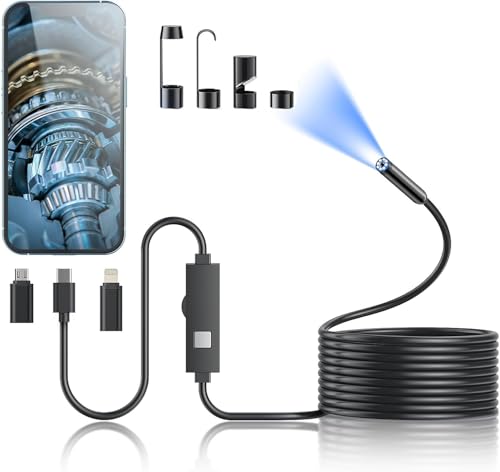
This scope is distinguished by its 16.4-foot semi-rigid cable, giving buyers a defined reach to compare against the inspection path. Its 7.9 mm single-lens probe captures 1920×1440-pixel images and video, and the product says it connects to Android 7+ devices. Eight adjustable LED lights are also specified for the probe. It is a fit for users who want a long cable and a forward-facing view rather than switching between camera angles. Because Android connection methods can differ by phone, confirm that the included interface works with your device before choosing it.
Bottom line: Pick this when a 16.4-foot cable and one forward view suit the access route.
EASTBEAR 16.4-ft Single-Lens Endoscope
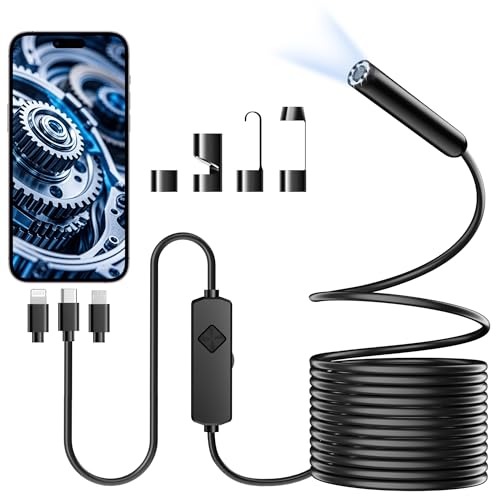
Android version support is the clearest distinction here: EASTBEAR specifies Android 4.2+, compared with the Android 7+ minimum given for 16.4-ft Single-Lens Endoscope. The single-lens 7.9 mm probe captures 1920×1440-pixel images, and the product specifies a 16.4-foot semi-rigid cable plus eight adjustable LEDs. It includes Lightning, Micro-USB and Type-C connectors, which gives more connector types to match against a phone or adapter setup. This is the suitable option when its Android support and connector selection match your device. It remains a single-lens scope, so it does not offer the side view provided by DEPSTECH NTC55 Dual-Lens 2K Endoscope.
Bottom line: Choose this if its Android version support and connector type fit your phone.
How to choose an Android endoscope camera
Start with the phone connection and the path the probe must travel. Android app support alone does not guarantee a working connection: confirm the connector fits your phone and check whether the camera app requires USB OTG, a setting some Android devices expose for wired USB accessories. Then compare probe diameter, cable reach and lens direction against the access opening and inspection target. A 7.9 mm probe is the specified size across these three options, but a narrow opening still needs clearance for the probe and any attached camera head. If you need to look behind a ledge, choose a dual-lens design; for a straight view, a single-lens may be sufficient. Match the phone’s Android version to the product’s minimum before deciding.
Single-lens and dual-lens scopes compared
A single-lens scope gives one camera perspective, while a dual-lens model adds a side-facing view. The practical choice depends on whether the inspection target faces the opening or sits around a corner. Probe diameter also affects access: these options specify 7.9 mm, so the opening must accommodate at least that diameter, with added room helpful for steering. Cable length matters too; among these, two products specify 16.4 feet and one does not give a length in its features. Use the comparison below to identify the type of view and reach that the specifications support, then match those traits to your route and phone.
| Inspection need | Scope trait | What to compare |
|---|---|---|
| Straight-ahead view | Single-lens | Probe access and cable reach |
| View around an obstruction | Dual-lens | Front/side camera switching |
| Older Android device | Check stated minimum | Android version and connector |
Probe size, cable reach and access
Measure the narrowest opening before selecting a probe; a 7.9 mm camera head needs an opening larger than 7.9 mm to pass through without binding. The route matters as much as the opening: a semi-rigid cable can hold a bent shape, but tight curves and sharp turns can still impede insertion or make steering difficult. For a straight access path longer than 16 feet, a 16.4-foot cable provides a reference; leave slack at the phone end rather than pulling the cable taut. The dual-lens option has a 7.9 mm probe, but its features do not establish cable length, so confirm reach before buying if the full route is critical.
Water resistance and safe inspection
IP67 is a protection rating, not permission for every kind of wet use. Under the IEC 60529 ingress-protection code, the second digit 7 corresponds to a specified temporary immersion test, commonly described as up to 1 meter for 30 minutes; real-world use can differ, and the camera body, phone and connector may not share the probe’s protection. Avoid connecting or handling a powered phone around water, and keep the phone and cable connection dry. Use a scope only in spaces that are cool and safe to access; do not insert it into energized electrical equipment or moving machinery. Let the probe cool and disconnect it before cleaning or storing it.
Frequently Asked Questions
Will an Android phone work with every endoscope camera?
No; the phone needs a compatible connector and a supported Android version, and some wired camera apps may require USB OTG.
What size opening fits a 7.9 mm endoscope probe?
An opening must be wider than 7.9 mm for a 7.9 mm probe to pass through freely. Allow extra clearance where the route bends, because the probe needs room to turn as well as enter.
Is an IP67 endoscope safe to use underwater?
IP67 indicates a defined temporary immersion test, commonly up to 1 meter for 30 minutes under IEC 60529; it does not establish suitability for extended underwater work. Keep the phone and cable connector dry, and use the probe only within the product’s specified limits.
How much cable length do I need for an inspection?
Measure the route from the phone to the farthest point, including turns, then allow extra slack so the cable is not pulled taut.
What does a side-view endoscope lens help inspect?
A side-facing lens helps show surfaces beside the direction the probe points, such as a wall around a bend. The dual-lens design here switches between front and side cameras; a single-lens scope provides only its forward-facing view.