
Apolosign 32 Inch Portable Smart Screen Compared

The ApoloSign 32-inch 4K Gen2 is the closest match for most buyers because it combines a touchscreen, built-in battery and 256GB of storage. Choose the other ApoloSign model if its memory configuration or full swivel rotation matters more; consider the non-touch HORION only if you can use a screen without touch or battery power.
A portable smart screen is a TV-style display on a rolling stand, designed to move between rooms without a fixed wall mount.
We earn a commission if you buy through links on this page. As an Amazon Associate I earn from qualifying purchases. Products are compared on manufacturer specifications, not hands-on testing.
- Best overall: ApoloSign 32-Inch 4K Gen2 – Combines 4K resolution, a 10-point touchscreen, 256GB storage and a built-in 15,000mAh battery.
- Best for full swivel rotation: ApoloSign 32-Inch UHD 4K Gen2 – Its name specifies full swivel rotation, with a 4K touchscreen and built-in battery.
- Best for non-touch TV use: HORION 32-Inch Portable Smart TV – The HORION is a rolling 32-inch smart TV for buyers who do not need touch or battery power.
| Product | Best for | Resolution and touch | Battery | Storage | Shop |
|---|---|---|---|---|---|
| ApoloSign 32-Inch 4K Gen2 | All-around home use | 3840 × 2160; 10-point touch | 15,000mAh | 256GB | Check Price on Amazon |
| ApoloSign 32-Inch UHD 4K Gen2 | Full swivel rotation | 3840 × 2160; touchscreen | 15,000mAh | 256GB | Check Price on Amazon |
| HORION 32-Inch Portable Smart TV | Plug-in TV viewing | 32-inch; non-touch | No battery | — | Check Price on Amazon |
ApoloSign 32 Inch Portable Smart Screens
Compare screen controls, power and storage to find the right rolling display for your rooms and routines.
ApoloSign 32-Inch 4K Gen2
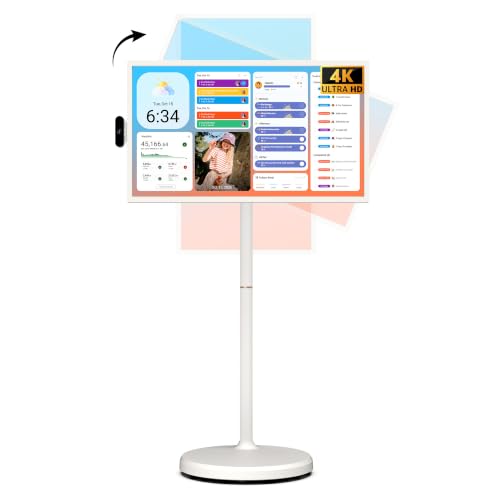
The 10-point touch display distinguishes this ApoloSign from the non-touch alternative, while its 4K resolution gives a 32-inch screen 3840 × 2160 pixels. It runs Android 16 with Google EDLA certification and has 8GB RAM, up to 8GB extended memory and 256GB storage. The built-in 15,000mAh battery supports moving it between rooms without relying on a cord during use. This configuration suits shared home activities and work; buyers who need a specific rotation style should compare the other ApoloSign model, whose name calls out full swivel rotation.
Bottom line: Pick this configuration for a 4K touch display with 256GB storage and battery power.
ApoloSign 32-Inch UHD 4K Gen2

Full swivel rotation is the distinguishing feature called out for this ApoloSign model, alongside a 32-inch 3840 × 2160 touchscreen. The product name specifies 16G + 256G storage, and its features identify an 8MP camera, Android 16 and a 15,000mAh built-in battery. Its calendar widget syncs with Google Calendar, Outlook and Google Tasks, which may suit a home or office display used for reminders. Choose it when screen rotation and the camera or calendar functions fit your setup; the maker does not identify the touch-point count, so buyers who need a certain number should confirm it before ordering.
Bottom line: Choose this model when full swivel rotation and its camera or calendar tools are priorities.
HORION 32-Inch Portable Smart TV

The HORION is the only non-touch, no-battery option here, so it is a different fit from the cordless ApoloSign screens. Its 32-inch display uses a rolling universal-wheel base, and the product features describe a TV platform with streaming apps, Chromecast and voice remote control. At 52 inches high, it is shorter than the ApoloSign models listed at 60.26 inches. This suits buyers who want a movable TV primarily for viewing and can keep it connected to power; it is not the pick for touch interaction or cord-free use.
Bottom line: Pick it for rolling TV viewing when touch and battery power are not needed.
How to Choose a 32-Inch Portable Smart Screen
Start with how you will control the screen and power it: touch input and a built-in battery matter if you plan to move it around for interactive use. A 32-inch 4K panel has 3840 × 2160 pixels, or about 138 pixels per inch across the screen diagonal, so it can show detailed content at ordinary room distances. Touchscreens are useful for direct interaction, but a remote remains handy when the display is across a room. Battery capacity in mAh is not a runtime estimate; screen brightness, wireless use and app activity affect how quickly a screen draws power. If you need a specific runtime, confirm it before ordering rather than assuming capacity alone answers the question.
Stand Height and Room Fit
Measure the intended parking spot and viewing position before choosing a rolling screen. The ApoloSign units are 60.26 inches high, while the HORION is 52 inches high; those figures can help assess clearance under shelves or against a low ceiling. A 32-inch screen has a diagonal measurement, not a 32-inch width, and the ApoloSign dimensions supplied are 28.87 inches wide by 16.14 inches long. The HORION is 28.8 inches wide and 16.8 inches long. Leave room to turn the stand and keep the screen away from narrow traffic paths; a tall rolling display can be knocked if bumped, so park it on a level surface outside busy walkways.
Touchscreen and TV Types Compared
Choose a touchscreen for tapping and interactive apps; choose a non-touch TV if viewing and remote control are enough. Both ApoloSign options have 4K touch displays and built-in 15,000mAh batteries, but the first specifies 10-point touch and the second calls out full swivel rotation and an 8MP camera. HORION trades those features for a non-touch TV platform and requires a power connection. This table separates the practical type differences; it does not estimate runtime from battery capacity.
| Need | Screen type | Power | Distinctive fit |
|---|---|---|---|
| Touch interaction | 4K touchscreen | Built-in battery | ApoloSign options |
| Swiveling touch display | 4K touchscreen | Built-in battery | ApoloSign full-swivel model |
| Remote-led TV viewing | Non-touch TV | Power connection | HORION |
Moving and Powering a Rolling TV
Plan the route between rooms before moving a rolling screen, especially over thresholds or uneven flooring. A 32-inch display on a tall stand is top-heavy compared with a low table display, so move it slowly, keep hands on the stand rather than the screen, and avoid pulling it by a power cord. A built-in battery can reduce the need to manage a cord while the screen is in use, but it does not establish how many hours the screen will run. Keep a plug-in model near an outlet and route its cable away from walking paths to reduce trip risk.
Frequently Asked Questions
How many pixels does a 32-inch 4K screen have?
A UHD 4K screen has 3840 × 2160 pixels, regardless of its 32-inch diagonal size. That works out to roughly 138 pixels per inch diagonally on a 32-inch 16:9 display.
Does a 15,000mAh battery mean a set runtime?
No, battery capacity alone does not determine runtime. Brightness, wireless connectivity and active apps all affect power use, so confirm runtime if you need the screen to last for a particular number of hours.
Can a non-touch smart TV use touch controls?
No, a non-touch screen does not accept direct finger input. Use its remote or other supported controls, and choose a touchscreen if tapping the display is essential.
What should I measure before placing a rolling TV?
Measure the floor space and overhead clearance, then account for the stand’s full turning area. The ApoloSign units are 60.26 inches high and 28.87 inches wide, so a narrow nook or low shelf may not fit them.
Is a rolling screen safe to move over thresholds?
Move a rolling screen slowly over level flooring and avoid pulling it by its power cord. Thresholds and uneven surfaces can catch wheels or destabilize a tall stand, so use care and keep the route clear.