
Unitek Hard Drive Adapter: USB and Drive Fit Compared

The Unitek USB 3.0 to SATA IDE adapter is the closest match for mixed SATA and older IDE drives because it accepts both drive types and connects over USB-A. Choose another model if your computer needs USB-C, or if you only need SATA and want UASP support.
We earn a commission if you buy through links on this page. As an Amazon Associate I earn from qualifying purchases. Products are compared on manufacturer specifications, not hands-on testing.
- Best overall: Unitek USB 3.0 SATA/IDE Adapter – Supports SATA and IDE drives together through USB-A.
- Best for SATA and UASP: Unitek USB 3.0 SATA Adapter with UASP – Adds UASP support for compatible SATA drives.
- Best for USB-C: Unitek USB-C SATA/IDE Adapter – Combines USB-C with simultaneous SATA and IDE access.
| Product | Best for | Drive support | Host connector | Interface speed | Shop |
|---|---|---|---|---|---|
| Unitek USB 3.0 SATA/IDE Adapter | Mixed SATA IDE | 2.5/3.5-inch SATA and IDE | USB-A | USB 3.0; SATA III up to 6Gbps | Check Price on Amazon |
| Unitek USB 3.0 SATA Adapter with UASP | SATA with UASP | 2.5/3.5-inch SATA | USB-A | USB 3.0 up to 5Gbps | Check Price on Amazon |
| Unitek USB-C SATA/IDE Adapter | USB-C mixed drives | 2.5/3.5-inch SATA and IDE | USB-C | SATA up to 6Gbps; IDE up to 5Gbps | Check Price on Amazon |
Unitek hard drive adapters
Choose by matching your drive connector and size to the adapter, then confirm your computer has the required USB port.
Unitek USB 3.0 SATA/IDE Adapter
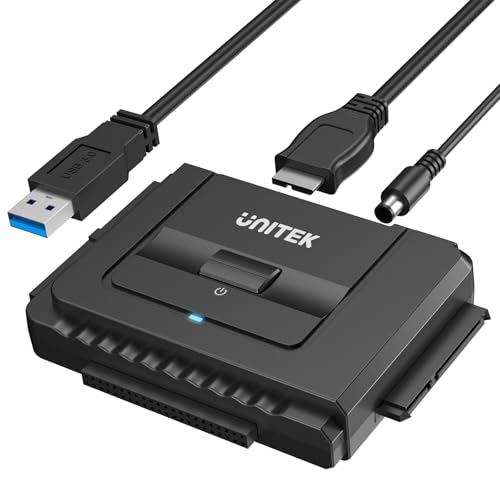
The USB-A model pairs SATA III and dual 40-pin/44-pin IDE connectors, making it the most versatile choice here for working with old and newer drives. It supports 2.5- and 3.5-inch IDE or SATA HDDs and SSDs, and optical drives such as CD-ROM and DVD-RW. The maker says one IDE and one SATA drive can be connected at once; the included power supply is 12V/2A. This is a fit for mixed-drive migration or recovery when the computer has USB-A. The limitation is the host connector: a computer without USB-A needs another option.
Bottom line: Choose this when you need to connect SATA and IDE drives and have USB-A.
Unitek USB 3.0 SATA Adapter with UASP

Unlike the other two adapters, this model is SATA-only and supports UASP, so it suits a workflow built around standard 2.5- or 3.5-inch SATA drives rather than legacy IDE disks. It supports SATA I, II and III HDDs or SSDs up to 18TB, plus optical drives, and includes a 12V adapter. The maker claims UASP can deliver up to 70% faster reads and 40% faster writes; actual speeds depend on the connected devices. Choose it when those SATA and UASP requirements match your setup. Its key limitation is no IDE connection, so it cannot directly connect an IDE drive.
Bottom line: Pick this for SATA drives when UASP support matters more than IDE access.
Unitek USB-C SATA/IDE Adapter

The USB-C connection distinguishes this dual-drive adapter from the USB-A options, while its SATA and 40-pin/44-pin IDE connectors cover both current and older drive types. It supports 2.5- and 3.5-inch HDDs and SSDs as well as CD/DVD optical drives, and includes a 12V/2A power adapter. The maker says one SATA and one IDE drive can be accessed simultaneously; the USB-C interface supports up to 6Gbps for SATA and 5Gbps for IDE. It fits a computer with USB-C and mixed drives. Buyers with only USB-A ports need a different connector option.
Bottom line: Choose this for simultaneous SATA and IDE access from a USB-C computer.
How to choose a Unitek hard drive adapter
Start with the drive connector: SATA drives use a narrow L-shaped data connector and a separate power connector, while IDE/PATA drives use a wider pin connector. A 2.5-inch SATA drive can draw power over a suitable adapter, but 3.5-inch drives generally need external 12V power; the included 12V/2A supplies address that need for these models. Then match the computer port: USB-A and USB-C plugs are not interchangeable without a compatible port or adapter. For a mixed collection that includes IDE, choose a model with IDE support; if every drive is SATA, a SATA-only option may be simpler. Check drive capacity limits before connecting larger drives.
SATA, IDE and USB speed limits
USB 3.0 has a signaling ceiling of 5Gbps, while SATA III’s link rate is 6Gbps; actual file transfers are lower because of protocol overhead and the drive itself. A SATA III drive connected through USB 3.0 therefore does not deliver 6Gbps over the USB link. IDE drives use older interfaces, and this USB-C model gives a separate maximum of 5Gbps for IDE. UASP can improve command handling when both the adapter and computer support it, but it cannot make a slow hard disk run like an SSD. Use the drive’s interface and the host’s USB generation as a ceiling, not a guaranteed transfer speed.
The connector and interface ceilings make these distinctions useful when choosing:
| Need | Adapter fit | Key limit |
|---|---|---|
| SATA and IDE drives, USB-A computer | USB 3.0 SATA/IDE | USB 3.0 link up to 5Gbps |
| SATA-only, UASP use | USB 3.0 SATA with UASP | Requires SATA drives |
| SATA and IDE drives, USB-C computer | USB-C SATA/IDE | Host port must support connection |
Power and safe drive handling
Most 3.5-inch desktop hard drives need external power, while 2.5-inch drives typically take power from the host connection; optical drives and older disks may also need more stable external power. Keep the adapter on a stable, nonconductive surface and avoid moving a spinning hard drive, because shock can damage its platters or heads. Connect the power supply before starting a transfer when the drive requires it, and do not unplug a drive during writes. These adapters are for data access, not a substitute for a backup: copy important files to a separate drive before attempting recovery or migration.
Common compatibility mistakes
IDE is not the same connector as SATA, so a SATA-only adapter will not connect an IDE disk directly. Laptop IDE drives commonly use a 44-pin connector that combines data and power, whereas desktop IDE devices use 40 pins and separate power; match the adapter’s connector carefully rather than forcing it. Also confirm that the operating system can read the drive’s file system, since a physical connection does not guarantee that files are accessible. A drive that clicks, repeatedly spins down or smells burnt should be powered off rather than repeatedly retried; continued attempts can worsen damage. Confirm the capacity limit and host connector before setup.
Frequently Asked Questions
Can a USB 3.0 adapter reach 6Gbps?
No, USB 3.0 has a 5Gbps signaling ceiling even when the adapter supports SATA III at 6Gbps. Real file transfers are slower still because of overhead and drive performance.
Do 3.5-inch hard drives need external power?
Usually yes: 3.5-inch desktop drives generally require 12V external power, unlike many 2.5-inch drives that draw power over USB. Use the adapter’s included power supply for drives that need it.
Can I connect an IDE drive to a SATA-only adapter?
No, IDE and SATA use different physical connectors and protocols. Choose an adapter with the correct 40-pin or 44-pin IDE connector for the specific drive.
Can two drives transfer files at the same time?
The dual-drive models support connecting one SATA and one IDE drive simultaneously. Transfer speed is still limited by the USB connection, drive performance and whether both drives are active.