
Wii U Remote Charger Options Compared by Fit

For most households, 4-Port Wii Remote Charging Station is the best fit if you charge up to four Wii Remotes at once; its four-port dock includes four 2,800 mAh rechargeable packs. Choose 2-Port Wii Remote Charger instead for a two-remote setup, and choose Wii U GamePad AC Adapter only if you need power for the Wii U GamePad rather than a Wii Remote.
A Wii Remote charging station docks replacement battery packs, while the Wii U GamePad uses its own AC power adapter. Confirm the controller type before choosing.
We earn a commission if you buy through links on this page. As an Amazon Associate I earn from qualifying purchases. Products are compared on manufacturer specifications, not hands-on testing.
- Best overall: 4-Port Wii Remote Charging Station – Four charging ports and four included 2,800 mAh Ni-MH packs suit households charging several remotes.
- Best for two remotes: 2-Port Wii Remote Charger – The two-port station includes two 2,800 mAh rechargeable packs and has a 23.6-inch USB cable.
- Best for the GamePad: Wii U GamePad AC Adapter – This is a separate AC adapter for the Wii U GamePad, with a 7-foot cable.
| Product | Best for | Charging format | Included battery packs | Cable length | Shop |
|---|---|---|---|---|---|
| 4-Port Wii Remote Charging Station | Four remotes | 4-port dock | 4 × 2,800 mAh Ni-MH | 40.6 in USB cable | Check Price on Amazon |
| 2-Port Wii Remote Charger | Two remotes | 2-port dock | 2 × 2,800 mAh Ni-MH | 23.6 in USB cable | Check Price on Amazon |
| Wii U GamePad AC Adapter | GamePad power | AC power adapter | — | 84 in cable | Check Price on Amazon |
Wii U Remote Charger Options
Match the charger to the controller first, then compare the number of remotes you need to charge at once.
4-Port Wii Remote Charging Station

Four charging ports make this station the option for households that want to recharge several Wii Remotes together. It comes with four 2,800 mAh Ni-MH rechargeable battery packs and a 40.6-inch USB cable. The maker says the station has a full-charge cutoff and uses red for charging and blue for fully charged. Its main tradeoff is the larger four-remote setup; if you only need to charge a pair, 2-Port Wii Remote Charger takes a smaller two-port approach. This station is for Wii and Wii U Remotes, not the Wii U GamePad.
Bottom line: Choose this when you need to recharge as many as four Wii Remotes together.
2-Port Wii Remote Charger

The two-port layout keeps this station focused on charging a pair of Wii Remotes, rather than the four-remotes-at-once capacity of 4-Port Wii Remote Charging Station. It includes two 2,800 mAh Ni-MH rechargeable packs and a 23.6-inch USB cable; the maker says the indicator is red while charging and yellow when full. Choose it when two packs meet your routine and you do not need four charging bays. The limitation is capacity: households charging three or four remotes at a time will need a different arrangement. It does not power the Wii U GamePad.
Bottom line: Pick this for a two-remote setup that does not need four charging bays.
Wii U GamePad AC Adapter
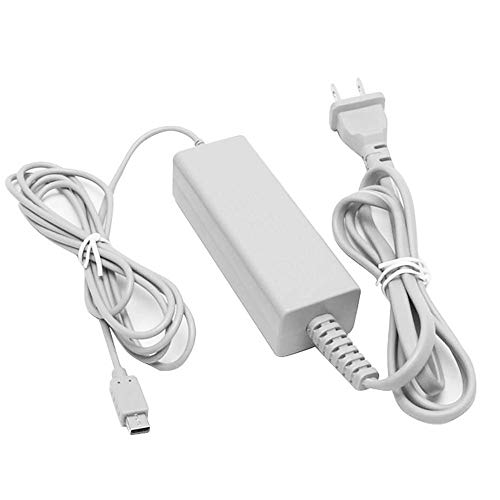
This product is an AC power adapter for the Wii U GamePad, not a dock for Wii Remote battery packs. It accepts 100–240 V, 50/60 Hz input and provides 4.75 V/1.6 A output, with a 7-foot cable. The maker says it includes protections against overheating, overcurrent, overvoltage and short circuits. Choose it when the GamePad is the device that needs a replacement or backup adapter. The limitation is its different purpose: it will not recharge the removable Ni-MH packs used with the remote charging stations.
Bottom line: Choose this only when you need an AC adapter for the Wii U GamePad.
How to choose a Wii U remote charger
Choose by controller and the number of remotes you charge at once. Wii Remotes use a battery compartment; a dock-style charger works with rechargeable replacement packs that fit in place of disposable batteries. The Wii U GamePad is a different device with a dedicated power adapter, so a remote dock is not a substitute. For a measurable rule, if you regularly charge three or four Wii Remotes together, choose a four-port station; if you charge only two, a two-port dock covers that need. Check that the battery pack is intended for the Wii Remote model you own, and check the pack arrangement before discarding any original battery covers or accessories.
Wii Remote and GamePad charging types
Wii Remote docks recharge compatible removable packs, while a Wii U GamePad adapter supplies power directly to the GamePad. The distinction matters because the GamePad’s adapter output and plug serve a different device than a battery-pack charging station. A dock may include two or four bays and matching packs; an AC adapter is identified by input and output voltage, current, and cable length instead. Use this quick comparison to identify the right type before considering capacity.
| Need | Charger type | Check before choosing |
|---|---|---|
| Recharge Wii Remotes | Dock with replacement battery packs | Remote compatibility and number of bays |
| Power a Wii U GamePad | GamePad AC adapter | Correct GamePad fit and electrical output |
Do not choose by the phrase “Wii U” alone: it can refer to either accessory category.
Battery packs and charging habits
Ni-MH rechargeable packs are designed for repeated charging, but their usable time between charges depends on the remote’s activity and the pack’s condition. Use the matching packs supplied for a dock rather than assuming every rechargeable AA or battery-shaped pack will seat and charge correctly. Avoid mixing different battery chemistries or partially depleted and fully charged cells in one device; uneven cells can affect operation. Remove packs from service if they are damaged, leaking, unusually hot, or swollen, and do not leave a charging setup near heat or moisture. The maker gives a 500-recharge claim for the four-pack set when used properly, but actual service life varies with use and care.
Frequently Asked Questions
Can a Wii U remote charger charge the GamePad?
A Wii Remote charging dock does not charge the Wii U GamePad; the GamePad uses its own AC adapter. Choose by device, not just the Wii U name.
How many charging ports do I need for Wii Remotes?
Choose a four-port dock if you regularly recharge three or four remotes together; two ports suit a pair. Port count indicates how many remotes can be docked at once, not how long a charge will last.
Can rechargeable AA batteries work in a Wii Remote dock?
A dock is intended for compatible rechargeable battery packs that fit its charging contacts. Do not assume ordinary AA cells will work in a dock; confirm the pack and station are designed to work together.
What does a red charging light on a Wii remote dock mean?
On the four-port station, red means charging and blue means fully charged; the two-port station uses red for charging and yellow for full. Indicator colors can differ between models, so identify the charger before interpreting the light.
How can I tell which Wii U charger I need?
Check whether the device is a Wii Remote or the Wii U GamePad. Remotes use rechargeable replacement packs in a dock, while the GamePad uses a dedicated AC adapter; verify the adapter output and device fit before connecting power.