
Raspberry Pi E Ink Display Options Compared by Fit

For most Raspberry Pi projects, Waveshare 7.5-inch E-Ink HAT is the straightforward choice because its 7.5-inch, 800×480 screen comes as a HAT with a 40-pin GPIO header. Choose 2.13-inch E-Ink Display HAT, 2-Pack or LAFVIN 2.13-inch E-Ink HAT instead for a compact 2.13-inch screen, or Waveshare 7.3-inch Spectra 6 Display for six-color output; Waveshare 7.5-inch Raw E-Ink Panel is a raw panel without a PCB, so it suits builders prepared to handle that form factor.
E-paper reflects ambient light rather than using a backlight, and generally needs power to refresh the image rather than hold it. Confirm the display’s board format and Raspberry Pi compatibility before ordering.
We earn a commission if you buy through links on this page. As an Amazon Associate I earn from qualifying purchases. Products are compared on manufacturer specifications, not hands-on testing.
- Best overall: Waveshare 7.5-inch E-Ink HAT – It combines a 7.5-inch, 800×480 screen with a Raspberry Pi 40-pin HAT header.
- Best for a compact two-pack: 2.13-inch E-Ink Display HAT, 2-Pack – The package includes two 2.13-inch HATs, each with 250×122 resolution and partial-refresh support.
- Best for color: Waveshare 7.3-inch Spectra 6 Display – Its 7.3-inch screen uses six-color E-Ink Spectra 6 technology.
| Product | Best for | Screen size | Resolution | Format / interface | Shop |
|---|---|---|---|---|---|
| Waveshare 7.5-inch E-Ink HAT | Standard Pi setup | 7.5 in | 800×480 | HAT / SPI | Check Price on Amazon |
| Waveshare 7.3-inch Spectra 6 Display | Color layouts | 7.3 in | — | Driver board / SPI | Check Price on Amazon |
| Waveshare 7.5-inch Raw E-Ink Panel | Custom integration | 7.5 in | 800×480 | Raw panel / SPI | Check Price on Amazon |
| 2.13-inch E-Ink Display HAT, 2-Pack | Two small displays | 2.13 in each | 250×122 | HAT / SPI | Check Price on Amazon |
| LAFVIN 2.13-inch E-Ink HAT | Compact refreshes | 2.13 in | 250×122 | HAT / SPI | Check Price on Amazon |
Raspberry Pi E Ink Displays
Compare screen dimensions, resolution and board format to find a module that suits your project and assembly needs.
Waveshare 7.5-inch E-Ink HAT
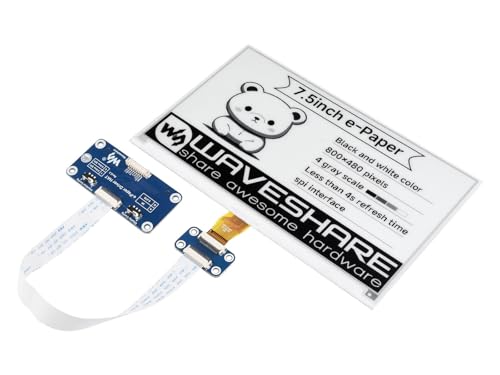
For a Raspberry Pi setup that can use a 40-pin GPIO header, this HAT combines a 7.5-inch panel with an embedded controller and SPI communication. The 800×480 resolution offers more room for labels, diagrams or a status layout than the 250×122 compact panels. The screen has no backlight and retains its last image without power; the maker says energy is basically needed for refreshing. It is a monochrome e-paper option, so choose another screen if color is essential. Confirm your board’s header and physical clearance before assembly.
Bottom line: Pick this when a 7.5-inch HAT and 800×480 workspace suit your Raspberry Pi project.
Waveshare 7.3-inch Spectra 6 Display

Unlike the monochrome panels here, this 7.3-inch module uses E-Ink Spectra 6 technology for six-color output. Its driver board connects over SPI, and its standard Raspberry Pi 40-pin GPIO extension header supports Raspberry Pi boards listed by the maker, including Pi 4, Pi 5, Pi 3 and Zero models. The display has no backlight and keeps showing its last content when power is removed; the maker describes power use as primarily occurring during refresh. The features do not give a resolution, so this is a weaker choice when pixel dimensions are a deciding requirement.
Bottom line: Choose this for a Raspberry Pi display project that needs six-color e-paper.
Waveshare 7.5-inch Raw E-Ink Panel

This is the raw-panel alternative to a HAT: it provides a 7.5-inch, 800×480 e-paper display with an embedded controller and SPI communication, but no PCB. That format can suit a project with a custom carrier or enclosure rather than a direct HAT installation. It is compatible with several Raspberry Pi boards, and the screen has no backlight and retains its image without power; the maker says power is basically required for refresh. The missing PCB means assembly and mounting need more planning than with a HAT, so choose another format if you want the GPIO header built into the display assembly.
Bottom line: Pick this when you want a 7.5-inch panel for a custom SPI build.
2.13-inch E-Ink Display HAT, 2-Pack

This two-pack is the only option here that supplies a pair of compact displays. Each 2.13-inch HAT has 250×122 resolution, a 40-pin GPIO extension header and SPI communication; the maker specifies black-and-white output and partial-refresh support. The panels have no backlight and retain the last image without power. Their small pixel area suits brief labels or simple status readouts, not dense dashboards. Choose a larger panel if the interface needs room for multiple sections or detailed graphics.
Bottom line: Choose this when two compact black-and-white displays are more useful than one large screen.
LAFVIN 2.13-inch E-Ink HAT
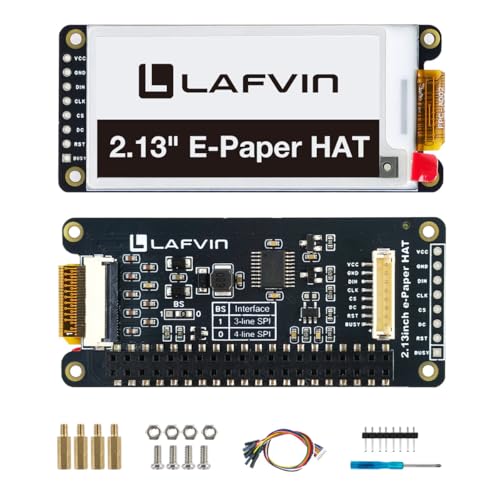
This 2.13-inch HAT is a compact single-screen option with 250×122 resolution and partial-refresh support. Its compatibility spans Raspberry Pi, Arduino and ESP32, which can suit a project that may move between controller families. The black-and-white panel has no backlight, retains the last image after power is removed and uses energy during screen updates, according to the maker. Its small screen is a real constraint: it is better suited to a few lines or a simple indicator than a large information-dense display. Confirm the connection and software setup for your chosen controller.
Bottom line: Pick this for a small black-and-white display with partial-refresh support.
How to Choose a Raspberry Pi E Ink Display
Start with the screen area and board format: a 7.5-inch 800×480 panel offers more workspace than a 2.13-inch 250×122 panel, while a HAT brings the display assembly to a GPIO header. E-paper is reflective and has no backlight, so ambient light matters more than it does with an illuminated LCD. SPI is a serial connection used by each of these products; it still requires a compatible driver and software configuration. For a custom carrier or enclosure, a raw panel may fit the design, but a HAT simplifies the physical board connection. If your design needs color, select a product that explicitly supports it rather than assuming all e-paper is monochrome or color-capable.
Use this quick rule: choose a 2.13-inch screen for short labels or simple status, and move to a 7.3- or 7.5-inch option when the layout needs more space.
Screen Size and Resolution for Raspberry Pi E Ink
Resolution determines how many pixels are available, while screen size affects how large those pixels appear. A 250×122 panel has 30,500 pixels, suited to short text and simple icons; an 800×480 panel has 384,000 pixels for more detailed layouts. These figures do not guarantee a particular font size or readability, which also depend on the application’s rendering and viewing distance. A larger diagonal alone does not define a sharper image: compare pixel dimensions as well as physical size. The 7.3-inch color module does not include a resolution in the specifications, so do not assume it matches the 7.5-inch panels.
Before choosing, sketch the longest line and number of information rows your interface needs, then select a panel with sufficient pixels and physical area.
HAT, Raw Panel and SPI Connections
A Raspberry Pi HAT is an add-on board format that connects through the GPIO header; a raw display panel is not the same complete board assembly. This distinction affects mounting, wiring and enclosure design, even when two screens share SPI communication. Raspberry Pi boards use 3.3-volt GPIO signaling, so confirm that the display interface and any level shifting are appropriate for the controller before wiring. A 40-pin header also does not guarantee every case will clear the screen assembly. Plan access to the GPIO header, keep wiring away from moving or hot components, and avoid powering a circuit through an unknown pinout.
The table compares the form factors by the project need they suit best.
| Project need | Form to consider | Tradeoff |
|---|---|---|
| Direct GPIO attachment | HAT | Check header and enclosure clearance |
| Custom carrier or mounting | Raw panel | Requires more integration planning |
| Short status text | 2.13-inch screen | Less room for detail |
| Larger information layout | 7.5-inch, 800×480 screen | Needs more physical space |
E-Paper Refresh and Project Limits
E-paper holds a visible image without continuous power, but changing the image requires a refresh; it is not a video display. Refresh speed depends on the panel and update mode, and partial refresh may help update a small region without redrawing the whole screen. Repeated partial updates can leave ghosting or residual marks on some e-paper panels, so plan occasional full refreshes when the controller and panel support them. The 2.13-inch specifications explicitly call out partial refresh, but they do not establish a universal refresh time across these products. Avoid choosing e-paper for animation or frequent motion; use it for information that can remain static between updates.
For battery-powered projects, estimate power around the update schedule and controller as well as the display; low display refresh power does not mean the entire Raspberry Pi system consumes no power.
Frequently Asked Questions
Can a Raspberry Pi e ink display show content with power off?
Yes, e-paper can retain its last image after power is removed, as these product features specify. A refresh still needs power, so a changed screen cannot be drawn while the system is off.
Is SPI the same as the Raspberry Pi GPIO connection?
SPI is the communication interface, while GPIO pins carry its signals between the Pi and display. Confirm the module’s pinout and voltage compatibility before connecting it; SPI wiring alone does not ensure software compatibility.
How many pixels does a 250×122 e-paper screen have?
A 250×122 panel has 30,500 pixels. That is suitable for simple text or indicators, while an 800×480 panel has 384,000 pixels for more layout detail.
Can an e-paper display replace a Raspberry Pi LCD for video?
No; e-paper is intended for static or infrequently updated content, not video or rapid animation. Refresh behavior varies by panel and update mode, and partial refresh can leave residual ghosting on some screens.
What should I check before fitting a Raspberry Pi display HAT?
Check that the board has the required GPIO header and that the HAT clears the enclosure. Raspberry Pi GPIO uses 3.3-volt signaling, so verify interface voltage compatibility before wiring.