
3D Printer Dremel 3D20 Parts and Accessories Compared

For a Dremel 3D20, the 9-by-6-inch build sheets are the direct-fit choice because they name the printer model and platform size. The manual is relevant for setup guidance, while the rotary tools are general finishing tools and the filament’s printer compatibility does not include the 3D20.
We earn a commission if you buy through links on this page. As an Amazon Associate I earn from qualifying purchases. Products are compared on manufacturer specifications, not hands-on testing.
- Best overall: 3D20 Build Sheets, 9 x 6 in – The 9-by-6-inch sheets explicitly list the Dremel 3D20 as a compatible printer.
- Best for setup guidance: Dremel 3D20 User Manual – The manual is specifically about the Dremel 3D20 and covers setup, operation, and maintenance.
- Best for light finishing: HARDELL Mini Cordless Rotary Tool – The cordless tool offers five speeds from 5,000 to 18,000 RPM for controlled sanding and polishing.
| Product | Best for | Fit or use | Size or range | Material or contents | Shop |
|---|---|---|---|---|---|
| 3D20 Build Sheets, 9 x 6 in | Platform replacement | 3D20 build platform | 9 x 6 in | 5 sheets | Check Price on Amazon |
| Dremel 3D20 User Manual | Setup reference | 3D20 setup and use | 11 x 8.5 in | Manual | Check Price on Amazon |
| HARDELL Mini Cordless Rotary Tool | Light post-processing | Print finishing | 5,000–18,000 RPM | 69-piece kit | Check Price on Amazon |
| HOTO Cordless Rotary Tool Kit | Variable-speed finishing | Print finishing | 5,000–25,000 RPM | 35-in-1 kit | Check Price on Amazon |
| Dremel DigiLab Blue PLA Filament | Compatible PLA material | 3D printing filament | 1.75 mm; 0.75 kg | PLA, blue | Check Price on Amazon |
Dremel 3D20 parts and accessories
Match each item to the printer task first: platform sheets, setup guidance, filament, or post-print finishing.
3D20 Build Sheets, 9 x 6 in

These sheets are the only item here that explicitly names the Dremel 3D20 and gives its platform size. The pack contains five 9-by-6-inch sheets, also identified for the 3D40 and 3D40-EDU, so it suits owners replacing a matching build surface rather than replenishing printer material. The sheets are called heat paper and described as rugged. Verify the printer’s platform dimensions and sheet placement before replacing an installed surface; a nominal size match alone does not confirm how the printer’s bed is prepared.
Bottom line: Choose these when your 3D20 needs a replacement build sheet.
Dremel 3D20 User Manual

Unlike the physical supplies and tools, this item is a manual focused on the Dremel 3D20. Its title says it covers setup, operation, maintenance, and high-precision workflows, making it relevant to owners who want a written reference rather than a replacement part. The physical dimensions are 11 by 8.5 inches. This is guidance, not a build surface, filament spool, or repair component, so it will not resolve a worn platform or replenish printing material.
Bottom line: Pick this for a 3D20-focused setup and maintenance reference.
HARDELL Mini Cordless Rotary Tool

Unlike the platform sheets, this is a general-purpose finishing tool rather than a 3D20 replacement part. The cordless rotary tool has five speed settings from 5,000 to 18,000 RPM and comes with 69 accessories for tasks such as sanding, grinding, polishing, and carving. Its staged speeds suit light, careful work on prints or resin crafts; the maker cautions that it is not for heavy-duty projects. Use suitable eye protection and keep the tool clear of loose clothing, since rotating bits can catch debris.
Bottom line: Choose this for light sanding or polishing after a print is complete.
HOTO Cordless Rotary Tool Kit
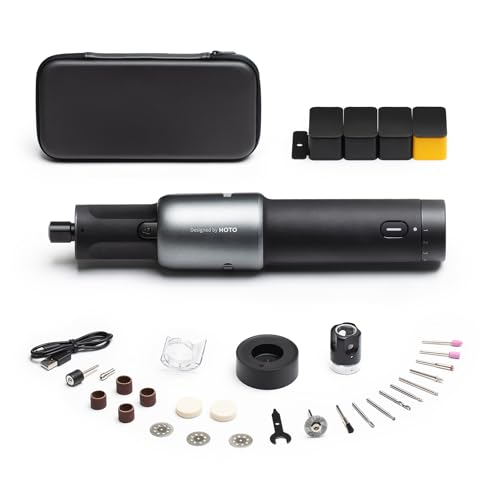
The HOTO rotary tool reaches 25,000 RPM, higher than the other finishing tool here, so it offers a broader speed range for print cleanup and other small DIY tasks. It has five speeds, a cordless pen-style form, an LED light, and a 35-in-1 storage bag. The maker describes it as suitable for sanding, polishing, cutting, and carving. It remains a general rotary tool, not a dedicated 3D20 accessory, and its maximum speed can be excessive for delicate plastic; start at a low setting and avoid dwelling on one spot.
Bottom line: Pick this if you want a cordless tool with speeds up to 25,000 RPM.
Dremel DigiLab Blue PLA Filament

This spool is printing material, unlike the finishing tools and platform sheets, but its compatibility claim covers Dremel DigiLab printers without naming the 3D20. The blue PLA filament has a 1.75 mm diameter and weighs 0.75 kg; the maker gives a 230°C nozzle temperature and a heated bed up to 60°C. RFID material detection is specified for the 3D45. The spool is identified for prototypes and models, so confirm the 3D20 accepts this filament diameter and material before using it.
Bottom line: Choose this only after confirming 1.75 mm PLA is suitable for your 3D20.
How to choose Dremel 3D20 accessories
Start with the job: platform replacement calls for a correctly sized build sheet, printing calls for compatible filament, and post-processing calls for a separate hand tool. The 3D20-specific match here is the five-sheet pack labeled 9 by 6 inches; the manual is a reference, not hardware. PLA is a common beginner filament because it generally prints at lower temperatures than ABS, but printer compatibility and required bed settings still matter. For rotary finishing, choose a tool with adjustable speed and begin at its lowest setting on plastic. A buyer replacing a platform sheet should compare the printer’s actual bed dimensions with the sheet before purchase rather than relying only on a family name.
Dremel 3D20 build sheet fit
The sheet pack explicitly names the 3D20 and measures 9 by 6 inches, making it the clearest direct-fit accessory in this group. Build surfaces need to cover the usable print area without folding over edges or obstructing clips and bed movement. The included sheets are also marked for two 3D40 variants, but that shared naming does not make other dimensions interchangeable. Keep the bed clean and dry before applying a replacement surface; residue and wrinkles can interfere with first-layer adhesion. If your installed surface uses a different attachment or layout, verify the bed dimensions and installation method before ordering.
Filament and finishing tools for the 3D20
Filament and rotary tools serve different stages of 3D printing: filament forms the object, while a rotary tool trims or smooths it after printing. The PLA spool here is 1.75 mm and the manufacturer’s compatibility statement names DigiLab printers, but not the 3D20, so confirm the printer’s accepted filament diameter and material first. PLA commonly prints around 200–220°C, though the specific formulation and printer profile determine the setting; the spool’s 230°C nozzle value should not automatically be treated as a 3D20 profile. For finishing, light pressure and brief contact reduce the chance of melting plastic from friction heat.
| Need | Accessory type | Fit check |
|---|---|---|
| Replace build surface | 9 x 6 in sheets | Confirm bed dimensions and installation |
| Learn setup or upkeep | 3D20 manual | Match the guide to your printer |
| Print new parts | PLA filament | Confirm diameter and material compatibility |
| Trim or smooth a finished print | Variable-speed rotary tool | Start at low speed; use eye protection |
Safe post-processing for 3D prints
Rotary tools can throw plastic fragments and generate friction heat, so wear eye protection and keep the bit moving rather than grinding one point. Small parts should be secured before sanding; holding a tiny print close to a spinning bit risks slipping into the tool. Plastic softens at far lower temperatures than metals, so use the minimum speed and pressure that removes material. A deburring blade or fine sandpaper can be easier to control for narrow edges than a powered bit. Keep hands, hair, and loose sleeves away from rotating accessories, and stop if the print begins to smear or melt.
Frequently Asked Questions
What size build sheet fits the Dremel 3D20?
The sheet pack labeled for the 3D20 measures 9 by 6 inches. Compare that size with the usable platform and attachment layout before replacing the installed surface.
Can I use 1.75 mm PLA in a Dremel 3D20?
The spool is 1.75 mm PLA, but its compatibility statement does not name the 3D20. Confirm the printer’s accepted filament diameter and material before loading it; PLA commonly prints near 200–220°C, with settings depending on the formulation.
What temperature does this PLA filament use?
The manufacturer gives a 230°C nozzle temperature and a heated bed up to 60°C for this spool. Printer profiles and filament formulations can require different settings, so do not assume those temperatures are a verified 3D20 profile.
How should I sand a 3D printed part safely?
Wear eye protection, secure small parts, and use low speed with light pressure because friction can soften plastic and bits can throw fragments. Stop if the surface starts smearing, and keep hands and loose clothing away from rotating parts.
How often should I replace a 3D printer build surface?
There is no single interval because replacement depends on wear, adhesion, and damage. Replace or renew a surface when it is visibly torn, deeply scored, or no longer holds a first layer after appropriate cleaning and bed leveling.