
Best Car Stereo Microphone: 5 Mics Compared

Universal 3.5mm Car Microphone suits most people because it includes a 3.5mm-to-2.5mm adapter and a 3-meter cable. Choose another mic if your stereo needs a different connector or you want a mount included in the package.
Car stereo microphones connect to a compatible head unit’s mic input for hands-free calling; the right plug and a secure mounting position matter more than the mic’s nominal diameter.
We earn a commission if you buy through links on this page. As an Amazon Associate I earn from qualifying purchases. Products are compared on manufacturer specifications, not hands-on testing.
- Best overall: Universal 3.5mm Car Microphone – Includes a 3.5mm-to-2.5mm adapter and a 3-meter cable.
- Best for included mounts: FingerLakes 3.5mm Mic with Mounts – Comes with a dash mount and visor clip.
- Best for flexible mounting: FingerLakes FL11 3.5mm Mic – The mic can be removed from its clip or attached with the included sticker.
| Product | Best for | Connector | Mounting | Shop |
|---|---|---|---|---|
| Universal 3.5mm Car Microphone | Adapter compatibility | 3.5mm; 2.5mm adapter | — | Check Price on Amazon |
| FingerLakes 3.5mm Mic with Mounts | Included mounts | 3.5mm | Dash mount; visor clip | Check Price on Amazon |
| MICMXMO 3.5mm Mic with Adapter | Named radio models | 3.5mm; 2.5mm adapter | — | Check Price on Amazon |
| ViaBecs 3.5mm TRS Mic | TRS head units | 3-pole 3.5mm TRS | Clip; adhesive mount | Check Price on Amazon |
| FingerLakes FL11 3.5mm Mic | Clip repositioning | 3.5mm | Clip; adhesive sticker | Check Price on Amazon |
Best car stereo microphones
Compare the connector, cable reach and mounting options before choosing a mic for your head unit.
Universal 3.5mm Car Microphone

Universal 3.5mm Car Microphone is the pick here with an included 3.5mm-female-to-2.5mm-male adapter, giving it a connection option beyond a 3.5mm plug alone. The cable measures 3 meters, and the microphone is described as mono and omnidirectional. The maker says it is intended for hands-free calling and lists compatibility with brands including Pioneer, Kenwood, JVC, Sony, Jensen and Alpine. It suits a buyer who needs the adapter and can verify the head unit’s input. The package does not identify a mounting clip, so buyers who need one should choose a mic with a mount.
Bottom line: Choose this if the adapter helps match your head unit’s mic jack.
FingerLakes 3.5mm Mic with Mounts
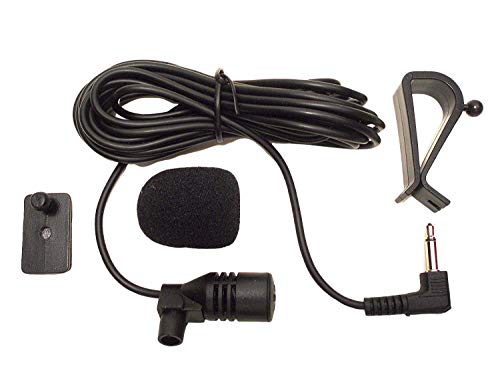
FingerLakes 3.5mm Mic with Mounts stands out for its included dash mount and visor clip, giving buyers two stated ways to position the mic. Its cable is 3 meters long, and the product is intended for car radios with a 3.5mm mic input. The maker says the electret condenser cartridge has high sensitivity and anti-noise capability; these are maker claims, not a guarantee of call quality in every cabin. This model suits drivers who want mounting pieces in the package. It does not include a 2.5mm adapter, so check the stereo’s jack before selecting it.
Bottom line: Pick this if you want both a dash mount and visor clip included.
MICMXMO 3.5mm Mic with Adapter

MICMXMO 3.5mm Mic with Adapter gives model-specific compatibility examples, including several Kenwood KDC-X units and three JVC KWV units, as well as a 3.5mm-to-2.5mm adapter for compatible 2.5mm inputs. Its name identifies a 3-meter cable, and its features describe it as a replacement microphone for car stereos with mic inputs. The model list can help narrow a replacement search, but it does not establish compatibility with every radio in those brands. Confirm your exact head unit’s jack and model match before ordering.
Bottom line: Choose this when your radio is among the named compatible models.
ViaBecs 3.5mm TRS Mic

ViaBecs 3.5mm TRS Mic specifies a 3-pole 3.5mm TRS connector, which is more precise than a plug-size description alone. It also includes a clip and adhesive mount, with a 3-meter cable for routing through a vehicle interior. The maker says placing the mic closer to the driver can improve voice pickup compared with factory or dashboard-mounted microphones. This model fits a buyer whose stereo accepts a 3-pole TRS mic and who wants either mounting option. Its compatibility does not cover every 3.5mm input, so check the head unit’s connector format first.
Bottom line: Pick this for a compatible TRS input and a choice of mounts.
FingerLakes FL11 3.5mm Mic
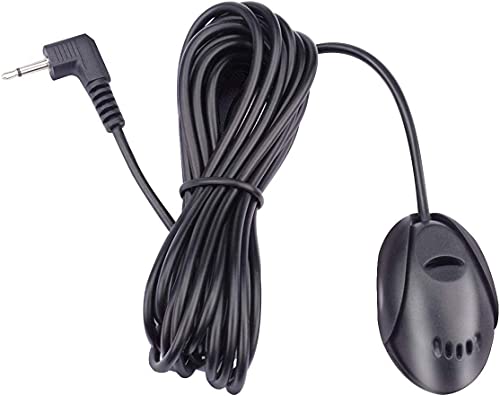
FingerLakes FL11 3.5mm Mic differs with a removable microphone that can be picked up from its clip, plus an adhesive sticker for attaching the mic to a surface. Its 3.5mm jack and 3-meter cable suit a stereo with a matching mic input and enough cable reach for the chosen position. The maker describes the design as omnidirectional and says it is intended to improve speech transmission for hands-free communication.
Bottom line: Choose this if you want to reposition the mic or attach it with a sticker.
How to choose a car stereo microphone
Match the stereo’s microphone input before comparing cable or mount features. A 3.5mm plug can use different contact layouts: TRS has three contacts, while TRRS has four, so plug diameter alone does not confirm a pinout match. Some microphones include an adapter, but an adapter changes plug size and does not necessarily change the wiring standard. Check the stereo manual or the original microphone’s connector shape and contact count. Then measure the route from the head unit to the intended mic position; a 3-meter cable provides about 9.8 feet of reach, but routing around trim consumes some of that length. For a model-specific replacement, compare the exact radio model rather than relying on brand alone.
Where to mount a car stereo microphone
Mount the microphone near the driver’s head, with its pickup opening unobstructed and away from direct airflow. A visor or upper A-pillar position is often practical because it can put the mic closer to the speaker than a low dashboard location; keep it clear of airbags, curtain-airbag deployment paths and the driver’s view. Route the wire behind trim without pinching it, and keep it clear of pedals, steering linkages and sharp edges. A clip allows repositioning without committing to an adhesive surface, while an adhesive mount needs a clean, dry, compatible surface to hold securely. Test the placement while parked before securing loose cable; moving the mic a few inches can change how much road and ventilation noise it picks up.
Car microphone connector and mount differences
Use this comparison to narrow the choice by connection and positioning needs; a matching plug still must suit the stereo’s input wiring.
| Need | Choice | Reason |
|---|---|---|
| 2.5mm jack option | Universal 3.5mm Car Microphone or MICMXMO 3.5mm Mic with Adapter | Includes a 3.5mm-to-2.5mm adapter |
| Dash or visor placement | FingerLakes 3.5mm Mic with Mounts | Includes both a dash mount and visor clip |
| 3-pole TRS input | ViaBecs 3.5mm TRS Mic | Specifies a 3-pole 3.5mm TRS connector |
| Removable clip or adhesive placement | FingerLakes FL11 3.5mm Mic | Mic lifts from clip; adhesive sticker is included |
Microphone placement and connector compatibility are separate decisions: a convenient mount cannot compensate for an incompatible input. If two choices match your stereo, prefer the cable that reaches with a little slack rather than stretching across moving or hot parts.
Common car stereo microphone setup mistakes
The most common mismatch is assuming every 3.5mm jack accepts every 3.5mm microphone. Confirm the head unit’s mic-input format, not just the connector width, and verify the exact model when replacing an original mic. A second mistake is routing cable across a door hinge, steering column or pedal area; vibration and repeated movement can damage insulation or interfere with driving. Keep cable tucked behind trim and away from airbag covers, where added objects can disrupt deployment. Finally, avoid placing the mic directly in front of a vent or close to a rattling trim panel. With the car parked, make a short call or recording check if the stereo supports it, then adjust the mic before fastening the cable permanently.
Frequently Asked Questions
Will a 3.5mm car microphone fit every stereo?
No; a 3.5mm plug can have different contact layouts, and the stereo’s mic input must match the microphone wiring. Check whether the input expects TRS or another format, rather than relying on plug diameter alone.
How long should a car microphone cable be?
A 3-meter cable is about 9.8 feet and suits many routes from a head unit to the driver area. Measure the planned path around trim first, since a straight-line cabin measurement understates the cable needed.
Where should I place an external car microphone?
Place it near the driver’s head with the pickup opening unobstructed, often on a visor or upper trim. Keep it out of the driver’s sightline and away from airbag deployment paths, vents and moving controls.
Can I route a microphone cable near an airbag?
Keep the cable out of airbag covers and deployment paths, including curtain airbags along the roof edge. Secure it behind trim without crossing pedals, steering parts or sharp edges.
Does a 2.5mm adapter guarantee microphone compatibility?
No; a size adapter changes the plug diameter, but it may not convert the connector’s wiring or signal format. Confirm that the head unit accepts the mic’s electrical pinout as well as its plug size.