
Russian Stickers for Keyboard: 3 Types Compared

Russian Stickers 5-in-1, Blue on Black suits most buyers who want Cyrillic labels plus application and cleaning tools; choose Russian Stickers, 2-Pack, White on Clear instead if you prefer transparent sticker backgrounds, or Russian Transfer Stickers, Blue Letters if you want letters without a visible background.
Keyboard stickers add visual labels to existing keys; they do not change the computer’s active input language, which must be selected in the operating system.
We earn a commission if you buy through links on this page. As an Amazon Associate I earn from qualifying purchases. Products are compared on manufacturer specifications, not hands-on testing.
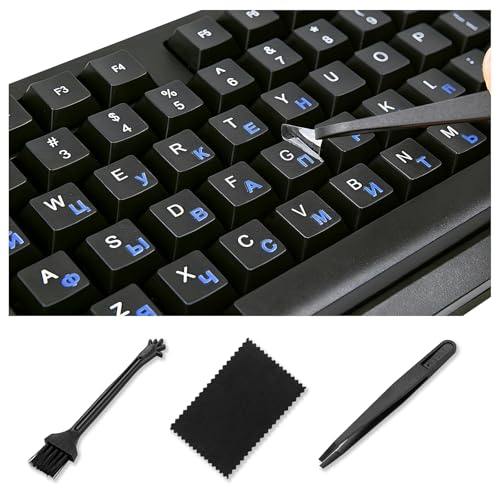
- Best overall: Russian Stickers 5-in-1, Blue on Black – Includes two sticker sets, tweezers, a cleaning brush, and a microfiber cloth.
- Best for transparent backgrounds: Russian Stickers, 2-Pack, White on Clear – White lettering sits on transparent-background stickers, and the set comes with two sheets.
- Best for borderless letters: Russian Transfer Stickers, Blue Letters – Transfer application leaves blue Cyrillic letters without a sticker background.
| Product | Best for | Background and lettering | Included items | Sticker size | Shop |
|---|---|---|---|---|---|
| Russian Stickers 5-in-1, Blue on Black | Tool-inclusive set | Black, blue lettering | Two sticker sets, tweezers, brush, cloth | 0.43 × 0.51 in. each | Check Price on Amazon |
| Russian Stickers, 2-Pack, White on Clear | Clear-background labels | Transparent, white lettering | Two sticker sheets | 0.51 × 0.43 in. each | Check Price on Amazon |
| Russian Transfer Stickers, Blue Letters | No-background letters | No background, blue letters | Transfer film application | — | Check Price on Amazon |
Russian Stickers for Keyboard
Compare background style, application format, and included accessories before choosing labels for your keyboard.
Russian Stickers 5-in-1, Blue on Black

Russian Stickers 5-in-1, Blue on Black is the tool-inclusive option, combining two sticker sets with tweezers, a keyboard cleaning brush, and a microfiber cloth. Each sticker measures 0.43 × 0.51 inches, and the blue lettering contrasts with a black background. The set is intended for desktop, laptop, and tablet computer keyboards, making it useful when several devices need labels or a spare sheet is welcome. Its main tradeoff is the visible background: buyers seeking letters that blend directly into key surfaces may prefer a transparent or transfer-style option.
Bottom line: Choose this set if application tools and a spare sticker set matter to you.
Russian Stickers, 2-Pack, White on Clear

Russian Stickers, 2-Pack, White on Clear uses a transparent background with white Russian lettering, a different look from the black-backed labels in Russian Stickers 5-in-1, Blue on Black. The set includes two sheets, and each small sticker measures 0.51 × 0.43 inches. It is intended for desktops, laptops, notebooks, and wired or wireless keyboards, and the maker says the stickers can be removed without leaving glue. White letters may be harder to distinguish on light-colored keys, so check the contrast against your keycaps before choosing this style.
Bottom line: Pick this set if you want white Cyrillic letters on a clear background.
Russian Transfer Stickers, Blue Letters
Russian Transfer Stickers, Blue Letters differs from sheet-style labels because transfer film is peeled away after the blue letters are pressed onto keys, leaving no sticker background or visible edges. The maker says the raised letters have a UV coating intended to resist everyday wear and can be placed on key tops or sides. This approach suits buyers who want the original key surface to remain visible. Application requires pressing each letter firmly several times before removing the film, so it may take more care than positioning a conventional sticker.
Bottom line: Choose this option if a background-free letter finish is your priority.
How to choose Russian keyboard stickers
Choose Russian keyboard stickers by matching the letter color and background to your keycap color, then confirm that the label size fits the keys. A transparent backing leaves more of the key visible, while a black backing creates a distinct label field; transfer letters leave no backing after application. Russian uses the 33-letter Cyrillic alphabet, but a keyboard’s physical key arrangement and its active software layout are separate things. Stickers provide visual reminders only; select a Russian input layout in the computer’s operating system to type the corresponding characters. If a key’s usable top is narrower than 0.43 inches in either direction, measure carefully before applying the sheet-style stickers that report that approximate footprint.
Sticker size and keyboard fit
Measure the flat, usable area on your keycaps before applying labels, because keycap shapes and printable surfaces differ across laptops and desktop keyboards. The two sheet-style sets here report individual sticker dimensions of about 0.43 × 0.51 inches, with the clear set giving 0.51 × 0.43 inches; those are the same dimensions in reverse order. Leave a small margin from the key edges so the label does not wrap over a curved side. Transfer letters are applied one at a time and are described as suitable for square, round, or concave keycaps, but the actual top or side placement still depends on the available flat area. Clean and dry keys before application.
Sticker backgrounds and transfer lettering
Sticker background determines how much of the original key remains visible and how the letters contrast. Sheet stickers apply as small labels with a background, while transfer lettering uses film to position individual letters and then removes that film. A clear background can visually blend with the key surface, but white lettering needs a suitably contrasting key color to stay readable. Transfer styles reduce visible borders, yet their individual application calls for controlled placement and firm pressure. Choose by finish and application tolerance: if you want tools in the package, the five-in-one set includes tweezers and cleaning accessories; if you prefer no backing, use a transfer style.
Applying and maintaining keyboard stickers
Apply labels to clean, dry keys and align each one before pressing it down; dust, skin oils, and moisture can interfere with adhesion. Work one key at a time and avoid stretching a sticker over a curved edge, where lifting is more likely. For transfer letters, press firmly several times before peeling away the transfer film, as the maker recommends. Keep liquid cleaners away from the keyboard and use a lightly dampened cloth only when the device is powered off and unplugged, then let keys dry fully before typing. If frequent cleaning or heavy daily use is expected, consider that ordinary surface wear can affect labels over time, even when a product describes a protective coating.
Frequently Asked Questions
Do Russian keyboard stickers change the typing language?
No, stickers change the visible key labels, not the computer’s active input layout. Select a Russian keyboard layout in the operating system; the physical labels then help identify the corresponding keys.
How many letters are in the Russian alphabet?
The modern Russian Cyrillic alphabet has 33 letters. Keyboard layouts also place punctuation and other symbols, so stickers may not label every character you use.
How should I check sticker fit on my keys?
Measure the usable flat area on several keys before applying labels. The sheet-style sets here report stickers about 0.43 × 0.51 inches, so a key area smaller than that may not provide a clean fit.
Can transparent keyboard stickers work on dark keys?
They can, but the white lettering needs contrast against the key color to remain easy to see. Compare the lettering and keycap shades before applying a sheet.
How do transfer-style keyboard letters apply?
Press each letter onto the key several times, then peel away its transfer film. The film positions the letter during application and is not meant to remain as a background.