
Oculview Cellular Trail Camera: 3 Models Compared

Oculview 360° Cellular Trail Camera suits buyers who want remote camera control and live footage from an off-grid location, provided a compatible cellular network reaches the camera.
Choose Oculview 4G LTE Solar Game Camera if you want a simpler trail-camera option, or Oculview 336° Cellular Trail Camera if the 336-degree pan and 90-degree tilt range is the deciding feature. Cellular trail cameras send images or video over a mobile network instead of relying on local Wi-Fi.
We earn a commission if you buy through links on this page. As an Amazon Associate I earn from qualifying purchases. Products are compared on manufacturer specifications, not hands-on testing.
- Best overall: Oculview 360° Cellular Trail Camera – It combines a built-in 4G LTE SIM, live footage and phone-controlled lens orientation.
- Best for solar setup: Oculview 4G LTE Solar Game Camera – Its name identifies it as a solar game camera with cellular live view.
- Best for stated pan range: Oculview 336° Cellular Trail Camera – It specifies 336 degrees of pan, 90 degrees of tilt and 4X digital zoom.
| Product | Best for | View control | Power | Shop |
|---|---|---|---|---|
| Oculview 360° Cellular Trail Camera | Remote lens control | Phone-controlled lens orientation | Solar powered | Check Price on Amazon |
| Oculview 4G LTE Solar Game Camera | Solar game monitoring | 360° full coverage | Solar powered | Check Price on Amazon |
| Oculview 336° Cellular Trail Camera | Defined pan range | 336° pan, 90° tilt | — | Check Price on Amazon |
Oculview cellular trail cameras
Compare the remote-viewing and camera-control features that separate these three Oculview models.
Oculview 360° Cellular Trail Camera
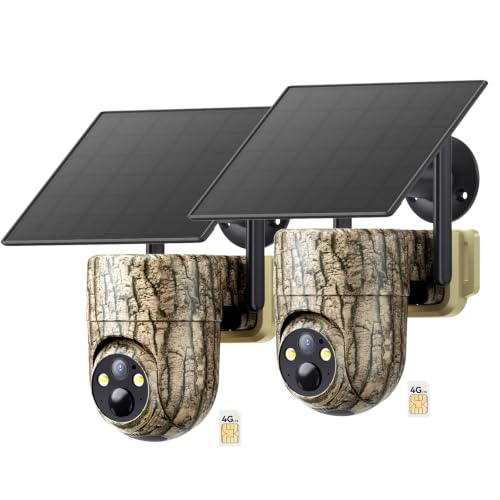
Remote lens orientation is the distinguishing feature of this Oculview camera: its phone app can change the view without a manual trip to the mount. The camera also has a built-in 4G LTE SIM for live video and photos, motion activation, instant alerts, night vision and solar power. The maker says the SIM can connect to AT&T, T-Mobile or Verizon networks. This configuration suits a remote site where live access and repositioning matter. Cellular access still depends on usable network coverage at the camera location.
Bottom line: Choose this when phone-controlled viewing and solar power are priorities.
Oculview 4G LTE Solar Game Camera
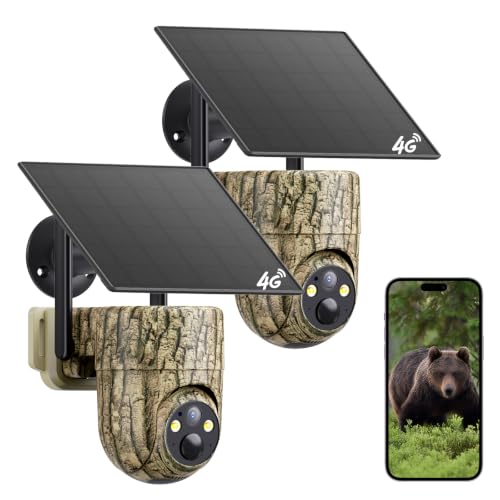
Solar game camera positioning distinguishes this model, while its features focus on cellular live viewing and 360-degree coverage. It has a built-in SIM, night vision, PIR motion activation and phone access without a local Wi-Fi connection. The maker says the SIM connects to major U.S. carriers; cellular service is needed for remote access. This option fits buyers seeking a game camera for an off-grid location. The 360-degree coverage does not give a specific pan-and-tilt range, so check the viewing range that matters for your placement before choosing.
Bottom line: Choose this for solar-powered game monitoring with cellular phone access.
Oculview 336° Cellular Trail Camera

The 336-degree pan and 90-degree tilt give this model a more specific movement range than the other Oculview trail-camera options. It also includes a built-in 4G LTE SIM, live video, motion activation, night vision, instant alerts and 4X digital zoom. The maker presents it for remote observation of farms, jobsites and feeding areas without Wi-Fi. This camera suits buyers who want to know the pan-and-tilt limits up front.
Bottom line: Choose this when the defined pan-and-tilt range is more useful than a solar setup.
How to choose a cellular trail camera
Choose a cellular trail camera by confirming network coverage at the exact mounting location, then deciding how much remote control you need. A built-in SIM does not eliminate the need for active cellular service, and signal can differ between a clearing and a wooded slope. Cellular cameras send images or video over a mobile network; local Wi-Fi is not required when cellular service is used. Live streaming and frequent alerts can use more data and power than occasional photo transfers, so match the camera’s service plan and power setup to how often you will check it. A practical rule: if live viewing is essential, verify a usable carrier signal at the final mount before relying on remote access.
Cellular coverage and camera placement
Place a trail camera where the lens has a clear view of the target path and the antenna can reach a mobile signal. Tree trunks, terrain and dense vegetation can weaken reception, so test signal at the camera height rather than assuming coverage from a nearby road or house. Mounting around 3 to 4 feet high is a common starting point for deer trails; adjust for the animal, slope and angle of the path. Aim slightly downward on a level trail and avoid facing directly into sunrise or sunset, which can create glare. Secure the mount against movement: even a small shift can change the target area or block the intended view.
Remote view, motion alerts and power
Remote live view is useful for checking a site without visiting it, while motion-triggered photos or clips can limit unnecessary transmission. A camera that pans or tilts can cover a wider area from one mount, but a moving lens does not guarantee every direction is monitored at once. Solar power can reduce battery changes when the panel receives suitable sunlight; shade, seasonal daylight and panel orientation affect charging. Clear leaves or snow from the panel and keep it aimed toward unobstructed daylight. For any cellular camera, consider both the signal and the power budget before enabling continuous live viewing or frequent alerts.
| Need | Feature to prioritize | Trade-off to consider |
|---|---|---|
| Remote repositioning | Phone-controlled pan or tilt | Confirm stated movement limits |
| Wide fixed-site view | Broad coverage range | Coverage range may not mean simultaneous view |
| Off-grid installation | Solar power and cellular access | Sun exposure and signal both matter |
Common cellular trail camera setup mistakes
Assuming that a built-in SIM means free or universal connectivity is a common setup mistake: remote transmission still relies on carrier coverage and a service plan. Another is mounting the camera before confirming the final view and cellular signal; moving a cellular camera can take more effort than adjusting a local Wi-Fi device. Secure the mount, frame the target area, and verify the carrier connection before leaving the site. Avoid positioning the lens where branches repeatedly cross the motion sensor, because moving vegetation can trigger unwanted activity. For off-grid placement, assess both network reach and unobstructed solar exposure rather than treating either one as a substitute for the other.
Frequently Asked Questions
Does an Oculview cellular trail camera need Wi-Fi?
No, the Oculview models use a built-in 4G LTE SIM for remote access rather than requiring local Wi-Fi. Live access still depends on cellular coverage and service at the camera site.
Will a cellular trail camera work without service?
Remote transmission needs an active cellular connection, so a camera outside carrier coverage cannot provide live remote access. Check signal at the actual mounting spot, since terrain and trees can affect reception.
How high should I mount a trail camera for deer?
A height of about 3 to 4 feet is a common starting point for deer trails. Raise or lower the camera to account for slope, the animal’s approach angle and the height of the target area.
Does 360-degree coverage mean the camera sees everywhere at once?
Not necessarily; a camera with pan control can point in different directions, but its lens may not monitor every direction simultaneously. Check the pan and tilt range and plan the target view around it.