
Aosu Solar Security Cameras: 5 Wireless Options

For a single camera with pan-and-tilt coverage, Aosu Solar Outdoor Camera, 2K is the clearest starting point; the deciding difference is whether you need one camera or a multi-camera kit. Choose a kit instead if you need coverage across separate areas or want cameras managed together.
Solar security cameras use a solar panel to help keep a rechargeable camera powered, so placement needs both a useful view and adequate sunlight.
We earn a commission if you buy through links on this page. As an Amazon Associate I earn from qualifying purchases. Products are compared on manufacturer specifications, not hands-on testing.
- Best overall: Aosu Solar Outdoor Camera, 2K – A single 2K camera with 360° pan-and-tilt coverage suits a focused monitoring area.
- Best for 4K detail: Aosu D1 Max 4-Camera 4K Kit – The four-camera kit offers 4K imaging and expandable 1TB storage.
- Best for a two-camera setup: Aosu 3K 5MP Solar PTZ Camera, 2-Pack – The 3K option comes as a two-pack with smart tracking.
| Product | Best for | Resolution | Camera count | Storage | Shop |
|---|---|---|---|---|---|
| Aosu Solar Outdoor Camera, 2K | One area | 2K (3 MP) | 1 | microSD or cloud | Check Price on Amazon |
| Aosu D1 Classic 4-Camera Kit | Local recording | 2K (3 MP) | 4 | 32GB built-in | Check Price on Amazon |
| Aosu D1 Max 4-Camera 4K Kit | 4K detail | 4K (8 MP) | 4 | 1TB expandable | Check Price on Amazon |
| Aosu 3K 5MP Solar PTZ Camera, 2-Pack | Two viewpoints | 3K (5 MP) | 2 | — | Check Price on Amazon |
| Aosu 2K Solar 4-Camera System | Expandable coverage | 2K | 4 | Local storage | Check Price on Amazon |
Aosu Solar Security Cameras
Compare these wireless outdoor options by resolution, camera count and recording approach.
Aosu Solar Outdoor Camera, 2K

Unlike the multi-camera kits, this is a single 2K camera with a fixed solar panel and pan-and-tilt control for one outdoor area. Aosu says it offers 360° coverage, smart tracking, color night vision with spotlights, and two-way talk. Recordings can use microSD or cloud storage, so this choice suits someone who wants to monitor one location without setting up a system of several cameras. The tradeoff is coverage: a single camera cannot monitor separate sides of a home at once, so choose a kit if you need multiple viewpoints.
Bottom line: Pick this for one outdoor area where pan-and-tilt coverage matters more than multiple camera positions.
Aosu D1 Classic 4-Camera Kit
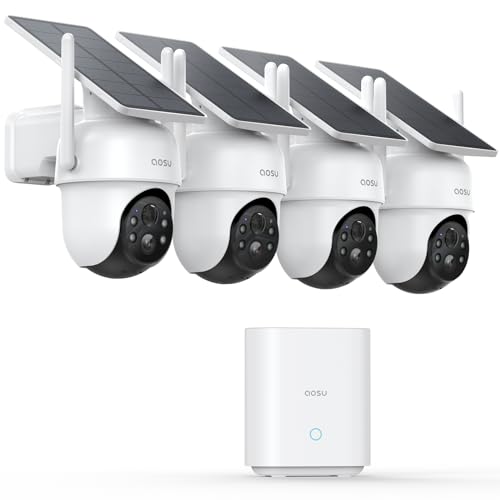
The D1 Classic pairs four solar-powered cameras with a base that stores recordings locally, rather than relying on each camera’s individual microSD or cloud option. Aosu says the 32GB aosuBase provides up to four months of loop recording without a subscription; actual retention depends on how much footage the system records. The system also supports simultaneous four-view live streaming and cross-camera event tracking, according to Aosu. Choose it for several monitored areas and local recording. Its 2K resolution is below the 4K option in this group, so it is less suited to buyers prioritizing finer image detail.
Bottom line: Choose this if four views and base-based local recording are more important than 4K resolution.
Aosu D1 Max 4-Camera 4K Kit

The D1 Max stands apart with 4K imaging and expandable storage up to 1TB, making it the detail-focused four-camera kit here. Aosu says its 6× digital zoom can show faces and license plates from up to 33 feet, and it includes full-color and infrared night-vision modes. On-device AI detection is designed to identify people and vehicles, while Smart Vehicle Guard monitors nearby movement around parked vehicles. These added detection functions suit buyers with varied outdoor activity to monitor. The tradeoff is that 4K detail and zoom do not replace careful camera placement; a distant or obstructed view can still limit useful identification.
Bottom line: Pick this for a multi-camera setup where 4K imaging and expandable storage are priorities.
Aosu 3K 5MP Solar PTZ Camera, 2-Pack

This two-pack offers a middle resolution step at 3K (5MP), rather than the 2K or 4K choices elsewhere in the group. Aosu says the cameras provide 360° PTZ coverage, human and vehicle tracking, full-color night vision, and a smart alarm with spotlight. The two-camera count suits a buyer who wants separate views, such as a driveway and side entry, without beginning with a four-camera kit.
Bottom line: Choose this for two monitoring areas and 3K resolution with tracking.
Aosu 2K Solar 4-Camera System

The flexible split solar-panel design is the distinguishing feature of this four-camera 2K system: each panel can be placed where it receives sunlight rather than directly beside its camera. Aosu says the system uses local storage, cross-camera tracking, and four-view live monitoring, and that additional cameras can be added as coverage needs grow. This suits a home where a camera view and a sunny panel position do not line up neatly. Solar performance varies with sunlight, season, placement, and settings, so shaded mounting locations may require a different panel position or more frequent charging attention.
Bottom line: Pick this if separately positioning the solar panels or expanding camera coverage is useful.
How to choose a solar security camera system
Choose first by how many separate views you need, then compare resolution and recording. A single pan-and-tilt camera can turn toward different points, but it cannot watch two directions at the same time; separate cameras give simultaneous fixed viewpoints. Resolution is a useful comparison: 2K, 3K, and 4K indicate increasing image detail, but field of view, distance, lighting, and digital zoom affect what details remain recognizable. A 4K image does not guarantee readable plates at every distance. For a driveway or gate, place a camera close enough to capture faces and vehicle approaches, and avoid aiming toward bright lights that can obscure night images. Choose storage separately from image quality: local recording and cloud recording have different access and retention arrangements.
Where to place solar panels and cameras
Put the camera where it can see the approach, and put its panel where it can receive direct sunlight for much of the day. A split-panel design offers more flexibility when the best camera view is shaded but a nearby roofline or wall gets sun; fixed-panel designs make camera and panel placement a single decision. Trim branches and avoid mounting behind glass, which can interfere with motion detection and night vision. A typical outdoor camera mounting height is about 8 to 10 feet: this can reduce tampering while keeping faces more identifiable than a very high, steeply downward view. Confirm that the Wi-Fi signal reaches the mounting point before installation, since exterior walls and distance can weaken it.
Solar camera power and Wi-Fi basics
Solar panels replenish a camera’s battery, but they do not make sunlight irrelevant: shade, short winter days, weather, frequent alerts, and live viewing can all affect charging needs. Aim panels toward an unobstructed sunny exposure and keep them clean of dust, leaves, and snow. Most home security cameras use 2.4 GHz Wi-Fi, which often reaches farther through walls than 5 GHz; the first camera in this group specifies 2.4 GHz only. Check your router’s band and signal at the planned camera location before mounting. For reliable alerts, also test live video there, because a camera that connects intermittently can be less useful even when its panel receives good sun.
Recording storage and motion alerts
Local storage keeps recordings on a camera or home base, while cloud storage sends footage to an online service; the available options vary by system. Loop recording typically replaces older footage when storage fills, so retention depends on capacity, recording length, activity volume, and resolution. Motion zones can reduce alerts from streets, trees, or neighboring yards, while person or vehicle detection can narrow notifications further when available. Start with zones covering entrances and paths rather than the entire view, then adjust sensitivity if wind or passing traffic triggers frequent alerts. Outdoor cameras can capture neighbors or public areas, so aim only at spaces you have a legitimate reason to monitor and use privacy masking if available.
Frequently Asked Questions
Will a solar security camera work in shade?
A solar camera can operate with limited sun while its battery has charge, but shade reduces panel charging. Move a separate panel to a sunnier spot when the camera itself needs to remain under an eave or in a shaded location.
Does 2.4 GHz Wi-Fi reach outdoor cameras?
A 2.4 GHz signal often travels farther through walls than 5 GHz, but distance, building materials, and interference affect coverage. Test a live camera feed at the intended mounting point before fastening the camera.
How high should an outdoor security camera be mounted?
About 8 to 10 feet is a common mounting range that balances tamper resistance and a useful view of faces. A steep angle from a higher mount can make identification harder, so test the view before drilling.
Can one pan-and-tilt camera watch two places at once?
No, a pan-and-tilt camera can point in different directions but only records the view it faces at a given moment. Use separate camera positions when simultaneous coverage of different approaches matters.
How long do solar camera recordings stay saved?
Retention depends on storage capacity, recording resolution, clip length, and how often motion triggers recording. Loop recording commonly overwrites older clips when storage fills, so check whether the system supports the retention period you need.