
Ender 5 Plus Linear Rail Kit Options Compared

For a complete Ender 5 Plus motion upgrade, choose DIY Motion Kit for Ender 5 Plus, which combines MGN12H rails with belts, pulleys and bearings. Choose Funssor Y-Axis MGN12H Kit if you want a Y-axis kit, or Micro Swiss NG Direct Drive Extruder if you need a direct drive extruder designed for an MGN12 rail; Ender 5 Plus Y-Axis Mod, No Rail explicitly excludes the rail itself.
We earn a commission if you buy through links on this page. As an Amazon Associate I earn from qualifying purchases. Products are compared on manufacturer specifications, not hands-on testing.
- Best overall: DIY Motion Kit for Ender 5 Plus – Combines MGN12H rails, GT2 belt, pulleys and bearings in an Ender 5 Plus motion kit.
- Best for Y-axis upgrade: Funssor Y-Axis MGN12H Kit – Identified as an Ender 5 Plus Y-axis MGN12H rail upgrade kit.
- Best for direct drive: Micro Swiss NG Direct Drive Extruder – A 3:1 direct drive extruder specified for printers with an MGN12 rail and MGN12H carriage.
| Product | Best for | Fitment or use | Rail or carriage | Shop |
|---|---|---|---|---|
| DIY Motion Kit for Ender 5 Plus | Complete motion set | Ender 5 Plus | MGN12H | Check Price on Amazon |
| Funssor Y-Axis MGN12H Kit | Y-axis rail kit | Ender 5 Plus Y axis | MGN12H | Check Price on Amazon |
| Micro Swiss NG Direct Drive Extruder | Direct drive upgrade | Ender 5, 5 Pro, 5 Plus | MGN12 rail, MGN12H carriage | Check Price on Amazon |
| Ender 5 Plus Y-Axis Mod, No Rail | Rail-free mod parts | Ender 5 series Y axis | MGN12H (rail excluded) | Check Price on Amazon |
| VEVOR HGR20 Linear Rail Guide Kit | Long generic rails | DIY, CNC, 3D printers | HGR 20 | Check Price on Amazon |
Ender 5 Plus linear rail kits and related upgrades
Compare what each option is intended to upgrade and whether its rails are included.
DIY Motion Kit for Ender 5 Plus

DIY Motion Kit for Ender 5 Plus combines rail hardware with the belt-drive parts, unlike a rail-only Y-axis upgrade. The set includes linear rails, slider blocks, a GT2 timing belt, pulleys, bearings and mounting pins, and its size is identified for the Ender 5 Plus. The maker says the low-friction rails support smooth movement and the belt is wear-resistant. This suits buyers who want several motion components in one set. The name also references Mercury One, so confirm that this is the intended configuration before ordering if you are not building that motion setup.
Bottom line: Choose this if you want rails and belt-drive hardware together for an Ender 5 Plus motion upgrade.
Funssor Y-Axis MGN12H Kit

Funssor Y-Axis MGN12H Kit is specifically identified as a Y-axis MGN12H upgrade for the Ender 5 Plus, making its scope narrower than a multi-part motion set. Its feature notes describe fine workmanship and a sturdier build, but do not enumerate the kit contents. That makes it a possible fit for someone seeking a Y-axis-specific rail mod rather than a broader conversion. Confirm that the package includes the rail and mounting hardware you need before ordering; the product name calls it a rail kit, while its feature note provides no parts breakdown.
Bottom line: Choose this for a Y-axis-focused MGN12H upgrade after confirming the included hardware.
Micro Swiss NG Direct Drive Extruder

Micro Swiss NG Direct Drive Extruder is an extruder upgrade rather than a linear rail kit: it is specified for Ender 5 series printers already using an MGN12 rail and MGN12H carriage. The unit combines a Micro Swiss all-metal hotend with a 3:1 gear ratio, and the maker says it is made in the USA. It suits owners who have the rail setup and want to change the extrusion system. It does not provide the rail itself, so it is not the right choice for installing a rail upgrade from scratch.
Bottom line: Choose this only if you already have the specified rail and want a direct drive extruder.
Ender 5 Plus Y-Axis Mod, No Rail

Ender 5 Plus Y-Axis Mod, No Rail is a Y-axis upgrade mod, but its variant explicitly says “No linear rail kit,” distinguishing it from a complete rail purchase. Its maker describes compatibility with Ender 5, Ender 5 Pro and Plus models, and says the set is intended to improve Y-axis stability. The maker calls it a complete set, but that does not include the rail for this selected variant. This option may suit someone sourcing the rail separately; it will not satisfy a buyer who needs the rail included.
Bottom line: Choose this only when you already have or will source the MGN12H rail separately.
VEVOR HGR20 Linear Rail Guide Kit
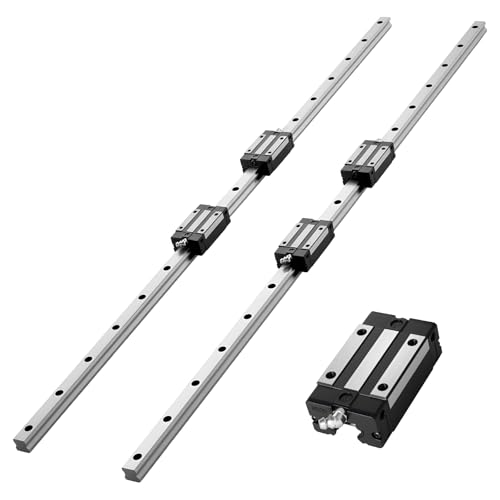
VEVOR HGR20 Linear Rail Guide Kit is a generic HGR guide kit rather than an Ender 5 Plus-specific MGN12H upgrade. Its two rails are each 39.37 inches long and the set includes four bearing slide blocks; the maker identifies CNC routers and 3D printers among compatible applications. The rails are medium-carbon steel rated HRC58–62, and the maker says the electroplated coating is at least 10 μm. This is suited to custom builds that need long HGR20 guides. Its length and rail profile make it a poor drop-in assumption for the Ender 5 Plus.
Bottom line: Choose this for a custom build requiring long HGR20 guides, not as a confirmed Ender 5 Plus fit.
How to choose an Ender 5 Plus rail upgrade
Start with the axis and parts included: a Y-axis mod, a full motion set and an extruder are different upgrades. MGN12 rails are nominally 12 mm wide; the H suffix identifies a longer carriage block than the compact C block. A rail kit needs a carriage that matches its profile, plus mounting geometry that matches the printer. Count the rails, blocks, brackets and fasteners against the intended conversion before buying. A set with belts and pulleys may suit a broader motion conversion, while a rail-only kit is narrower. If the upgrade requires drilling or changing frame parts, check alignment and clearance before modifying the printer; do not assume two kits share mounting holes just because both say MGN12.
Rail length, carriage and fit
Match rail profile and working travel before comparing other features. MGN12 rails are 12 mm wide, while HGR20 rails use a much larger 20 mm profile; the two are not interchangeable in mounts or carriages. A 39.37-inch rail is 1,000 mm long, far longer than a printer-axis rail typically requires, so a generic guide may need cutting and custom brackets. Measure usable travel, end clearance and mounting-hole spacing on the printer or conversion design. A useful rule: if the guide is longer than the available mounting surface, do not assume it can be trimmed without affecting its end treatment or alignment. Keep the rail and carriage matched by profile and manufacturer specifications.
What comes with a linear rail kit
Kit contents determine whether the purchase is a complete conversion or just one component. A rail-and-block set supplies the sliding guide, while a motion conversion may also need belts, pulleys, bearings, brackets and fasteners. The belt must match the pulley tooth profile and pitch; GT2 denotes a 2 mm tooth pitch, so mixing belt pitches can cause poor engagement. Check whether the chosen configuration includes rails, since some upgrade variants are sold without them. Power the printer off before working around motors or belts, and keep fingers clear of pinch points when checking carriage travel. After installation, verify that the carriage moves freely by hand before powering the printer.
Common Ender 5 Plus rail upgrade mistakes
The most common mismatch is buying a carriage or mounting kit for the wrong rail profile. MGN12H and HGR20 describe different guide sizes, not alternate names for the same part. Another mistake is treating an extruder made for an existing MGN12H carriage as a rail kit; an extruder changes filament drive and hotend hardware, not the printer’s rail installation. Check the exact printer model and axis, then compare rail length, carriage type and hardware count against the conversion plan. Keep rails parallel during installation: binding or uneven travel can result when guides are misaligned. Never force a carriage across a tight spot; correct alignment before running the printer.
Frequently Asked Questions
What does MGN12H mean on a linear rail kit?
MGN12 identifies a miniature guide with a nominal 12 mm rail width, and H denotes its longer carriage style. Match the carriage profile to the rail rather than substituting an HGR20 block.
Can I use an HGR20 rail instead of MGN12?
Not as a direct substitute: HGR20 uses a 20 mm profile, while MGN12 is 12 mm wide. A custom mount and matching HGR20 carriage would be needed, and fit should be measured before purchase.
Does a direct drive extruder include linear rails?
An extruder specified for an MGN12 rail and MGN12H carriage assumes that rail setup is already present. Check package contents separately if you still need the rail and its mounting hardware.
What belt pitch is used by GT2 pulleys?
GT2 belt teeth have a 2 mm pitch. Pair the belt with pulleys of the same tooth profile and pitch to avoid mismatched engagement.
How should I check rail movement after installation?
With the printer powered off, move the carriage gently through its travel and check for binding or a hard stop. Correct alignment before powering the motors, and keep fingers clear of belt and carriage pinch points.