
Samsung Odyssey G7 VESA Mount Adapters Compared

For a Samsung Odyssey G7 VESA mount, choose an adapter that names your exact monitor model; Odyssey G6/G7 Adapter, Multi-Size covers several G7 variants and multiple screen sizes. These brackets connect compatible monitors without built-in VESA holes to a separate mount, but buyers with white-backed monitors should choose another option because Odyssey G6/G7 Adapter, Multi-Size and Odyssey G6/G7 Adapter, 100 x 100 mm specify black backs.
We earn a commission if you buy through links on this page. As an Amazon Associate I earn from qualifying purchases. Products are compared on manufacturer specifications, not hands-on testing.
- Best overall: Odyssey G6/G7 Adapter, Multi-Size – Names multiple G7 models and sizes from 27 to 49 inches, with a black-back requirement.
- Best for select 27- and 32-inch models: Odyssey G7/G6 Adapter Arm, 27/32-inch – Names specific G7 and G6 models and specifies a 100 x 100 mm VESA fit.
- Best for angle adjustment: BN61-14898A / BN96-42913A Bracket – Maker says the bracket supports rotation, tilt and height adjustment.
| Product | Best for | Compatible models | VESA pattern | Material | Shop |
|---|---|---|---|---|---|
| Odyssey G6/G7 Adapter, Multi-Size | Broad model coverage | G70A/B, G75NB/T, G77T; selected 27–49 in. | — | Metal | Check Price on Amazon |
| BN61-14898A / BN96-42913A Bracket | Adjustable positioning | Selected G6/G7, 27–49 in. | — | Metal | Check Price on Amazon |
| Odyssey G7/G6 Adapter Arm, 27/32-inch | Select 27/32-inch models | Selected G7/G6, 27–32 in. | 100 x 100 mm | — | Check Price on Amazon |
| Odyssey G6/G7 Adapter, 100 x 100 mm | Standard VESA fit | Selected G6/G7, CJ890, CRG9, CHG90, S95UA | 100 x 100 mm | Metal | Check Price on Amazon |
Samsung Odyssey G7 VESA Mount Adapters
Match the adapter to the full model code on the monitor before choosing a standard arm or wall mount.
Odyssey G6/G7 Adapter, Multi-Size

This adapter names the broadest mix of Samsung monitor families here, including selected G70, G75 and G77 variants plus several 49-inch models. Its metal construction connects a compatible display to a separately chosen mounting system. The maker specifies black-backed monitors, so check the rear panel color as well as the complete model code before buying; white-backed monitors are excluded. The size range is broad, but it does not mean every Samsung display of those diagonal sizes fits. Buyers with an unlisted suffix or model should verify compatibility before ordering.
Bottom line: Choose it when your black-backed monitor matches one of its named model codes.
BN61-14898A / BN96-42913A Bracket

Unlike the simpler compatibility-focused choices, this bracket is described by the BN61-14898A and BN96-42913A part numbers and adds positioning adjustments. The maker says it allows rotation, tilt and height adjustment, and its dimensions are 6.26 x 6.26 x 1.15 inches. It is made of metal and names selected 27-, 28-, 32- and 49-inch G6/G7 models. The part number and display model both matter: buyers should not assume that a similar Odyssey name or screen size alone guarantees a fit.
Bottom line: Pick it if your monitor matches a named model and you want the angle and height adjustments.
Odyssey G7/G6 Adapter Arm, 27/32-inch

This option is narrower than the multi-size brackets: it targets specified 27- and 32-inch Odyssey G7/G6 displays and explicitly fits standard 100 x 100 mm VESA mounts. The maker warns that it is not compatible with every G6/G7 or every curved Samsung monitor, and excludes the 27-inch and 32-inch HG70 series. That limited model scope is the key tradeoff, so compare the complete monitor model code against the named compatibility list rather than relying on the screen size or curved design.
Bottom line: Choose it for a named 27- or 32-inch model when your mount uses 100 x 100 mm.
Odyssey G6/G7 Adapter, 100 x 100 mm
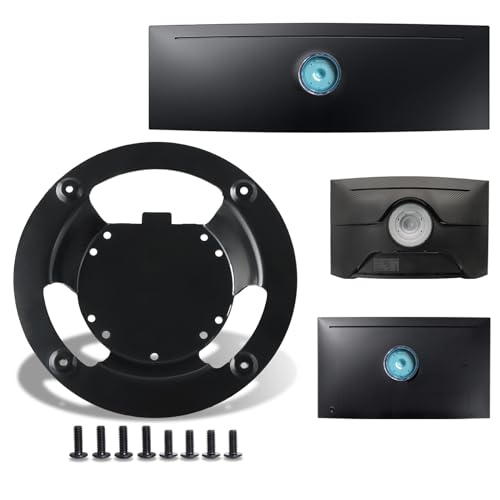
This adapter makes the standard mounting pattern explicit: its holes match 100 x 100 mm VESA mounts. It names several G6/G7 variants along with CJ890, CRG9, CHG90 and S95UA models, and is metal rather than 3D-printed plastic. The maker specifies a black back cover and says an installation video tutorial is provided. That model list is not universal coverage, even where the display family or size sounds similar. Buyers should check the exact monitor model and rear color, then confirm that their separate mount uses the specified pattern.
Bottom line: Pick it when your named monitor has a black back and your mount is 100 x 100 mm.
How to choose a Samsung Odyssey G7 VESA mount
Start with the complete model code, not just “Odyssey G7” or the diagonal size: the adapter fit lists distinguish G70A, G75T and other variants. A VESA adapter bridges a monitor’s proprietary stand attachment to the hole pattern on an arm or wall mount. Check that pattern on the adapter and the mount; two products both called VESA-compatible can use different patterns. Several choices here call out black monitor backs, so confirm the rear color as well. For an unlisted suffix or a white-backed display, do not assume a match based on family name alone; verify compatibility before ordering.
VESA pattern and mounting fit
A 100 x 100 mm pattern means four mounting holes form a square with 100 mm between neighboring hole centers in each direction. It is a common monitor mounting interface, but it does not establish that an adapter fits a particular Samsung back panel. Check the separate arm or wall mount for its supported pattern and monitor weight range; larger curved displays can place more leverage on a mount than a flat display. Use only the hardware intended for the adapter and monitor, and do not force screws that bind. If the fit list does not name your full model code, verify the adapter match rather than relying on a shared screen size.
| What to verify | Decision rule |
|---|---|
| Monitor model | Exact code appears in adapter compatibility |
| Rear cover | Black where the adapter requires it |
| Mount interface | Pattern matches, such as 100 x 100 mm |
Mounting curved Odyssey monitors safely
Support a monitor with both hands while attaching an adapter; do not let the display hang from a partially secured bracket. Curved screens and ultrawide displays can shift the center of mass away from a mount, so the arm or wall bracket must be rated for the monitor’s weight and size, not just its hole pattern. Tighten fasteners evenly and stop if a screw bottoms out before the bracket is secure. Keep cables loose enough for the arm’s full movement so they do not pull on the ports. A compatible adapter does not increase the load rating of the mount behind it.
Frequently Asked Questions
How do I find the Samsung Odyssey model number?
Look for the full model code on the monitor’s rear label or in its on-screen information menu. Compare every letter and suffix with the adapter’s compatibility list; model families and screen sizes alone can cover incompatible variants.
What does a 100 x 100 mm VESA pattern mean?
The four mounting-hole centers form a square measuring 100 mm on each side. Confirm that both the adapter and the separate arm or wall mount use that same pattern.
Can a Samsung Odyssey G7 adapter fit every curved monitor?
No; these adapters name selected G6/G7 models, and one explicitly warns against assuming compatibility with all Samsung curved displays. Verify the full model code before mounting.
Does an adapter make a monitor safe on any arm?
No; the arm must support the monitor’s weight and size as well as the adapter’s VESA pattern. Curved and ultrawide screens can increase leverage, so stay within the mount’s specified load rating.
Can I use an adapter with a white-backed monitor?
Some choices here require a black rear cover, including Odyssey G6/G7 Adapter, Multi-Size and Odyssey G6/G7 Adapter, 100 x 100 mm. Check the adapter’s color restriction against the monitor’s back before installation.