
Keyboard Without a Number Pad: 4 Compact Picks Compared

For a keyboard without a number pad, SABLUTE 84-Key Wireless Keyboard suits most people who want an 84-key layout with dedicated navigation keys and an included wrist rest. Choose Macally 78-Key Wireless Keyboard for a lighter set of extras and a wireless connection; pick a wired model if you prefer not to use a wireless receiver.
These compact keyboards omit the separate numeric keypad, leaving more room for a mouse beside the keyboard.
We earn a commission if you buy through links on this page. As an Amazon Associate I earn from qualifying purchases. Products are compared on manufacturer specifications, not hands-on testing.
- Best overall: SABLUTE 84-Key Wireless Keyboard – Its 84-key wave layout keeps function, arrow, and navigation keys, and includes a cushioned wrist rest.
- Best for travel: Macally 78-Key Wireless Keyboard – The 78-key wireless layout is described as portable and uses a USB-A receiver.
- Best for backlighting: Lumsburry 87-Key Wired Keyboard – The wired 87-key model has adjustable rainbow backlighting.
- Best for quiet typing: CHERRY STREAM TKL Wired Keyboard – The wired TKL model is designed for silent keystrokes.
| Product | Best for | Keys | Connection | Standout feature | Shop |
|---|---|---|---|---|---|
| SABLUTE 84-Key Wireless Keyboard | Wrist-rest support | 84 keys | 2.4 GHz receiver | Cushioned wrist rest | Check Price on Amazon |
| Macally 78-Key Wireless Keyboard | Portable wireless use | 78 keys | 2.4 GHz USB-A receiver | 12 shortcut keys | Check Price on Amazon |
| Lumsburry 87-Key Wired Keyboard | Adjustable backlighting | 87 keys | Wired USB | Adjustable rainbow backlight | Check Price on Amazon |
| CHERRY STREAM TKL Wired Keyboard | Quiet office typing | 87% reduced size | Wired USB | Silent keystrokes | Check Price on Amazon |
Keyboard Without a Number Pad Picks
Compare key counts, connection types, and layout extras to find the compact keyboard that fits your desk and routine.
SABLUTE 84-Key Wireless Keyboard

SABLUTE 84-Key Wireless Keyboard stands apart with its included mouse and cushioned wrist rest, pairing an 84-key wave keyboard with a six-button mouse. The compact layout retains function, arrow, and navigation keys, and seven dedicated media buttons handle volume and playback. A shared USB-A receiver connects both devices, with a USB-C adapter included for compatible ports. The keyboard’s quiet typing and the mouse’s quiet left and right clicks may suit a shared workspace.
Bottom line: Pick this combo if you want a wrist rest, media keys, and a mouse in one set.
Macally 78-Key Wireless Keyboard
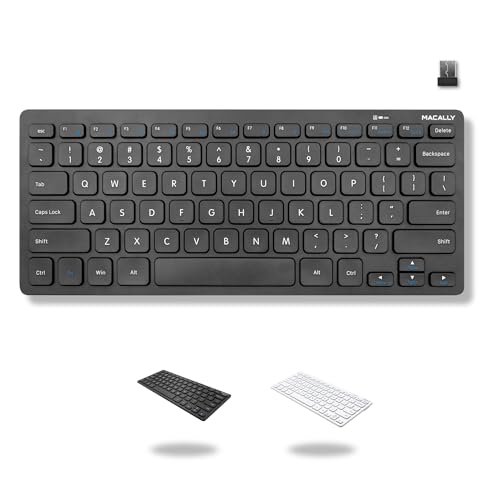
Macally 78-Key Wireless Keyboard has the fewest keys among these compact options, which may make it easier to carry but leaves less room for dedicated functions than an 84- or 87-key layout. It connects through a 2.4 GHz USB-A receiver and provides 12 shortcut keys. The maker says it is plug-and-play with PCs and Chromebooks, making it a straightforward fit for those systems. The keyboard is a practical match for travel or a crowded desk where a wireless connection is useful. Its receiver-based connection is a limitation for setups without a free USB-A port.
Bottom line: Choose this option if portability and a wireless connection matter more than a larger key layout.
Lumsburry 87-Key Wired Keyboard

Lumsburry 87-Key Wired Keyboard is the wired choice with adjustable rainbow backlighting, including brightness and light-mode controls for dim workspaces. Its 87-key layout includes 12 multimedia shortcuts, and the 57-inch USB cable connects directly without a driver. The maker says the keycaps have laser etching and a grip coating, and positions the keyboard for Windows PCs. This model suits desk setups where lighting and a direct cable connection are useful. It is less convenient for travel than a wireless keyboard, and the compatibility claim is limited to Windows.
Bottom line: Pick this wired model if adjustable backlighting is a priority.
CHERRY STREAM TKL Wired Keyboard
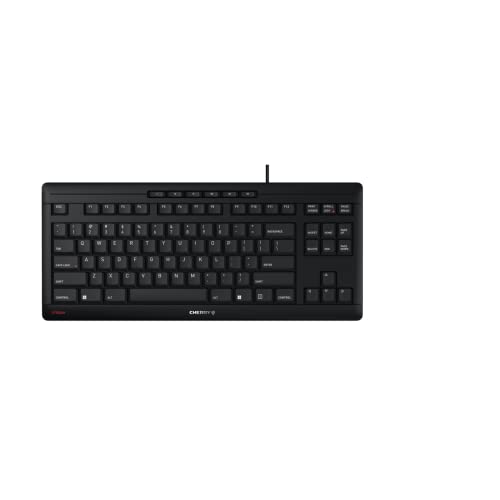
CHERRY STREAM TKL Wired Keyboard is a tenkeyless wired keyboard that emphasizes quiet keystrokes and on-key status LEDs rather than wireless convenience or backlighting. Its reduced-size layout is intended to bring the hands closer together when using a keyboard and mouse. The maker describes the keystrokes as silent and positions the model for office and industrial use. This is a fit for desk users who want a familiar TKL format and a quieter typing experience. The product is marked renewed, and the wired connection may not suit a setup where cable-free placement matters.
Bottom line: Choose this model for quiet, wired typing in an office setting.
How to Choose a Compact Keyboard Without a Number Pad
Start with the keys you need to keep: compact layouts vary from small 60% boards to 75% and tenkeyless (TKL) formats. A common TKL layout has about 87 keys and retains the function row, arrows, and navigation cluster; smaller layouts may combine or omit those keys. If you regularly use arrow and navigation keys, prefer a layout that keeps them dedicated, such as an 84- or 87-key option here. A 78-key layout can save more space, but shortcuts or key combinations may take over functions that larger boards give their own keys. Decide whether the mouse-side space matters more than direct access to less frequently used keys.
Wireless and Wired Keyboard Connections
Choose a connection based on your ports and desk setup: a USB receiver needs an available compatible port, while a wired USB keyboard occupies a port continuously. Bluetooth keyboards pair without a receiver, while wired keyboards avoid wireless pairing and battery dependence. For a shared desk, also consider cable reach and receiver placement; avoid stretching a cable taut across a walkway. The SABLUTE combo includes a USB-C adapter for compatible ports, while the Macally keyboard and SABLUTE set use USB-A receivers.
Keyboard Layout Sizes and What They Keep
Tenkeyless keyboards remove the numeric keypad but generally keep the standard typing block and function row; compact 75% layouts fit keys more tightly, and still smaller designs often omit dedicated navigation keys. Key counts are a useful first comparison, not a universal size standard: manufacturers can arrange or combine functions differently. Before choosing a compact keyboard, check whether the arrow keys, Home/End controls, and function row are dedicated or accessed through a modifier. The 84- and 87-key choices in this group retain more keys than the 78-key option. A smaller layout is most useful when every inch of desk width matters and you are comfortable using shortcuts.
Quiet Typing and Backlighting Considerations
Key noise depends on the switch or scissor mechanism, keycap design, desk surface, and typing force; a keyboard described as quiet can still produce sound from key bottoms or stabilizers. For calls or a shared room, a mat under the keyboard can reduce sound transmitted through the desk, and a lighter touch can reduce impact noise. Backlighting helps identify keys in dim surroundings, but it does not replace adequate room lighting. If you work in a dark room, look for brightness controls; if you type around others, prioritize a model whose maker specifically describes quiet keystrokes. Keep liquids away from electronics, even when a keyboard is described as spill-resistant.
Frequently Asked Questions
Does a tenkeyless keyboard include arrow keys?
Most tenkeyless layouts retain dedicated arrow keys, along with the function row and navigation cluster. Smaller compact layouts can compress or omit dedicated navigation keys, so check the layout before choosing.
How many keys does a compact keyboard usually have?
Compact keyboards commonly range from about 60 keys on very small layouts to around 87 on tenkeyless models. Key counts vary by layout, so confirm that the keys you use most are dedicated.
Will a keyboard without a number pad save desk space?
Removing the numeric keypad shortens the keyboard’s right side and can leave more room for a mouse. The amount of space saved depends on the board’s overall width and layout, so compare its dimensions when desk width is tight.
Can a compact keyboard work for spreadsheets?
Yes, but a keyboard without a dedicated numeric keypad may slow frequent number entry. If you enter figures often, consider whether a separate numeric keypad or a larger keyboard layout would better suit the task.