
Vehicle Blackbox DVR Mirror: 4 Models Compared

For most drivers seeking a vehicle blackbox DVR mirror, WOLFBOX G840S 12-inch Mirror Dash Cam is the strongest fit because it combines a 12-inch display with a 4K front camera, 1080p rear camera and GPS. Choose a different option if you want a smaller screen, a factory-position replacement, or CarPlay and Android Auto.
A mirror dash camera records road video through cameras mounted at the front and rear, with footage displayed on or near the rearview mirror.
We earn a commission if you buy through links on this page. As an Amazon Associate I earn from qualifying purchases. Products are compared on manufacturer specifications, not hands-on testing.
- Best overall: WOLFBOX G840S 12-inch Mirror Dash Cam – Its 12-inch display pairs a 4K front camera with a 1080p rear camera and GPS.
- Best for a compact display: Pyle PLCMDVR49 4.3-inch Mirror Dash Cam – Its 4.3-inch screen is smaller than the other mirror displays.
- Best for factory-style installation: AUTO-VOX V6 Dual 2K Mirror Camera – It replaces the original mirror and includes four bracket adapters.
- Best for phone integration: 12-inch 4K Mirror Dash Cam with CarPlay – It supports CarPlay and Android Auto and includes a 64GB card.
| Product | Best for | Display | Camera resolution | Standout feature | Shop |
|---|---|---|---|---|---|
| WOLFBOX G840S 12-inch Mirror Dash Cam | Large screen | 12 in | 4K front, 1080p rear | GPS, Wi-Fi | Check Price on Amazon |
| AUTO-VOX V6 Dual 2K Mirror Camera | Factory-style fit | 9.36 in | 2K front and rear | CarPlay, voice control | Check Price on Amazon |
| 12-inch 4K Mirror Dash Cam with CarPlay | Phone integration | 12 in | 4K front, 1080p rear | CarPlay, Android Auto | Check Price on Amazon |
| Pyle PLCMDVR49 4.3-inch Mirror Dash Cam | Compact display | 4.3 in | 1080p front | G-sensor, loop recording | Check Price on Amazon |
Vehicle blackbox DVR mirror options
Compare display size, camera resolution and installation style to find the mirror setup that matches your priorities.
WOLFBOX G840S 12-inch Mirror Dash Cam

The 12-inch display and GPS set this mirror dash cam apart from the smaller-screen options. WOLFBOX says the front camera records in 4K UHD and the rear camera in 1080p; the package includes a 32GB card and an external GPS antenna. Its 5.8GHz Wi-Fi connects with the WOLFBOX app for viewing and playback. Choose it if a large display and GPS are priorities. The larger screen may be less suitable for drivers who prefer a compact mirror display, so check its dimensions against your vehicle’s mirror area before ordering.
Bottom line: Choose this if you want a large display, GPS and a 4K front camera.
AUTO-VOX V6 Dual 2K Mirror Camera
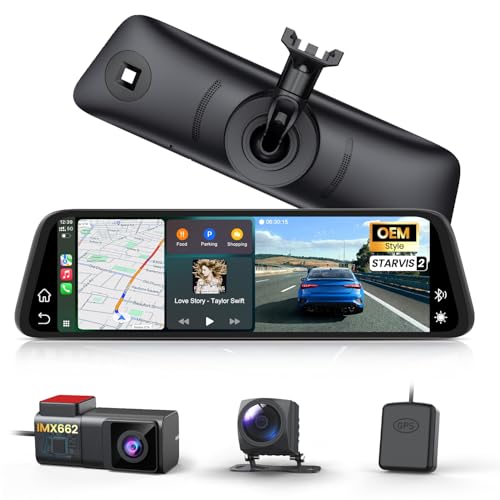
The factory-position replacement design distinguishes this option from mirrors that mount over the original mirror. AUTO-VOX says the front and rear cameras record in 2K and describes HDR and WDR for handling bright rear headlights. The 9.36-inch touchscreen includes CarPlay, voice control and automatic brightness; four bracket adapters are included. It suits drivers who want a more integrated installation and phone features. Because it replaces the existing mirror rather than simply covering it, confirm that the included bracket adapters fit your vehicle before ordering.
Bottom line: Pick this if you want a replacement mirror with CarPlay and a factory-style installation.
12-inch 4K Mirror Dash Cam with CarPlay
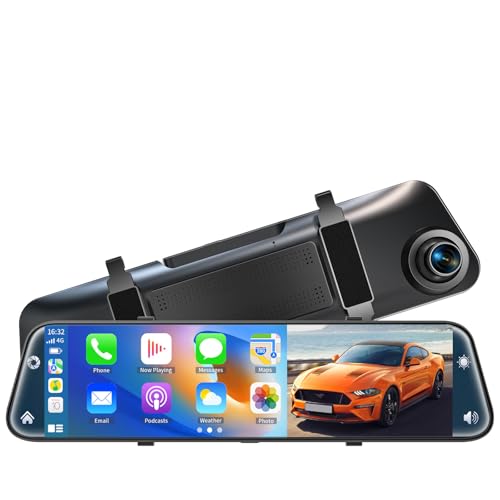
CarPlay and Android Auto distinguish this 12-inch mirror camera, while the other 12-inch option highlights GPS and Wi-Fi. The maker says its front camera records in 4K and the rear camera in 1080p; the system also has loop recording, reverse assist, voice control and a 64GB card. Its touchscreen covers the factory mirror, but the maker says it cannot be used as a standard rearview mirror. That limitation matters if you rely on a reflective mirror rather than the camera display, so consider that before choosing this setup.
Bottom line: Choose this if CarPlay or Android Auto matters more than retaining a reflective mirror.
Pyle PLCMDVR49 4.3-inch Mirror Dash Cam

The 4.3-inch TFT screen makes this the compact-display choice among these mirror cameras. Pyle says the system records in Full HD 1080p and includes a dual-camera setup, a waterproof rear camera, G-sensor, motion-triggered parking recording and loop recording. It suits drivers who want a smaller display and basic recording features rather than the larger screens or phone integration offered by the other choices.
Bottom line: Pick this if a 4.3-inch screen and loop recording suit your setup.
How to choose a mirror dash camera
Start with the display and camera resolution, then weigh installation and the features you will actually use. These options range from a 4.3-inch screen to 12 inches, and camera setups range from a 1080p front camera to 4K front and 1080p rear combinations. A larger screen can occupy more of the mirror area; measure the available space and check your sightline before choosing one. Decide whether you need GPS, phone connectivity, voice control or parking recording. If you have less than 12 inches of usable mirror width, do not assume a 12-inch unit will fit; measure the intended mounting area and compare it with the unit’s dimensions.
Mirror replacement versus overlay installation
Mirror dash cameras either mount over the original mirror or replace it, and the installation style changes fit requirements. An overlay leaves the factory mirror in place, while a replacement design needs a compatible mount or bracket. The AUTO-VOX option is described as a factory-position replacement and includes four bracket adapters; the Pyle and WOLFBOX options are mirror-style camera systems. Before ordering, check the attachment method, mirror dimensions and cable route for your vehicle. A camera display is not a substitute for maintaining a clear view through the rear window and side mirrors; position the equipment so it does not obstruct the driver’s view.
Resolution, recording and memory cards
Resolution indicates the pixel dimensions of recorded video, but it is only one factor in usable footage. A 4K front camera records more pixels than a 1080p front camera, while lighting, lens angle, windshield glare and camera placement also affect how clearly details appear. Loop recording typically overwrites older unlocked clips when a card fills, so save important footage before it is overwritten. G-sensors can lock clips when they detect a sudden motion or impact, but a locked clip may use card space until managed. Check that the memory card capacity and type are supported by the specific camera before relying on continuous recording.
Parking recording and safe setup
Parking recording can capture events while a vehicle is parked, but the trigger and power setup vary by camera. Motion detection watches for movement, while a G-sensor responds to sudden movement or impact; neither guarantees that every event is recorded. Some parking modes require a separate power connection or hardwire kit, so confirm the required wiring and whether it is included before installation. Route cables away from airbags, pedals and moving trim, and avoid placing a camera where it blocks the driver’s forward view. Set up screens, phone connections and recording preferences while parked, not while driving.
| Priority | What to compare | Decision cue |
|---|---|---|
| Wide display | Screen size | Measure available mirror area before choosing a 12-inch screen. |
| Higher front resolution | Front camera resolution | Compare 4K and 1080p options, along with rear-camera resolution. |
| Integrated appearance | Mounting style | Check bracket compatibility for replacement mirrors. |
| Parking footage | Recording trigger and power | Confirm required wiring and card compatibility. |
Frequently Asked Questions
Does a mirror dash camera replace the factory mirror?
Some models cover the factory mirror, while replacement designs take its place in the original position. Check the mount style and bracket fit for your vehicle before ordering.
What size screen should I choose for a mirror dash cam?
The options here range from 4.3 inches to 12 inches. Measure the mirror area and check the camera’s outer dimensions, since screen size alone does not tell you how much space the unit occupies.
Can a mirror dash camera record while parked?
Some systems offer parking recording triggered by motion or a G-sensor. Parking modes may require a separate power connection, so verify the wiring requirements and card support before relying on them.
How does loop recording work on a dash camera?
Loop recording typically overwrites older unlocked clips when the memory card fills. Save important footage promptly, and check the camera’s card compatibility and capacity requirements.
Is a 4K dash camera always clearer at night?
No; resolution alone does not determine nighttime clarity. Lens quality, exposure, glare, camera placement and lighting also affect how well footage captures details.