
Sony PS3 Sixaxis and DualShock 3 Wireless Controllers

Choose the DualShock 3 if you want vibration as well as motion controls; the SIXAXIS is the simpler fit if you only need motion input. These wireless PS3 gamepads connect without a cable during play.
For two replacement controllers or Windows 7, 8, or 10 compatibility, consider OKHAHA PS3 Wireless Controller 2-Pack instead, but it is a third-party option rather than a Sony controller.
We earn a commission if you buy through links on this page. As an Amazon Associate I earn from qualifying purchases. Products are compared on manufacturer specifications, not hands-on testing.
- Best overall: PlayStation 3 DualShock 3 Wireless Controller – Adds vibration to motion controls for a more versatile PS3 gamepad.
- Best for motion-only play: PlayStation SIXAXIS Wireless Controller – The SIXAXIS is the straightforward choice when vibration is not a priority.
- Best for two players: OKHAHA PS3 Wireless Controller 2-Pack – The pack includes two controllers and claims PS3 and Windows compatibility.
| Product | Best for | Compatible systems | Pack size | Color | Shop |
|---|---|---|---|---|---|
| PlayStation 3 DualShock 3 Wireless Controller | Vibration and motion | PS3 | 1 controller | Black | Check Price on Amazon |
| PlayStation SIXAXIS Wireless Controller | Motion-focused play | PS3 | 1 controller | Black | Check Price on Amazon |
| OKHAHA PS3 Wireless Controller 2-Pack | Two-player replacement | PS3, Windows 7/8/10 | 2 controllers | Blue and red | Check Price on Amazon |
Sony PS3 Sixaxis and DualShock 3 wireless controllers
Compare the Sony controllers with a third-party two-pack by control features, compatibility and how many players you need to equip.
PlayStation 3 DualShock 3 Wireless Controller
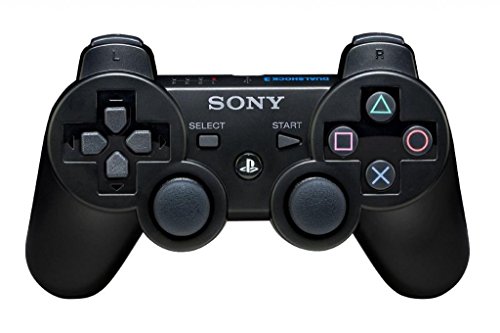
Vibration sets this controller apart from the SIXAXIS option, while motion sensing keeps it suitable for games that use tilt or movement input. The renewed Sony controller is black and intended for PlayStation 3 play. Choose it if you want the familiar DualShock-style feedback in addition to wireless controls. Its main limitation is scope: the compatibility facts cover PS3, not PC use, so buyers seeking computer compatibility should consider another option and confirm support first.
Bottom line: Pick this if vibration and motion controls both matter for PS3 play.
PlayStation SIXAXIS Wireless Controller

The SIXAXIS is the Sony alternative for PS3 players who prioritize motion input over vibration feedback. This renewed black controller is identified as a wireless PlayStation 3 control, making it a direct match for a PS3 setup. Six-axis motion sensing is useful only in games designed to read controller movement; conventional games may rely mainly on the buttons and sticks. Choose it for motion-enabled titles when rumble is not a requirement. Its limitation is that the product facts do not establish PC compatibility, so do not assume it will work with a computer.
Bottom line: Choose it when motion control matters more than vibration.
OKHAHA PS3 Wireless Controller 2-Pack

The two-controller bundle differs from the Sony choices by supplying a pair and claiming compatibility with Windows 7, 8, and 10 as well as PS3. The maker says it supports Bluetooth wireless connection, rechargeable operation, vibration and six-axis motion; its PC use requires a USB cable, which the maker says is included. The blue-and-red striped pair suits someone replacing two pads or setting up local multiplayer. The limitation is that this is a third-party controller, not a Sony DualShock 3 or SIXAXIS, so buyers seeking an original Sony model should choose one of the Sony options.
Bottom line: Pick the pair when you need two controllers and can use a third-party model.
How to choose a PS3 wireless controller
Choose by the game features and player count you need: DualShock 3 adds vibration, while the SIXAXIS option emphasizes motion input, and the third-party set supplies two pads. A PlayStation 3 controller pairs over Bluetooth for wireless play; a USB cable is also used for setup or charging depending on the controller. On PC, controller support varies by Windows version and game, so check both before relying on a wireless pad. A practical rule is to choose a two-pack when you need two working controllers immediately; for a single-player setup, the Sony options avoid paying attention to an extra pad you do not need. For motion controls, confirm the game supports them rather than assuming every PS3 title uses tilt input.
DualShock 3 and SIXAXIS differences
The key distinction is vibration: DualShock 3 adds rumble, while original SIXAXIS controllers do not. Both controller families support six-axis motion sensing, which detects movement for compatible games. That makes vibration the deciding condition for most buyers: choose DualShock 3 if feedback matters, and SIXAXIS if you want motion input without rumble. Third-party pads may combine both features, but compatibility and implementation vary by model. The comparison below separates the options by control style and intended use.
| Need | Choice |
|---|---|
| Vibration and motion | DualShock 3 |
| Motion without rumble | SIXAXIS |
| Two controllers or stated Windows support | Third-party two-pack |
Pairing and charging a PS3 controller
Pair a PS3 controller to the console with a USB cable first, then use the PS button to complete registration; after pairing, Bluetooth supports wireless play. A controller can generally be charged from the console by USB, and a depleted battery needs wired charging before another wireless session. Keep the cable connected during initial setup rather than troubleshooting Bluetooth before registration. On PC, the two-pack maker says a USB cable is required; game and operating-system compatibility can still vary. If a controller fails to reconnect, try a wired connection and press the PS button before resetting or replacing it.
Choosing a PS3 controller for PC use
PC use requires checking the controller model, operating system and game together; PS3 compatibility does not guarantee Windows compatibility. The third-party pair specifically claims support for Windows 7, 8 and 10 and says a USB cable is required for PC use. The Sony controller facts here only identify PS3, so treat them as console-focused unless your PC setup confirms support. A measurable decision rule is to choose the third-party pair only if your computer runs one of the named Windows versions and you can use a cable. Wireless PC setup can require extra configuration, so verify input recognition in the game before relying on the controller.
Frequently Asked Questions
How do I pair a PS3 controller wirelessly?
Connect the controller to the PS3 with a USB cable and press the PS button to register it. After pairing, disconnect the cable and use Bluetooth for wireless play.
Does the PS3 SIXAXIS controller have vibration?
Original SIXAXIS controllers do not have vibration feedback. The DualShock 3 adds rumble while retaining motion sensing, so choose it when vibration matters.
Can I use a PS3 controller on a Windows PC?
PC support depends on the controller, Windows version and game. The third-party pair claims Windows 7, 8 and 10 support and requires USB for PC use; confirm recognition in your game before depending on it.
Can a PS3 controller charge while I play?
A PS3 controller can charge through a USB connection to the console, including during play. A depleted battery may need time connected before it can be used wirelessly again.