
MSI B550 Gaming Plus: Specs and Alternatives Compared

The MSI MPG B550 Gaming Plus V1 is the strongest match for the MSI B550 Gaming Plus search because its maker includes AM4, DDR4 support up to 128 GB, and PCIe 4.0. Choose another board if built-in Wi-Fi is a priority.
We earn a commission if you buy through links on this page. As an Amazon Associate I earn from qualifying purchases. Products are compared on manufacturer specifications, not hands-on testing.
- Best overall: MSI MPG B550 Gaming Plus V1 – Its AM4 board supports dual-channel DDR4 up to 128 GB and includes PCIe 4.0 and Gen 4 M.2.
- Best for exact model match: MSI MPG B550 Gaming Plus – This is the named MSI MPG B550 Gaming Plus model, with ATX dimensions for case-fit checks.
- Best for Wi-Fi: ASUS TUF Gaming B550-PLUS WiFi II – Adds Wi-Fi 6 and Bluetooth 5.2 on an AM4 ATX board.
| Product | Best for | Memory support | Networking | Shop |
|---|---|---|---|---|
| MSI MPG B550 Gaming Plus | Basic ATX fit | — | — | Check Price on Amazon |
| MSI MPG B550 Gaming Plus V1 | DDR4 capacity | 128 GB, 4400 MHz | — | Check Price on Amazon |
| MSI B550 Gaming WIFI6E | Overclocked memory | DDR4, 4800+ MHz OC | 1G LAN | Check Price on Amazon |
| ASUS TUF Gaming B550-PLUS WiFi II | Wireless networking | DDR4, speed — | Wi-Fi 6, 2.5 Gb LAN | Check Price on Amazon |
MSI B550 Gaming Plus Motherboards
Compare the named board with related AM4 models by memory, networking and expansion features.
MSI MPG B550 Gaming Plus
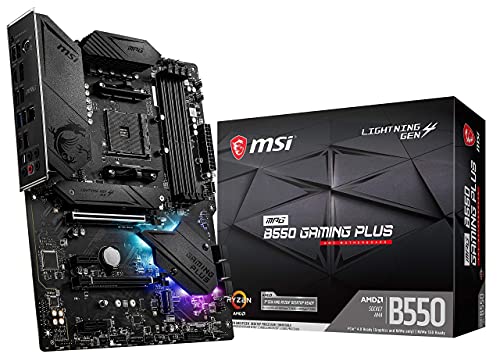
The MSI MPG B550 Gaming Plus is the closest match to the search phrase, with an AMD B550 chipset, AM4 socket and ATX form factor. Its dimensions are 12.0 × 9.6 × 1.5 inches, useful when checking clearance around a case or nearby components. The input identifies the board type and physical measurements but does not provide processor generations, memory capacity or networking features, so this is best for a buyer who already has a compatible AM4 build plan. Confirm the case supports ATX before choosing it; an ATX board will not fit a smaller Micro-ATX-only case.
Bottom line: Choose this when the named MSI board and an ATX case are the priority.
MSI MPG B550 Gaming Plus V1
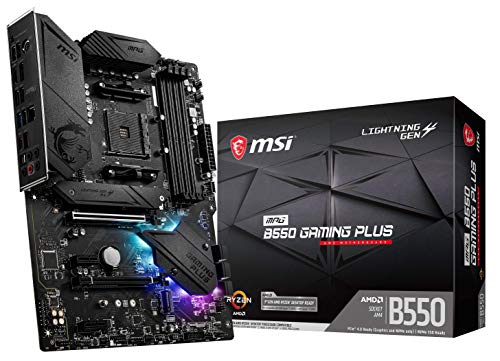
The MSI MPG B550 Gaming Plus V1 distinguishes itself with concrete DDR4 limits: dual-channel memory up to 128 GB and a supported speed up to 4400 MHz. MSI identifies support for 3rd Gen Ryzen processors and future Ryzen processors with a BIOS update, plus PCIe 4.0, Gen 4 M.2 with M.2 Shield Frozr, and USB 3.2 Gen 2. RGB lighting is also provided through Mystic Light and expandable headers. This suits a build where memory headroom and those connections matter more than onboard wireless. The future-processor support depends on a BIOS update, so check the exact CPU support and BIOS requirement before assembling.
Bottom line: Pick this for the explicit 128 GB DDR4 ceiling and listed Gen 4 storage support.
MSI B550 Gaming WIFI6E

The MSI B550 Gaming WIFI6E is a related MSI B550 board rather than the exact Gaming Plus model, and its headline distinction is memory overclocking up to 4800+ MHz. The board supports Ryzen 5000, 5000 G-Series, 4000 G-Series and 3000 Series processors, with four DDR4 DIMM slots and one reinforced PCIe 4.0 x16 slot. Its cooling design includes an extended heatsink and M.2 Shield Frozr, while storage includes a Gen 4 x4 M.2 connector. The name includes WIFI6E, but the maker does not establish wireless specifications; verify wireless capability if that feature decides the purchase.
Bottom line: Choose this related MSI board if memory overclocking support is the priority.
ASUS TUF Gaming B550-PLUS WiFi II

The ASUS TUF Gaming B550-PLUS WiFi II is a different brand and model, but it is a close AM4 ATX alternative when networking is important: its features include Wi-Fi 6, Bluetooth 5.2 and 2.5 Gb LAN. It supports 3rd Gen Ryzen CPUs, PCIe 4.0, two M.2 slots and USB 3.2 Gen 2, with BIOS Flashback also named in the model heading. The power design uses 8+2 DrMOS stages, and the cooling features include fanless VRM and chipset heatsinks. Unlike the exact MSI options, this board is an ASUS TUF model; choose it only if the added wireless and wired-network specifications suit the build.
Bottom line: Pick this when Wi-Fi 6 and 2.5 Gb wired networking matter more than matching MSI.
How to choose a B550 motherboard
Start with the processor socket and case size: these boards use AM4 and ATX, and a smaller case may not accept a full-size ATX board. B550 supports PCIe 4.0 from compatible Ryzen processors, while the exact slots and connectors vary by board. Memory speed also depends on the processor, DIMM configuration and BIOS; a speed marked OC is an overclocked target, not a guarantee for every CPU and kit. For a straightforward decision, choose the board whose CPU support, memory ceiling and networking match the parts already selected. If you need wireless networking, require a model whose specifications explicitly name Wi-Fi, rather than inferring wireless support from a product name.
AM4 processor and BIOS compatibility
AM4 identifies the socket, not universal processor compatibility: motherboard chipset, BIOS version and CPU generation all matter. The B550 Gaming Plus V1 specifies 3rd Gen Ryzen and future Ryzen support with a BIOS update; that update condition means compatibility should be checked before the CPU is installed. The related MSI board names Ryzen 3000, 4000 G-Series, 5000 and 5000 G-Series support. Integrated graphics also depend on using a processor with graphics, and the motherboard’s display outputs alone do not add graphics capability. Match the exact CPU model to the board’s CPU support list, especially for a first boot with a newer processor, and confirm whether a BIOS flash feature is available on the chosen model.
ATX clearance and memory planning
ATX boards measure 12 × 9.6 inches under the standard form factor, so check the case’s motherboard support and keep clearance for cable routing and tall CPU coolers. A board that physically fits can still conflict with a radiator, drive cage or front-panel cable. Dual-channel memory works with matched modules in the recommended paired slots; consult the motherboard manual for slot order. The V1 lists up to 128 GB and 4400 MHz, while the related MSI model’s 4800+ MHz figure is an overclocked speed. This table separates the key decision point for each need.
| Build need | Prioritize | Check before purchase |
|---|---|---|
| Exact model match | MSI B550 Gaming Plus | ATX case fit |
| Higher memory ceiling | 128 GB capacity | CPU and memory compatibility |
| Wireless networking | Wi-Fi named in specs | Exact Wi-Fi generation |
PCIe, M.2 and thermal fit
PCIe 4.0 x16 is the graphics-card connection on these B550 options, while M.2 slots support compact SSDs; slot generation and lane sharing can differ by board. The MSI V1 names Gen 4 M.2 with a heatsink, and the related MSI board specifies one Gen 4 x4 M.2 connector. Heatsinks help transfer heat from an SSD, but a drive’s thickness and case airflow still affect fit and temperature. Check the board manual for shared SATA or PCIe lanes before populating every slot, since using one connector can disable another on some layouts. Keep the M.2 screw and thermal pad correctly positioned during installation.
Frequently Asked Questions
Does every B550 board support every Ryzen CPU?
No; compatibility depends on the exact processor and BIOS version. The Gaming Plus V1 calls for a BIOS update for future Ryzen processor support, so confirm the CPU model and required BIOS before assembly.
What does 4800 MHz OC mean for DDR4?
OC means the memory speed is an overclocked target, not a guaranteed default speed. CPU memory-controller limits, module configuration and BIOS settings can affect the achieved rate.
Can an ATX motherboard fit a Micro-ATX case?
Only if that case specifically has ATX mounting support; Micro-ATX support alone is not enough. Standard ATX boards are 12 × 9.6 inches, so verify board compatibility and interior clearance.
Do motherboard HDMI and DisplayPort guarantee video output?
No; the installed CPU must also provide integrated graphics for the motherboard display outputs to work. Check the processor’s graphics capability before planning to run without a separate graphics card.
Does a Gen 4 M.2 SSD need a heatsink?
A heatsink is useful for managing drive heat, especially during sustained transfers, but SSD temperature also depends on airflow and workload. Confirm the drive thickness and whether the motherboard’s M.2 cover fits it.