
Futaba FASST Compatible Receivers: 4 Models Compared

For a Futaba FASST compatible receiver with the most clearly stated channels, choose Corona R8FA 8CH: it supports 8 channels, compared with the 7-channel TFR6A options. Choose another model if its transmitter compatibility better matches your radio, and verify the exact FASST system before binding.
These receivers communicate with compatible transmitters over 2.4 GHz; matching the protocol matters more than choosing by channel count alone.
We earn a commission if you buy through links on this page. As an Amazon Associate I earn from qualifying purchases. Products are compared on manufacturer specifications, not hands-on testing.
- Best overall: Corona R8FA 8CH – Its 8-channel count is explicitly stated, offering one more channel than the TFR6A models.
- Best for dual failsafe options: SPARKHOBBY FrSky TFR6A – It offers two selectable failsafe settings and names support for Futaba FASST systems except gun controls such as 3PK and 4PK.
- Best for listed transmitter fit: R14FA FASST Compatible Receiver – Its title names compatibility with Futaba 10C, 12FG, 14SG, 16SZ, and 18SZ transmitters.
| Product | Best for | Channels | Transmitter compatibility | Size | Shop |
|---|---|---|---|---|---|
| Corona R8FA 8CH | More stated channels | 8 | T6EX, T8FG, 10CG, 14SG, 3PM, 4PKS | 55 × 33 × 14 mm | Check Price on Amazon |
| FrSky TFR6A 7-Channel | Seven-channel setup | 7 | Futaba FASST system | — | Check Price on Amazon |
| SPARKHOBBY FrSky TFR6A | Selectable failsafe | 7 | Futaba FASST except gun control | 37 × 22 × 8 mm | Check Price on Amazon |
| R14FA FASST Compatible Receiver | Named radio models | — | 10C, 12FG, 14SG, 16SZ, 18SZ | 100 × 27 × 20 mm | Check Price on Amazon |
Futaba FASST Compatible Receivers Compared
Compare the channel counts, named transmitter fits, and dimensions supplied for each FASST compatible option.
Corona R8FA 8CH
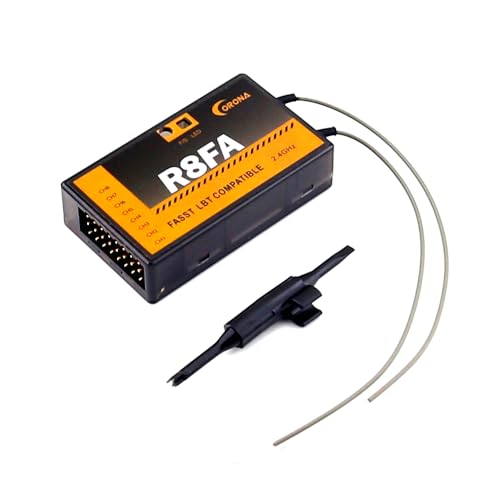
Corona R8FA 8CH stands out with 8 channels and a named set of compatible Futaba transmitters, including T6EX, T8FG, 10CG, 14SG, 3PM, and 4PKS. Its size is 55 × 33 × 14 mm, so compare those dimensions with your model’s receiver bay before choosing it. The product name identifies it as a 2.4 GHz FASST compatible HV receiver. This is the clearest fit when your setup needs more than 7 channels, but the compatibility names do not establish fit with every FASST transmitter; confirm the exact radio model before binding.
Bottom line: Choose it when you need 8 channels and your transmitter is among the named compatible models.
FrSky TFR6A 7-Channel

FrSky TFR6A 7-Channel is a 7-channel TFR6A receiver identified as compatible with the Futaba FASST system. Its channel count makes it a direct option for a model needing no more than 7 receiver channels; a model needing 8 calls for a higher-channel receiver instead. The product name supplies no transmitter model list or physical dimensions, so use the exact transmitter compatibility information and receiver-bay measurements for your setup before choosing it. This option is best considered when the 7-channel limit fits the model and protocol match is confirmed.
Bottom line: Pick it for a seven-channel model after confirming fit with your exact transmitter.
SPARKHOBBY FrSky TFR6A

SPARKHOBBY FrSky TFR6A separates itself from the other TFR6A option with two selectable failsafe settings and stated 37 × 22 × 8 mm dimensions. It supports Futaba FASST controls and modules except gun controls, with 3PK and 4PK given as examples; it also supports FrSky TF modules. The product explains a bind sequence using the receiver’s F/S button, but the compatibility exception is important if you use a gun-style transmitter. Choose this receiver when those stated limits fit your equipment and the smaller stated dimensions suit your receiver bay.
Bottom line: Choose it when you want selectable failsafe settings and your radio is within its compatibility limits.
R14FA FASST Compatible Receiver

R14FA FASST Compatible Receiver is the option whose title names five transmitter models: Futaba 10C, 12FG, 14SG, 16SZ, and 18SZ. It is a 2.4 GHz FASST compatible replacement associated with R8FA and R14FA receiver models. Its dimensions convert to 100 × 27 × 20 mm. No channel count is provided, so this is a weaker match when channel capacity is the deciding factor. Choose it when your transmitter is in the named group and you have confirmed that its channel capacity suits your build.
Bottom line: Choose it when your radio is one of the five named models and channel capacity is confirmed.
How to choose a Futaba FASST compatible receiver
Choose by transmitter protocol first, then by channel count and physical fit. FASST is Futaba’s 2.4 GHz radio system, but a receiver described as FASST compatible should not be assumed to work with every Futaba transmitter or every other Futaba protocol. Confirm the exact transmitter model and system variant before binding. Next, count the channels your model needs, including control surfaces and any auxiliary functions; leave room for planned additions rather than choosing a receiver that is already fully allocated. Finally, measure the receiver bay and check connector access. A receiver that matches the radio but cannot be mounted securely is not a practical fit.
Channel count and model fit
Channel count sets how many independent receiver outputs are available, not how many servos a model can always use in every configuration. An 8-channel receiver offers one more output than a 7-channel receiver, which can matter when a model needs an auxiliary function in addition to its main controls. Make a channel list before buying: assign each control function one output, then add any switching or accessory channels. Compare the finished count with the receiver’s capacity. Dimensions also matter; a 37 × 22 × 8 mm case may fit a tighter bay than a 55 × 33 × 14 mm case, but measure the available space and allow room for wiring and secure mounting.
Use this comparison to narrow down the channel capacities and compatibility limits.
| Need | Choice to consider | Check before selecting |
|---|---|---|
| Up to 7 channels | 7-channel TFR6A option | Exact transmitter compatibility |
| 8 channels | R8FA | Transmitter model and receiver bay |
| Transmitter in a named 10C–18SZ group | R14FA-compatible option | Channel capacity for the build |
Binding and failsafe setup
Bind the receiver with the model’s propulsion system made safe: remove propellers or disconnect the drive motor before powering the radio equipment. This prevents an accidental motor start from turning setup into a physical hazard. After binding, verify that each control moves the intended surface and confirm what the system does when signal is lost; do not assume a failsafe is configured just because binding succeeded. Repeat the check after changing transmitter settings or receiver assignments.
Common receiver compatibility mistakes
The most common mistake is treating “Futaba compatible” as a universal protocol guarantee. Futaba transmitters and receivers may use different systems, so match the exact radio model and protocol rather than relying on brand alone. Another mistake is counting only primary flight controls: flaps, retracts, lights, or other auxiliaries can use additional channels. A receiver’s case size is also not its full installation footprint; connectors, antenna routing, and mounting space need clearance. Before final installation, check the radio’s system compatibility, confirm enough channels remain for all functions, and secure the receiver and antennas according to the model’s layout.
Frequently Asked Questions
Does a Futaba FASST receiver work with every Futaba transmitter?
No; a FASST compatible receiver should be matched to a transmitter that uses a supported FASST system. Check the exact transmitter model and protocol before binding, since brand alone does not establish compatibility.
How many channels do I need for an RC model?
Count one receiver output for each independently controlled function, including auxiliary functions such as flaps or retracts. A 7-channel receiver suits a build needing up to 7 outputs, while a build needing 8 requires an 8-channel receiver.
What does a receiver failsafe do?
A failsafe sets the receiver’s output behavior after the control signal is lost. Verify the selected failsafe behavior with the propulsion system made safe, and check it again after changing radio settings.
How should I bind an RC receiver safely?
Remove propellers or disconnect the drive motor before powering equipment for binding, because a motor can start unexpectedly during setup. Then use the receiver’s binding procedure and verify control direction and failsafe response before operation.
How much room should I leave around an RC receiver?
Measure the receiver bay and compare it with the receiver’s case dimensions, then allow additional clearance for connectors, wiring, antenna routing, and secure mounting. A receiver size alone does not include the space those connections need.