
Herman Miller Celle Chair: Fit and Alternatives

Herman Miller Celle Chair, Graphite is the named Celle chair here, with dimensions of 26 × 27.2 × 24.2 inches; choose it if those dimensions fit your workspace. Consider an alternative if you need stated controls such as a headrest, tilt lock or adjustable lumbar support.
Before ordering Herman Miller Celle Chair, Graphite, confirm that its adjustment controls meet your needs.
We earn a commission if you buy through links on this page. As an Amazon Associate I earn from qualifying purchases. Products are compared on manufacturer specifications, not hands-on testing.
- Best overall: Herman Miller Celle Chair, Graphite – It is the named Celle chair, and its dimensions give you a concrete starting point for checking desk and room fit.
- Best for broad height fit: GABRYLLY Ergonomic Office Chair – It gives a user-height range of about 5 feet 2 inches to 6 feet 1 inch, plus adjustable seat height and headrest.
- Best for lumbar adjustment: SIHOO M18 Ergonomic Office Chair – It combines adjustable lumbar and back support with a user-height range of 5 feet 6 inches to 6 feet 2 inches.
| Product | Best for | Dimensions | Weight | Adjustments or fit | Shop |
|---|---|---|---|---|---|
| Herman Miller Celle Chair, Graphite | Celle chair shoppers | 26 × 27.2 × 24.2 in | — | — | Check Price on Amazon |
| GABRYLLY Ergonomic Office Chair | Broader height range | 24.5 W × 27.5 D × 46–56.4 H in | 41 lb | Seat height, headrest, backrest, flip-up arms | Check Price on Amazon |
| SIHOO M18 Ergonomic Office Chair | Lumbar adjustment | — | 31.5 lb | Seat height, headrest | Check Price on Amazon |
| Herman Miller Aeron, Size B | Medium size Aeron | 41 H × 16 L × 27 W in | 50 lb | Tension control, rear tilt lock, forward tilt | Check Price on Amazon |
| SIHOO B100 Mesh Ergonomic Chair | Adaptive lumbar support | — | 35.5 lb | Seat height 18.3–21.9 in; adaptive lumbar | Check Price on Amazon |
Herman Miller Celle Chair and Alternatives
Compare the named chair with related office chairs by footprint, adjustment features and fit.
Herman Miller Celle Chair, Graphite

Unlike the other chairs here, this is the named Herman Miller Celle chair. The product name identifies it as a fully adjustable home-office task chair, and the color is Graphite. Its dimensions are 26 × 27.2 × 24.2 inches, a useful footprint to compare with the space under and around your desk. Choose it when you specifically want the Celle and its size works for your room. Confirm that its adjustment controls meet your needs; shoppers who require a headrest or tilt control may prefer an alternative with those features identified.
Bottom line: Pick it if you want the Celle model and its dimensions suit your workspace.
GABRYLLY Ergonomic Office Chair

Unlike the Celle, this mesh chair identifies a user-height range and several adjustment points. GABRYLLY gives a suitable range of about 5 feet 2 inches to 6 feet 1 inch, with adjustable seat height, headrest and backrest plus flip-up arms. Its seat measures 20.5 inches wide by 20 inches deep, and the maker gives a 300-pound capacity and a 90–120-degree recline range. It suits shoppers who want those named features and fit guidance. Its broader overall footprint and high-back design may not suit compact desk spaces, so compare the chair dimensions with available clearance.
Bottom line: Choose it if its height range and adjustable headrest suit you.
SIHOO M18 Ergonomic Office Chair

Unlike the GABRYLLY, the M18 specifically identifies adjustable lumbar support and back support. SIHOO says it suits people 5 feet 6 inches to 6 feet 2 inches tall; the controls also include seat height, headrest and back support adjustment. Its charcoal mesh-back design is positioned for home or work use. That combination makes it a fit for shoppers prioritizing lumbar adjustment within the height range. The maker does not give a complete assembled footprint or seat dimensions, so it is harder to compare room fit than with a chair whose overall measurements are provided.
Bottom line: Pick it if adjustable lumbar support is a priority and you fall within its height range.
Herman Miller Aeron, Size B
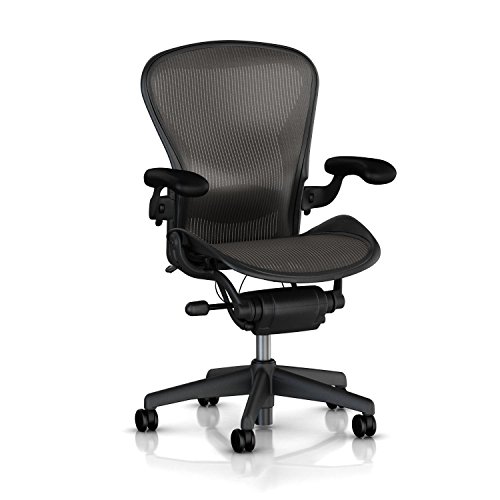
This is the other Herman Miller option, but it is an Aeron rather than a Celle. Its Size B designation is identified as medium, and the features include tension control, rear tilt lock, forward tilt and lumbar support. It also comes with hardwood-floor casters. The dimensions are 41 inches high, 16 inches long and 27 inches wide. Choose it if you are comparing chair types within the same maker and want those named tilt and lumbar functions. The Size B label alone does not establish a personal fit; check the chair’s fit guidance against your body and desk setup.
Bottom line: Choose it if you want a medium-size Aeron with the tilt and lumbar features.
SIHOO B100 Mesh Ergonomic Chair

Unlike the M18, the B100 describes its lumbar support as adaptive rather than as a manually adjusted feature. SIHOO says the support moves with posture; the chair also has a wide headrest and flip-up armrests. Its seat-height range is 18.3 to 21.9 inches, making that measurement especially useful when checking desk and leg fit. The gray chair is specified without a footrest. It suits buyers who want a seat-height range and adaptive lumbar design, but shoppers who need a user-height range or a footrest should compare other options instead.
Bottom line: Pick it if its seat-height range works and adaptive lumbar support is your priority.
How to choose an ergonomic office chair
Start with fit at the desk: a common ergonomic target is feet flat on the floor, knees near a 90-degree angle and elbows close to desk height. Seat height is the first adjustment to check; a footrest can help when raising the seat is necessary to reach the desk but leaves feet unsupported. Then compare the controls you actually need, such as lumbar adjustment, tilt lock or armrest movement. A headrest is most relevant when you recline; it is not a substitute for a backrest that fits your torso. The table separates common chair features by the need they address, so use it to narrow your priorities before comparing individual models.
For any chair with a weight capacity, stay within that limit; do not infer a capacity from the chair’s weight or size.
| Need | Feature to compare | Fit check |
|---|---|---|
| Feet supported | Seat-height adjustment | Can your feet rest flat at desk height? |
| Lower-back contact | Lumbar support adjustment | Does support meet your lower back? |
| Reclining posture | Tilt range or lock | Does the chair support your preferred recline? |
| Arm clearance | Adjustable or flip-up arms | Can the chair approach the desk? |
How to check chair dimensions and desk fit
Measure the usable space before comparing chair dimensions: allow room for the base to move and for the seat to slide back from the desk. Seat height is measured from the floor to the top of the seat, while overall height includes the backrest; these numbers answer different fit questions. A desk around 28 to 30 inches high is common, but the right seat height depends on your leg length and whether you can keep your feet supported. Check chair width against doorways and desk legs, and compare seat depth with the space behind your knees. A seat that presses into the back of the knees can be uncomfortable even when its width seems adequate.
When a chair’s measurements do not separate seat dimensions from overall dimensions, use them only as a rough footprint comparison rather than assuming they describe the sitting area.
What chair adjustments matter for daily use
Seat-height adjustment, back support and tilt address different needs, so do not treat an “ergonomic” label as proof that every control is present. Set seat height so feet are supported and thighs are roughly level; then adjust the backrest so it contacts the lower back without forcing a rigid posture. Armrests should let shoulders relax and should not prevent the chair from moving close to the work surface. Recline ranges and tilt locks matter most if you change posture during the day; a fixed upright setup may not need a wide recline range.
For long desk sessions, change posture regularly rather than holding one position for hours. Check stated capacity limits before use, and never exceed them; a chair’s dimensions do not establish its load rating.
Frequently Asked Questions
How do I know if a chair fits my height?
Compare the maker’s user-height range with your height, then verify that the seat can place your feet flat on the floor. Seat height is only one part of fit; seat depth and backrest contact also matter.
What seat height works with my desk?
A common desk height is about 28 to 30 inches, but the right seat setting depends on your leg length and keyboard position. Aim for supported feet and elbows near desk height; use a footrest if the seat must be raised to reach the desk.
How much space should I leave around an office chair?
Allow enough room to roll back from the desk and turn without striking walls or furniture; measure the chair’s overall width and depth against the workspace. Also check doorways and desk legs, since the chair must pass through and fit under the work surface.
Is lumbar support the same as back support?
No; lumbar support targets the inward curve of the lower back, while back support can refer more generally to the chair’s backrest. Adjustable lumbar support lets you change where that lower-back contact occurs.
When should I use a chair tilt lock?
A tilt lock holds the chair at a selected recline position, which can help when you want a steady posture for a task. A recline range such as 90–120 degrees describes backrest movement, not seat-height adjustment.
Why does a chair’s weight capacity matter?
The capacity is the maker’s load limit, so choose a chair rated for your intended load and do not exceed that limit. A chair’s own weight or overall dimensions cannot be used to estimate its capacity.