
HDMI to AUX Adapters: 3 Types Compared

For TV audio over HDMI ARC, choose 192KHz HDMI ARC/eARC to AUX Extractor if your TV supports ARC or eARC and can output PCM or stereo; its eARC support sets it apart from 192KHz HDMI ARC to 3.5mm Extractor. Choose VPFET HDMI Audio Extractor instead when you need to extract sound from a regular HDMI source, because ARC adapters do not work with standard HDMI ports.
These adapters convert digital HDMI audio to an analog 3.5mm AUX connection, but the HDMI port type and audio format must match.
We earn a commission if you buy through links on this page. As an Amazon Associate I earn from qualifying purchases. Products are compared on manufacturer specifications, not hands-on testing.
- Best overall: 192KHz HDMI ARC/eARC to AUX Extractor – Works with ARC or eARC TV ports and has a 4-foot cable.
- Best for ARC-only TVs: 192KHz HDMI ARC to 3.5mm Extractor – Converts ARC audio to stereo 3.5mm but does not support eARC.
- Best for HDMI sources: VPFET HDMI Audio Extractor – Extracts audio from an HDMI signal and offers 2.0CH, 5.1CH, and pass modes.
| Product | Best for | HDMI compatibility | Audio output | Cable length | Shop |
|---|---|---|---|---|---|
| 192KHz HDMI ARC/eARC to AUX Extractor | ARC and eARC TVs | ARC/eARC TV port | 3.5mm stereo AUX | 4 ft | Check Price on Amazon |
| 192KHz HDMI ARC to 3.5mm Extractor | ARC-only TVs | ARC TV port; no eARC | 3.5mm stereo AUX | 0.8 ft | Check Price on Amazon |
| VPFET HDMI Audio Extractor | Standard HDMI sources | Standard HDMI input; no ARC/eARC | Optical or 3.5mm AUX | — | Check Price on Amazon |
HDMI to AUX adapters
Match the adapter to the HDMI port and audio source you plan to connect.
192KHz HDMI ARC/eARC to AUX Extractor

ARC and eARC TV compatibility distinguishes this adapter from ARC-only models and standard HDMI extractors. It converts TV audio to 3.5mm stereo AUX, and its 4-foot cable gives some room between the TV and an amplifier or speaker. The TV must use an ARC/eARC-enabled HDMI port and output PCM or stereo audio; its AUX volume can be adjusted with the TV remote. Choose this model for a compatible TV setup. It will not work from a standard HDMI port or directly from a game console or set-top box.
Bottom line: Pick this for a TV with an ARC or eARC port when you want stereo AUX output.
192KHz HDMI ARC to 3.5mm Extractor
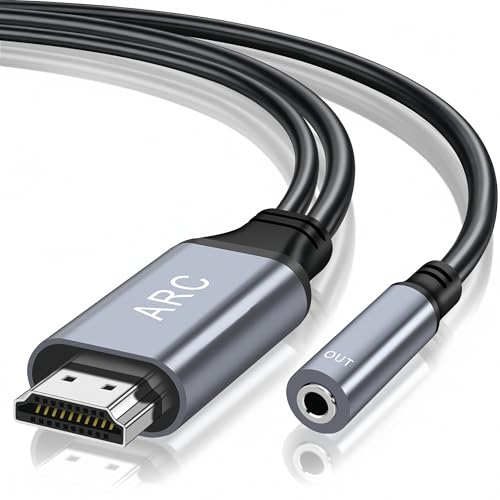
The short 0.8-foot cable and ARC-only input make this adapter a fit for a nearby speaker or amplifier connected to a TV’s ARC port. It converts ARC audio to 3.5mm stereo, but unlike 192KHz HDMI ARC/eARC to AUX Extractor, it does not support eARC. The maker says to power the USB cable and set the TV output to PCM; the unit also does not pass 5.1-channel Dolby AC3 or DTS, and TV-remote volume control is unavailable. Choose it when the TV has ARC but not eARC and the short cable reach suits your layout.
Bottom line: Choose this for an ARC TV and a nearby AUX-powered audio system.
VPFET HDMI Audio Extractor

Unlike TV-connection ARC adapters, this extractor takes an HDMI signal as its input and offers optical or 3.5mm audio output. Its selectable modes are 2.0CH, 5.1CH, and pass; use 2.0CH for the AUX output, while the 5.1-channel mode is for optical. The maker specifies HDMI 1.4, HDCP 1.4, and up to 4K at 30Hz. This is the relevant option when the source is a standard HDMI device rather than TV audio returning over ARC. It does not support ARC or eARC, and a TV cannot serve as its input source.
Bottom line: Pick this to extract AUX audio from a regular HDMI source rather than a TV ARC port.
How to choose an HDMI to AUX adapter
Start by matching the adapter to the HDMI port carrying the audio, because ARC and standard HDMI do different jobs. ARC sends a TV’s sound back through an ARC-enabled HDMI port; a regular extractor takes HDMI audio from a source device. For a TV, confirm the port is marked ARC or eARC and use an ARC-compatible converter. For a console, streaming device, or other HDMI source, choose an extractor designed for a standard HDMI input. Also check the audio output: 3.5mm AUX is analog stereo, so set the source to PCM or stereo when the adapter requires it. If the TV lacks ARC, an ARC-only adapter will not make a standard HDMI port compatible.
ARC versus standard HDMI audio extraction
ARC is a return channel from the television, while a conventional HDMI extractor separates audio from a source device’s HDMI signal. The distinction determines which port connects to the adapter: TV ARC/eARC for return audio, or source HDMI for extraction. Use this guide to identify the signal path before choosing.
| Connection type | Use it for | Port requirement |
|---|---|---|
| ARC or eARC adapter | TV audio to AUX | TV HDMI port labeled ARC/eARC |
| Standard HDMI extractor | HDMI source audio to AUX | Source-device HDMI output |
An ARC adapter will not substitute for a standard extractor on a game console or set-top box. Likewise, a standard extractor is not the correct input path for TV audio returning over ARC.
Audio formats and AUX compatibility
AUX means analog audio, commonly carried as stereo through a 3.5mm connector. A TV or source sending a surround format may not produce sound through a stereo-only converter, so PCM or stereo output is the safest setting when the adapter calls for it. HDMI audio can carry multichannel formats, but the extractor’s output mode and connected equipment determine what reaches the AUX jack. Select 2.0-channel mode for stereo AUX on an extractor that provides mode selection; do not assume an optical 5.1 mode also applies to the analog output. If sound is missing, verify the HDMI port type, audio format, and selected output mode before replacing cables.
Set up an HDMI to AUX connection
Connect the adapter to the correct HDMI path first, then connect its 3.5mm output to the speaker, amplifier, or other AUX input. ARC models need a TV’s ARC/eARC port and often require USB power; standard extractors sit on the source device’s HDMI output path. Set the TV or source to PCM or stereo when required, and select 2.0CH when an extractor offers that mode for AUX. Check that the receiving equipment is set to its AUX input. A common mistake is plugging a TV-focused ARC adapter into a console’s regular HDMI port; ARC compatibility is a port feature, not a property of every HDMI connection.
Frequently Asked Questions
Can I connect an HDMI to AUX adapter to any HDMI port?
No; ARC adapters need a TV HDMI port that supports ARC or eARC, while a standard extractor takes HDMI from a source device. Check the port label and signal direction before connecting.
Why is there no sound from my HDMI to AUX adapter?
A wrong port type or audio format is a common cause. Confirm an ARC adapter is connected to the TV’s ARC/eARC port, set audio to PCM or stereo if required, and check that the AUX device is on its AUX input.
Does an HDMI to AUX adapter support surround sound?
A 3.5mm AUX output carries analog stereo, not a discrete 5.1-channel connection. On an extractor with selectable modes, choose 2.0CH for AUX; a 5.1 setting may be intended for optical output instead.
Do HDMI to AUX adapters need USB power?
Some adapters require USB power during use, so the HDMI connection alone may not be enough. Check whether the specific adapter’s USB power cable is connected before troubleshooting audio.
Can a game console use a TV ARC audio adapter?
An ARC-only TV adapter is not designed for a console’s standard HDMI output. Use a standard HDMI audio extractor for a source device, and reserve ARC adapters for audio returned from a compatible TV port.